Proton Pass and SimpleLogin are separate services

Continuing the discussion from Proton introduces emergency access - #15 by anonymous378


Respectfully, you’re wrong.

Changing your mailbox address is not the same as migrating all your aliases from one SL account to another. Meaning that your aliases are managed by a different account, which is not the same as having a different email inbox on the same account.

That may be true, but if so, it is only possible because SimpleLogin is NOT a native Proton product and still operates independently and separately from other Proton services.

That is where you are misinformed.

SIMPLE LOGIN IS NOT FULLY INTEGRATED INTO PROTON (AND MIGHT NEVER BE)

As I’ve mentioned earlier, SimpleLogin is not a native Proton product and hence is not fully integrated into Proton as a product, and vice versa. That is deliberate, and Proton appears to have no plans to change that.

Having a SimpleLogin account does not necessarily mean that you have a Proton account. You can still sign up for SimpleLogin with a non-Proton address, and when you do that, your SimpleLogin account is NOT a Proton account.

SIMPLE LOGIN AND PROTON PASS ARE SEPARATE PRODUCTS.

Even if one relies on the other, and a premium subscription to one grants you premium access to the other, they remain separate products. I know this because Proton told me. That’s why SimpleLogin operates independently. Simple Login aliases and Proton Pass aliases are two separate things.

Proton Pass is a native Proton product that partially depends on SimpleLogin, but they are still separate products. When you create a Proton Pass account, regardless of if it’s with a Proton address or not, you have a Proton account. It is not the same with SimpleLogin. Moreover, when your Proton Pass account is linked to a Proton address they cannot be unlinked. Ever.

SIMPLE LOGIN AND PROTON PASS HAVE SEPARATE SUBSCRIPTIONS.

Having a premium subscription to SimpleLogin does not mean you have a premium subscription to Proton Pass, and vice versa. Even if one grants you access to the other, they are completely separate subscriptions. I thought they were one and the same, but I was disabused of that notion by Proton Support. They are most certainly not.

MY SUBSCRIPTION IS WITH PROTON PASS. NOT SIMPLE LOGIN.

I have a paid subscription to Proton Pass Plus. I also have a premium subscription to Proton Mail Plus. My Proton Pass account and my Proton Mail account are two completely separate Proton accounts.

If I upgraded to Proton Unlimited with my Proton Mail account, which again, I have no desire to and cannot afford, I would not be able to transfer the aliases from my original Proton Pass Plus account into my “new” Proton Pass account on Proton Unlimited.

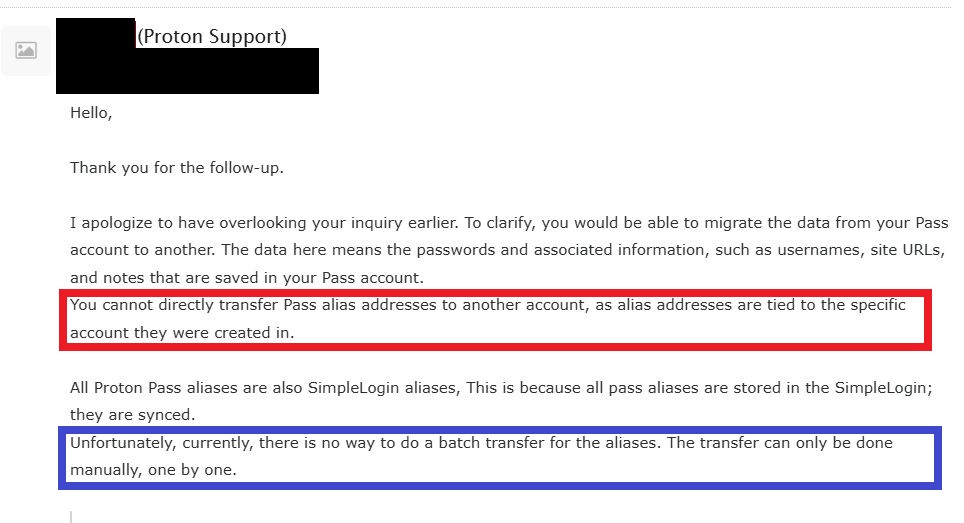
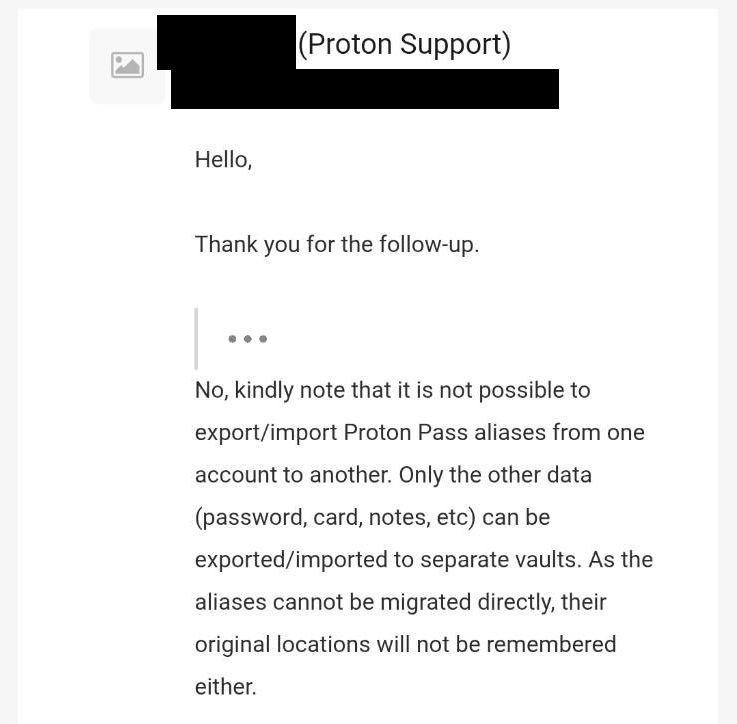
In other words, if you have two Proton Pass accounts, you cannot transfer aliases from one account to the other. You can migrate all your data from one Proton Pass account to another, EXCEPT ALIASES. Aliases and all the metadata related to them are the exception.

I invite you to ask Proton if you don’t believe me.

THERE IS A WORKAROUND, BUT IT’S A TEDIOUS PROCESS

In my previous comment, I said the following:

In a seamless, direct, and automatic process, all my Proton Pass aliases would be transferred from one account to the other within a few clicks. That is not possible with Proton Pass.

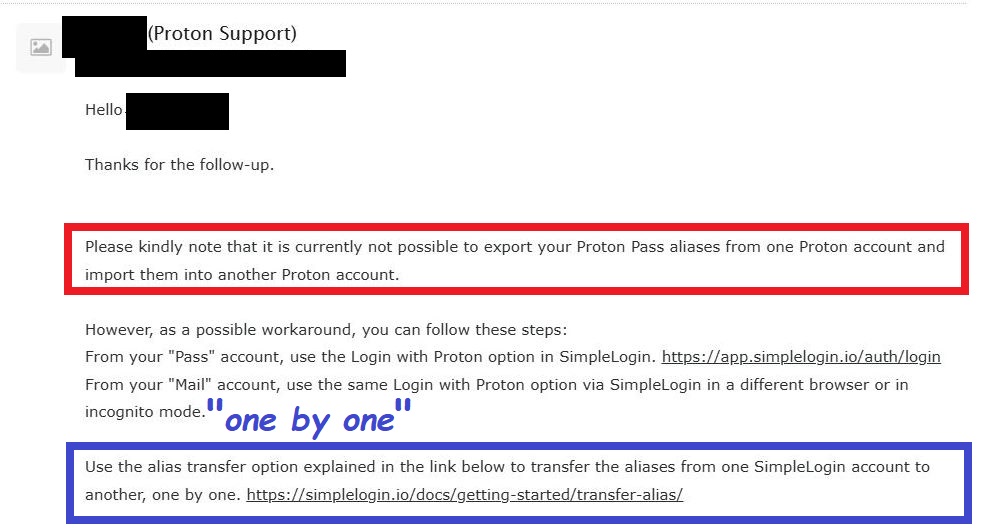
The workaround is to do it via SimpleLogin, since Proton Pass relies on it. However that workaround involves manually transferring every single Proton Pass alias one by one via Simple Login, which would take forever if you have hundreds and hundreds of aliases. Not to mention, you have to remember which vault each alias belongs to because that metadata is not transferrable either.

That is not a practical solution.

PROTON NEEDLESSLY CREATED THIS PROBLEM AND THEY NEED TO FIX IT.

By not allowing multiple subscription under the same account, Proton makes emergency access needlessly complicated. Everything I just explained doesn’t change the fact that I have no desire nor can I afford to upgrade to Proton Unlimited, which is why it doesn’t make sense to me that we can’t have multiple subscriptions under one account.

Even if by some miracle, Proton finally allowed it, I am likely still screwed because Proton doesn’t currently allow the transfer of subscriptions from one account to another, which is not the same as merely transferring data. Proton intentionally created a problem that never needed to exist, hence my frustration.
2 Likes

This does not matter. SL is owned by Proton and the functionality works…

Has nothing to do with what we were discussing which is being able to transfer aliases to a proton pass account. Which you can do. Easily.


Again irrelevant in that SL has the functionality to link with a proton account.

But also, relevant in that my original point was having separate accounts can be beneficial if you want to save money.


Incorrect. It does mean that. If you have one of Pass+ or SL premium you have both.

It does matter because directly migrating Proton Pass aliases from one Proton Pass account to another Proton Pass account via Proton Pass is not possible.

It is only possible via SimpleLogin, which is indirect, and a long, manual, and tedious process.

You’re the one who mentioned SimpleLogin. Not me. I was responding to your comment. I’m not subscribed to Simple Login. I am subscribed to Proton Pass.

Proton Pass aliases and SimpleLogin aliases are two separate things. Transferring Proton Pass aliases to a new Proton Pass account is only possible via SimpleLogin, which is an impractical workaround.

You cannot transfer your Proton Pass aliases in one single batch. It has to be done manually one by one, alias by alias. If you have 500+ aliases, that is not a pragmatic solution.

I explained why this is not a practical idea. Losing my Proton addresses and having to create new ones every year is not pragmatic. Not to mention the hassle of having to transfer data from one account to another, especially when some data like aliases cannot be easily migrated.

Again, you’re the one who is incorrect.

Just because premium access to one gives you premium access to the other doesn’t mean they are the same subscription. I made the same assumption as you, and I was corrected.

Proton Pass & SimpleLogin subscriptions are managed separately

Proton Pass and Simple Login’s payments are managed by different paying processing companies, hence they are separate subscriptions. Proton Pass and all native Proton products are managed by Stripe. SimpleLogin is managed by Paddle.

Don’t believe me? Ask Proton. Or test this experiment.

Pay for a $5 monthly Proton Pass subscription directly via Proton (not SL) and link your credit card to that Proton account.

Before your next billing cycle, freeze or remove your credit card.

Log into SimpleLogin with your Proton Pass credentials and add a different card from a different bank account.

Wait for your billing cycle to come through and see what happens.

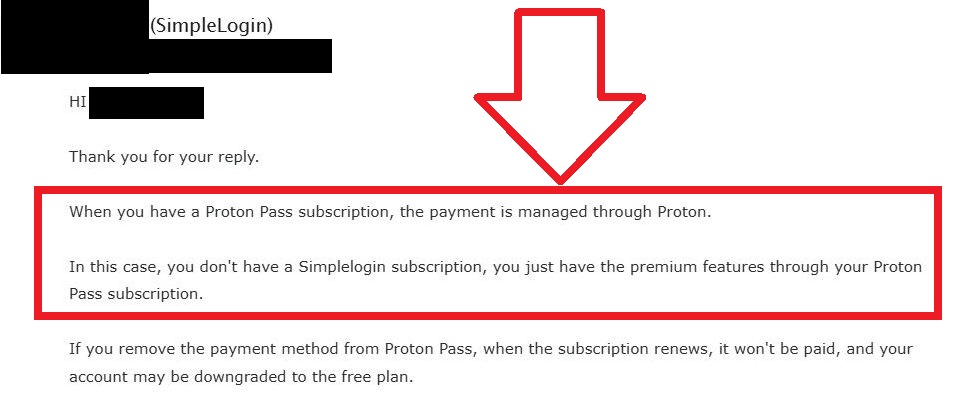
According to Proton, your payment will NOT go through. SimpleLogin will not even try to process the payment. You know why? Because you don’t have a SimpleLogin subscription, you have Proton Pass subscription.

That is essentially what I was trying to do, and I was told it was not possible, because SimpleLogin and Proton Pass are separate products, and completely separate subscriptions.

2 Likes

Only because you literally refuse to do it any other way. You could easily just create an SL account, and link it to your Pass account. You do understand that all your Pass aliases are just SimpleLogin aliases, right? This is why they are built to function together.

If you actually took advantage of both parts of the product you pay for you could…

link your pass+ account to SL → Manage those alias’ in SL → buy new Pass+ sub on black friday for cheaper then re-upping current sub → unlink old pass+ from SL (SL will still have all aliases you created until that point) → link new Pass+ to SL.

You would still have all of your alias’ and they would then show up in your new Pass+ account. It takes longer for me to type out how to do this, then it does to actually do it.

It seems silly that this isnt practical for you but you were also advocating having 3 separate subscriptions.

My option costs way less and is objectively easier. Even if you wanted to just stick with your Mail+ account, it would still save money rotating your Pass+ and whatever other subs you have each year. It seems you are opposed to anything that isn’t the exact way you already do it.

read the links. I am not fighting you over a fact.

I think the first problem in this discussion is that you contradicted yourself here. You first said it was impossible to transfer the aliases, and then you later admitted it was possible.

I agree that it is impractical in your use case, considering your number of aliases (500+), but it is not impractical for every use case. I once transferred a few aliases to my friend, and it was easy, definitely not impractical at all. I also don’t mind transferring fewer than 50 aliases, and I try to keep the total number of aliases around that number. I know it would be much better if there were a way to do it in batch, but the workaround is not impractical in some cases.

The second problem is that this is a huge misunderstanding. There’s an official statement from Proton saying that they are the same on their website. To quote Proton:

Does Proton Pass use SimpleLogin by Proton?

Proton Pass uses SimpleLogin by Proton, which is an email alias service that provides advanced email forwarding. You can also manage your aliases in SimpleLogin itself.

Link: Email Aliases keep your real email address private | Proton

It’s the last question under the Frequently Asked Questions section at the end of the page

People are misunderstanding the process here. It does not matter how many aliases you have. Once you have them on a SL account, which is a simple matter of linking the original Pass account to a SL account, you can easily switch which Pass+ sub you link to SL, and have access to all those alias’.

Regardless of how you handle your subs it still makes sense to link your Proton account to SimpleLogin because

1 - Proton literally increased the cost of both SL Premium and Pass+ a year ago so that users would have both in one package. So you may as well take advantage of what you pay for.

2- You have more control of your aliases’ in the SL dashboard.

The issue for @PurpleDime is he refuses to interact with SL at all. Which is silly since part of the cost of the Pass+ subscription is access to all the SimpleLogin premium features.

:100: They are the same. They have been for a long time now. This should be obvious just by using features.

How do you do this? I’ve never tried this before. I’m assuming you go to SimpleLogin’s Account settings ( Login | SimpleLogin ) and change email under the Account Email section (change the email address used to log in to SimpleLogin, not changing mailbox) to the email address used by the new Proton Pass account? Is that the correct way to do it?

If this really works, I think it would help many people. However, in my particular use case, this method is not helpful. My reason for transferring my aliases from the current SimpleLogin account to another new account is to ditch the old SimpleLogin account which has received warning to disable my account from Proton/SimpleLogin (because of their silly anti-abuse false positive). So I guess I will still need to manually transfer the aliases one by one in this case. There’s no point linking my old SimpleLogin account to a new Proton account, because they will ban my old SimpleLogin account anyway.

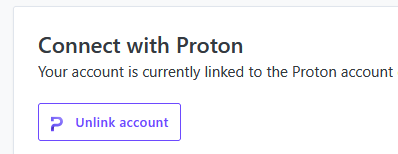
In account settings you can link or unlink an account.

When you unlink an account, you still keep all alias’ made until that point. You can then link a different account to start making more aliases.

You would do this after the linking step, if you changed what email the aliases are forwarding too.

You could still do this, its just an order of operations thing.

1 - unlink your Pass account from the SL you don’t want.
2 - create a new SL account
3 - link Pass to that account. That should allow you to manage those aliases with the new account.

Although I have not confirmed it, doing it this route.

1 Like

You created that SimpleLogin account with an email address that is not Proton Mail, then you linked it to your Proton account, so you have the unlink button, right? Because I don’t have that ‘Connect with Proton’ section and the ‘Unlink account’ button in my account settings. I initially created a Proton account, then I went to SimpleLogin and used the ‘Log in with Proton’ button to sign in SimpleLogin the first time.

If you do it this way, I don’t think the aliases from the old SL account will stay inside the Pass account, because it initially belongs to the SL account.

Think about this, in a hypothetical scenario where the aliases stays in the Pass account, what about the old SL account? Would the aliases vanish from the old SL account? Or do the aliases stay in both the old SL account and the unlinked Pass account? If they stay in both accounts after unlinking, that mean I can link and unlink the SL account to an infinite number of Pass accounts, and let an infinite number of Pass accounts manage those aliases at the same time. That sounds illogical, right?

Yeah. I had totally forgot that people may have created their SL account with the Proton account they use.

I haven’t tried but I assume you could change the email setting and then have it be unlinkable.

image

I had that thought in the back of my mind as well, which is why I am not sure. My understanding is that the aliases would transfer to the new SL account and, your old SL account would lose them.

I understand, I guess the only way to know for sure is to test it.

exactly! There shouldn’t be to much risk as you should be able to just re-link the proton account to the old SL account if they dont transfer, assuming changing the login email allows you to unlink.

I was clear from the beginning that it is not possible to do it directly. Proton Pass doesn’t allow for it. See the screenshot from Proton Support. I get your point, though.

The average person has at least 100 online accounts. That’s the average person, who doesn’t necessarily use a password manager, and likely uses one or 2 email addresses for all these account. Based on that, it’s not hard to imagine that the average alias user has at the very least the same amount of accounts, and consequently, probably 100+ aliases too.

My point is, I don’t think it’s practical for the average person to migrate ALL their aliases manually. Because that’s what we are talking about. Migrating all aliases. Not just a few.

I don’t understand what you’re saying here. Are you saying that I am misunderstanding, or that Proton is creating confusion and misunderstanding because people assume SL & Proton Pass are the same product? Please clarify.

I already have an SL account. Proton Pass depends on SimpleLogin. When you create a Proton Pass account, you have an SL account. Not an SL subscription. An SL account.

That’s simply not true.

I have logged into SL with my Proton Pass credentials many times, and I have both the SL and Proton Pass apps installed on my phone. I don’t know if you recall, but in the early days of Proton Pass, it was not possible to manage and create reverse aliases via Proton Pass. It had to be done via SL. Hence, why I used SL.

That doesn’t change the fact that a Proton Pass subscription and SL subscriptions are 2 separate things. And that it’s not possible to transfer Proton Pass aliases in one single batch with all the metadata attached to it. See the screenshot from earlier, and the screenshots below, all from Proton Support.


Are you saying Proton is wrong?

Yes, Proton Pass aliases are Simple Login aliases. That is because they are managed by Simple Login by default because Proton Pass is built on top of SL. But Simple Login aliases are not managed by Proton Pass by default. SL remains an independent product.

That is partly because Proton wants to allow people who have no interest in Proton Pass to continue to use SL as a stand-alone product. That’s what they told me.

As I’ve mentioned previously, I’ve logged into SL with my Proton Pass credentials many times. It doesn’t solve the problem.

I never advocated for it. Having three separate Proton accounts is not my desire. I’m only in this situation because Proton doesn’t allow bundled subcriptions under one account.

I reject the idea that it’s easier.

How could you possibly know that it would cost me way less?

I read the links. The fact remains, the subscriptions are separate.

Did you miss the part where I said they have completely separate billing companies? Which is why I am not able to pay for my Proton Pass subscription via Simple Login. I am forced to do it via Proton. That’s because the subscriptions are separate.

Read the screenshot from Proton Support.

1 Like

I’m saying that you are misunderstanding. Proton made it clear that Proton Pass’s alias feature is powered by SimpleLogin as I mentioned in my previous comment:

You stated that Proton Pass aliases and SimpleLogin aliases were two separate things. But they are actually the same thing. Proton Pass aliases are just SimpleLogin aliases under the hood, made possible through API integration. In a hypothetical situation, if SimpleLogin’s server has a problem and no longer works, the alias feature in Proton Pass, as it is now, will cease to function.

I agree that the subscriptions are separate. I agree that it is not possible to export your Proton Pass aliases (export means to save the data locally on your local device). I agree that there is no way to do batch transfer for SimpleLogin or Proton Pass aliases.

But what @anonymous378 suggested is technically a different thing. He didn’t suggest you to transfer the aliases or export your aliases. He suggested that you unlink your current SimpleLogin account from your Proton account. Then link it to your new Proton account. Doing it that way, you will be able to manage all the aliases that belong to your current SimpleLogin account via your new Proton account. You don’t need to transfer the aliases, you unlink and link your account. That is what he was saying. Have you tried doing that?

This is a continuation of the conversation I was having with @unseen and @anonymous378 on another post. My last reply was hidden for veering off-topic so I will post it here. But first I need to explain the topic.

TL;DR:

Most people do not know nor understand that SimpleLogin and Proton Pass are separate services. Even if one depends on the other, and premium access to one grants you premium access to the other, they are still separate subscriptions and SimpleLogin is an independent product.

EXPLANATION:

If you subscribe via Proton Pass Plus, you have a Proton Pass subscription.

You do not have a SimpleLogin subscription.

Conversely, if you subscribe via SimpleLogin, you have a SimpleLogin subscription.

You do not have a Proton Pass subscription.

Even though SimpleLogin is integrated into Proton, there are ways in which it is not, like how you pay for it.

Different billing companies

As most of you probably know, SimpleLogin is not a native Proton product. It was acquired by Proton in 2022 and later integrated into its suite of services.

Despite now being part of Proton, SimpleLogin is managed by a different payment processing company. They are managed by Paddle, while native Proton products are managed by Stripe.

This is one of the reasons why the subscriptions are separate.

SimpleLogin remains an independent product

Proton Pass is powered by SimpleLogin and depends on it. But SimpleLogin is still considered a separate service because Proton wishes to maintain it as such for those who have no interest in Proton Pass.

All of this I learned from Proton Support because I wanted to seamlessly switch my payment method from Proton Pass to SimpleLogin. I assumed the subscriptions were one and the same, but they are in fact NOT. Hence, it is not possible.

Proton Pass aliases cannot be migrated (directly)

If you have two Proton Pass accounts, it is not possible to transfer your aliases from one account to the other. Almost all of your Proton Pass data can be seamlessly and directly transferred, but not your aliases.

The only workaround is to transfer your aliases via SimpleLogin, but it’s a tedious manual process. It can only be done one by one, alias by alias, and hence not in a single batch. Also, all the metadata attached to your aliases is lost during migration, meaning that Proton won’t remember which vault they belong to.

@unseen My reply to your comment.

Thank you for clarifying.

Yes. I don’t deny that. I never did.

I’m sorry for the confusion, I should have elaborated.

What I meant by that statement is that by default, Proton Pass aliases (with Proton domains), are not managed the same way as SL aliases (with SL domains). SL aliases are managed separately and independently from Proton Pass by default. The reverse is not true.

I explained in my previous comment. I understand that Proton Pass is built on top of SimpleLogin. I have always understood that. Hence, Proton Pass aliases are SL aliases because they are powered by SL.

But SimpleLogin aliases are by default managed separately from Proton Pass aliases. When you create an alias from Proton Pass, by default, you do not have the option to choose SimpleLogin domains.

I hope that clarifies what I was trying to get across.

Thank you for recognizing that.

Context Reminder

I want to remind everyone that this was a hypothetical scenario in which I would be willing or could afford to upgrade my Proton Mail Plus account to a Proton Unlimited account, and potentially transfer all my aliases from Proton Pass into it.

The point I was trying to make is that even if I could or wanted to upgrade to Proton Unlimited, it would not be possible to seamlessly and directly transfer all my aliases from Proton Pass in one single batch.

With that in mind, let me reiterate that I have no desire nor can I afford to upgrade to Proton Unlimited.

That being said, thank you for clarifying what @anonymous378 meant.

I’m skeptical that this solution would work. Here’s why.

You and I have established that Proton Pass and SimpleLogin have separate subscriptions.
Mine is with the former, not the latter. When I log into SimpleLogin, I have to choose “login via Proton” and use my Proton Pass credentials. There is no other way for me to log into SL. If I try to log into SL directly, by not choosing the “via Proton” option, the attempt fails.

A Proton account may be unliked from an SL account, but I suspect that is only if the SL account was created natively, i.e. directly via SimpleLogin. Correct me if I’m wrong.

What I see on my SL dashboard

I just logged into SL with my Proton Pass credentials and I do not see any options to unlink in the settings. I also found this 9 months old Reddit post by someone seemingly in a similar situation as mine who was not able to do it either.

Ultimately, this option is not viable for me

If @anonymous378’s solution is possible, I would imagine Proton would have suggested it to me, but they never did. I remain doubtful, but I will still ask Proton Support to confirm.

Nevertheless, even if it is somehow possible, I’m not upgrading to Proton Unlimited. I’m still stuck in the situation where I have to create two emergency access processes for my trustees because I was forced into having 2 separate Proton accounts.

Are you sure? Premium access to Proton Pass does grant you access to Simplelogin but not the other way around, as far as I know. Can someone double check this?

Also, you are contradicting yourself from your quote above with this:

This I know is not true.

Only half powered by Simplelogin - with its aliasing management. Not fully since Simplelogin does not have password management in its stand alone service.

Yes, this is a good thing. I want them to continue doing so.

No one is really forced into anything, it’s just the nature of the situation on your end where you have to. But you can certainly only manage all your aliases with Proton Pass if you wanted to. If you already had Simplelogin, then that could complicate things on how to continue managing aliases should you get Proton Pass Plus after. But Proton by default doesn’t force anyone into anything unless you want to do things that needs you to have two things given ones set up.

Yes, this is correct and only if you chose to link Proton to sign in with Proton in the future. But last I checked, you can also sign in with your OG SL credentials too.

Yes, the premium access works both ways.

But it is, my friend.

Yes. The aliasing feature is as far as I know, the only thing from Proton Pass that is powered by SimpleLogin.

That’s fair.

I just wish it was possible to seamlessly move my payment method from one to the other without losing my subscription, but it’s not, because the subscriptions are separate. I hope this changes, though.

If I have to, that implies I’m forced into it.

I don’t know if you understood what this conversation was originally about from the previous thread, but I was complaining about the fact that Proton doesn’t allow multiple subscriptions under the same account.

If you already pay for one Proton product (Proton Mail Plus), you cannot pay for another single Proton product (Proton Pass Plus) with the same account. Your only choices are to either upgrade to Proton Unlimited which is more expensive, or create a 2nd Proton account which is not ideal. Both choices are suboptimal for those who can’t afford and/nor need Proton Unlimited.

Proton has no good reason to not allow it. It’s purely a marketing decision to force people to pay more or get a sub-bar user experience. I just saw a recent Reddit post express the same frustration.

1 Like

Yeah, I was thinking about it differently and have a different understanding of it.

For example: if I have Proton Pass Plus. I also have Simplelogin. I don’t have a SL subscription but if I have access to all of SL, then what practical difference does that make? You do get full SL access on the SL website as if you had an SL subscription.