A New Chapter for Portmaster
As you may have seen in our recent announcement, Safing has joined forces with IVPN. This marks a significant step forward for Portmaster and its community. The transition brings together a shared vision for privacy and security, and more resources to ensure Portmaster’s continued growth. The groundwork for v2 was laid by the original Safing team, with the IVPN team now focused on ongoing maintenance, bug fixes, and new developments.
Why v2 Matters
Portmaster v2 doesn’t introduce flashy new features, but it brings major foundational improvements that pave the way for future innovation and stability. These core changes require a fresh install, as they couldn’t be delivered via auto-update.
Key improvements:
- Offline Installers
Set up Portmaster without needing an internet connection — perfect for secure or air-gapped environments.- Streamlined Updates
Updates now download and install faster and use less storage, making the whole process more efficient.- Better Linux Support
Improved compatibility with immutable Linux distributions such as Fedora Silverblue and NixOS.- Smarter DNS Monitoring
Enhanced VPN compatibility and privacy, with more robust DNS monitoring.- Modern Database Engine
A switch to an SQLite backend increases stability and keeps the database lean.“Working with IVPN on Portmaster v2 was a fantastic experience! We collaborated closely on finalizing the release, and the IVPN team did a great job testing and squashing bugs in the final stages. Portmaster v2 is a high-quality, well-tested product thanks to IVPN’s dedication.”
— Daniel, Co-Founder of Safing
I for one do want a proper Little Snitch competitor for macOS. And yet, there is no mention of that in this announcement. Disappointing. But Safing is one of the few companies with a product focus on Linux so that’s something.
Really cool to see IVPN expanding and join forces with other companies.
LuLu and Tiny Shield (proprietary) are alternatives. But I agree, been waiting for years for a macOS release of Portmaster and hoped the acquisition by IVPN would speed things up. I guess we’ll have to wait further.
Based on what I’m seeing on the website, Portmaster is only available for Windows and Linux? If so, it’s disappointing that there are no plans for macOS.
I wonder if IVPN will eventually include Portmaster’s premium features as part of an IVPN subscription? My current IVPN Pro subscription won’t expire until 2028. It would be nice to get more features!
Have you used v2 yet? What do you think?
I’ve been using v2 for a few weeks now. IMO, it’s an excellent product, especially if you use a private DNS provider, such as Control D or NextDNS.
That said, it comes complete with its own blocklists as well, which can be selectively applied per app. Portmaster also defaults to a Cloudflare DoT setup with malware protection, in the event you don’t have another DoT or DoH provider.
The granularity of the app-specific toggles and options is superb. You can, for instance, allow only specific hosts for an app, and block all other outgoing LAN and/or Internet traffic.
The big downside is limited history with the free version. You only get the last 30 minutes or so. However, after my experience thus far, I’m seriously considering the Plus package (40 euros/year) in order to get full logs. This package allows for up to 5 installs.
If you want access to their overlay network (Safing Privacy Network, or “SPN”), you have to go for Pro (99 euros/year). I confess I don’t really understand how SPN works, but it doesn’t seem necessary if you use a VPN.
For the technically inclined, here’s their blog post breaking down SPN:
I have both Control D and NextDNS. I am mainly using NextDNS at the moment. How are you integrating both into your workflow?
If I have YogaDNS, is Portmaster even necessary? I like that it’s now owned by IVPN, which is what I’m currently using.
I literally just installed Portmaster and I’m seeing what you’re saying. I have never seen those blocklists before. Is it even necessary if I route everything to either Control D or even NextDNS? I can use more familiar blocklists to do the job.
After installing Portmaster, I noticed YogaDNS stopped working. I even turned off the bypass secure DNS toggle and YogaDNS is working fine now. Is this normal? Is YogaDNS necessary with Portmaster? Do they compliment each other or pick one of the two?
So far, everything is at default while I’m researching and studying the UI. I installed Portmaster on a spare laptop so I can afford to screw this up while learning. Maybe I’m misreading the app, but it seems by default, some Microsoft apps are getting through. Is it possible to block everything with the free tier of Postmaster and only let Firefox and Brave through? With Firefox and Brave, I’ll have them go through NextDNS. If this is configured like that, would you say I’ll have a hardened web browsing machine? I also have Microsoft blocking enabled through NextDNS.
No, you don’t need to use their built-in blocklists. So long as you add the resolver correctly, Control D or NextDNS will still apply the filtering you’ve configured. Check the tooltips, they may seem small at first, but several of them open up into much more detailed explanations.
You’re going to want to choose one or the other, as they’ll both attempt to intercept DNS requests. YogaDNS isn’t needed with Portmaster, as it has its own DoH/DoT configuration.
I’ve briefly used YogaDNS in the past, but I think Portmaster is the better option. Just significantly more control over app behavior and great per-app logging (limited as it may be in the free version).
I would urge caution before blocking apps or services (especially Windows services) wholesale. Some data is required for Windows to function properly. The best course of action is to observe the logs for a bit and then slowly lock it down.
I wouldn’t be too concerned about blocking apps outright. That’s usually not necessary unless you’re intentionally trying to force an “offline mode.” It’s better to see what endpoints the apps are connecting to, and block or allow based on that behavior.
If you’re looking to just generally limit / opt out of MS telemetry, there are better tools for the job. If you’re on Win Pro, I’d take a look at PG’s Group Policy recommendations:
As far as specific tools, I personally use O&O ShutUp for further limiting Windows / Microsoft permissions.
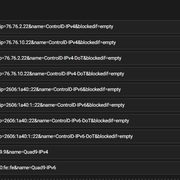
This is how I have my Control D resolvers set up in Portmaster. If you wanted to use NextDNS instead, you’d just add them and drag them to the top position, so they’re the preferred upstream resolvers. I highly recommend reading through the “DNS Servers” tooltip, as there is a bit of a learning curve.
For example, if you have NextDNS configured to return an “NXDOMAIN” record in the event of a block, then blockedif=empty is correct. If it’s set to 0.0.0.0 or something else, you’ll need to adjust that.
Fantastic explanation! This is definitely going to help me. With regard to Portmaster, can it set certain instances where it’ll use Control D and certain instances where it’ll use NextDNS? I’m reading that YogaDNS can do that, and I already have some potential use cases in mind. That’s why I bought a license for YogaDNS. Given what you have said, maybe I should have held off and tried out Portmaster first. It would be nice to see more details and datapoints about Portmaster.
There seems to be a lot of worry about Windows’ telemetry. So, given how powerful Portmaster is, wouldn’t that largely mitigate against that and help harden Windows? I see no indication that Portmaster supports Quic. Do you know if it does?
Wanted to update this thread, as I’ve actually tried purchasing Portmaster Plus, unsuccessfully. Their payment portal seems to be flat-out broken, and their account portal doesn’t seem to be a whole lot better (half the time I get bad gateway). It’s always possible it’s something on my end, but I tried with several cards and different browsers to no avail. I sent an email to support, so we’ll see what they say. As of right now, caveat emptor regarding upgrading to Portmaster Plus or Portmaster Pro.
Edit: Safing (Portmaster) did reach out to me quickly after I emailed them about the issue. They were able to straighten out the charges and provide me with a product key. It wasn’t a smooth process, but support was on it.