I’ve been a NextDNS user for a while, but only on my phones. NextDNS even recommends YogaDNS for Windows. So I downloaded and installed the app. It wasn’t hard to set it up for Windows, and I thought everything was working. Brave is indicating that it’s successfully using NextDNS. Yet, Firefox isn’t. I’m seeing the following message when I log into my NextDNS account with Firefox: “This device is using NextDNS with no profile. Make sure you use the DoH endpoint shown below.” What’s going on?
Unfortunately, YogaDNS isn’t freeware, and I’m not against buying a license provided the value is there. I’m reading that YogaDNS can force all DNS enquiries from Windows to go through the DNS of my choice, which in this case is NextDNS. Yet, things are going smoothly on Brave and not Firefox. I have a month to get a feel for the app in this trial period. What are your use cases and why is it worth buying a license?
Have you checked Firefox’s “DNS-over-HTTPS” settings? If you’re using YogaDNS, it’ll intercept all outgoing DNS requests, so you should set this to “Off” / disabled.
Brave has a similar setting called “Use secure DNS.” I’d recommend disabling that as well. Ideally, you don’t want programs fighting over who has control of DNS.
Disabling these options should force everything through YogaDNS and result in the desired behavior.
Gotcha! I also see an option to put in my NextDNS DoH link in there. I just tested it and that also solved the problem. I must be blind, but where is the option to toggle it off?
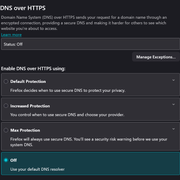
Here’s a screenshot of the DoH settings (depending on version, it may differ). You may need to keep scrolling, sometimes it gets hidden at the bottom.
It should work both the way you’ve discovered and with it off, but test to be sure!
I know the method works because I just verified it with NextDNS. If turning it off makes things easier, then sure! I’ll test this later today.
Do you also have YogaDNS? How do I verify that everything, including Windows and other Microsoft telemetries, are forced through YogaDNS and then to NextDNS?
Thanks!
Good question. I think the easiest way to verify that is to run a nslookup on a domain and confirm the response is coming from 127.0.0.1 (localhost), which is what Portmaster or YogaDNS binds to. For example:
nslookup quad9.net
Look for:
Server: 127.0.0.1
Address: 127.0.0.1#53
It may look a little different, but so long as it shows 127.0.0.1, it’s using the program’s resolver.
There are a variety of methods to check this. You can also open up Resource Monitor, and go to “Network” > “Listening Ports.” You should see either YogaDNS or Portmaster (whichever you’re using, not both) bound to port 53.