Advice disclaimer: This wiki is not an endorsement of non-fingerprintable extensions. As noted below, the general advice is to always limit extensions, both for privacy (fingerprinting) and security (smaller attack surface, fewer parties to trust, stronger site isolation). Therefore, even if an extension is non-fingerprintable, there are still downsides to using them. You should therefore consider not only (a) whether or not an extension is fingerprintable but also (b) whether or not their “upsides” outweigh the security downsides (like, e.g., uBlock Origin). This wiki is only for helping out with (a), not (b).
Authorship disclaimer: A lot of what is said in this wiki (as of the last date of edit) is a paraphrasing or outright quote of @ruihildt from their original post on the Techlore forum. (Anything otherwise will be indicated.)
The best general advice for extensions is to limit them, as said on the Privacy Guides website:
In general, we recommend keeping your browser extensions to a minimum to decrease your attack surface. They have privileged access within your browser, require you to trust the developer, can make you stand out, and weaken site isolation.[1]
But from time to time, questions are asked as to whether or not a specific extension is fingerprintable.[2][3][4] This wiki aims to help answer that. These questions can usually be adequately answered with this post here by @ruihildt in the Techlore forum. But because the Techlore forum is planned for deletion on June 1 of 2026,[5] it is best to migrate that knowledge to a more active forum like here.
Since their post is focused on Firefox, this wiki will also be focused on Firefox. As a layperson, this is the best I can do. Anyone trained or knowledgeable in the field should edit this wiki as they see fit, including adding a section about the fingerprintability of Chromium extensions.
What makes a Firefox extension fingerprintable?
This question falls under the broader question of what makes a browser in general fingerprintable. There is currently a browser fingerprinting overview by @jonah in the works (soonTM). It is not yet finalized. However, it is generally thought that anything that affects the webpage impacts fingerprinting.[6][7] Extensions therefore come into the picture of fingerprintability when they affect the webpage somehow and to some unknown extent. For example, Return YouTube Dislike modifies the webpage by adding back the number of dislikes a video has under the dislike button.
However, even if an extension modifies the webpage, it doesn’t mean it can be used to fingerprint the browser reliably. @ruihildt says:
For example if an extension only randomly modify [sic] a webpage, it can’t be used as a reliable signal/metric.
Even so, unreliable fingerprinting should not be thought to preclude fingerprinting:
. . . [I]t’s hard to reason about all of these parameters, even if you know what to look for. Which is why we recommend not to use extensions at all.
For an extension to do anything, it requires permissions. To modify a webpage, then, it would need the relevant permissions to do so. We can therefore theoretically track which extensions are fingerprintable (i.e., which affect the webpage) by looking at the permissions they require, which is discussed in the next section.
Which permissions lead to fingerprinting?
The list of permissions an extension requests upon install, like so…
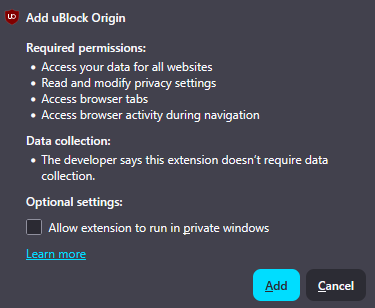
… is not fine-grained enough to determine its fingerprintability. You therefore need to look at the source code of the extension. (You can do so by following the steps here.) Within the source code is a file called manifest.json which lists all resources and permissions of the extension, like so…
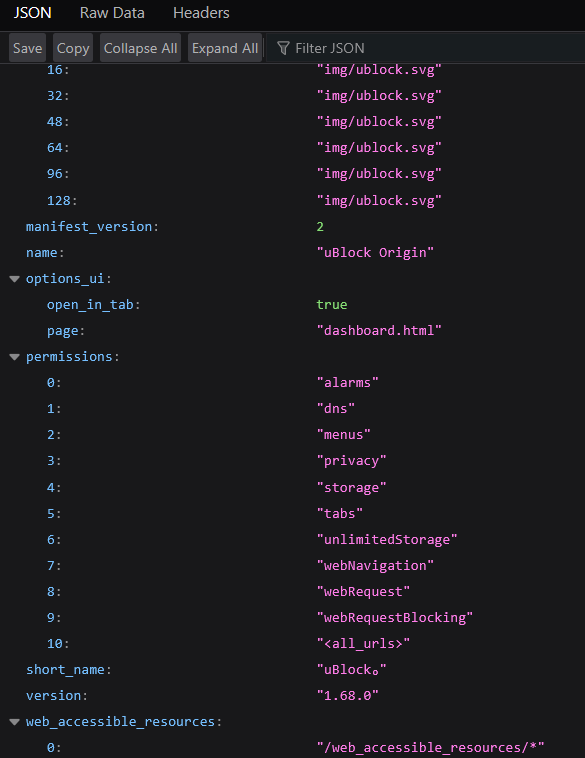
@ruihildt says:
This is not an exhaustive list and you should not use it to determine if an extension is fingerprintable.
. . .
Here are some things we can look out for:
- Web accessible resources, this can be icons, CSS or other, which a page can view, is probably unique per extension
- Content scripts, this is basically whether the extension can inject a script and modify the webpages directly
- Network/DNS requests, extensions can intercept requests an potentially modify them
- specific URL or <all_urls>, which allow extension to make intervention in specific websites
- others I forget now most probably

You must therefore analyze the extension’s manifest.json file to see if it does or requires anything from the list above to consider whether or not it is fingerprintable. To reiterate, it is not an exhaustive list. There are things that can make an extension fingerprintable that are not listed there. How to analyze the manifest.json file is discussed in the next section.
How do I analyze the manifest.json file?
To what extent we should analyze an extension’s manifest.json file to determine if its permissions do or require anything from the list above is not something I am familiar with and is therefore beyond me.
Current limitations of this guide
Anyone who reads this guide should be aware of its limitations, and anyone who edits it should ideally help fix it.
- Section 1 (What makes a Firefox extension fingerprintable?) will be greatly supplemented when the browser fingerprinting overview is finished and published. Currently, “fingerprinting” is simplified as “that which affects/modifies the webpage.” There is likely a lot of nuance missing from this simplification. To fix this, either (a) help bring to fruition the browser fingerprinting overview or (b) provide nuance in this section.
- Section 2 (Which permissions lead to fingerprinting?) is highly limited because the list of things to look out for is not exhaustive. As discussed in that section, @ruihildt admits in their original Techlore forum post that there are things that impact fingerprinting that remain unlisted. To fix this, help expand the list or provide further nuance.
- Section 3 (How do I analyze the manifest.json file?) is empty because I do not know how to analyze the
manifest.jsonfile. To fix this, help explain how one should analyze themanifest.jsonfile to see whether or not the extension does/requires whatever is listed in section 2.
Last edited by @ManicMastery 2026-01-16T08:09:40Z