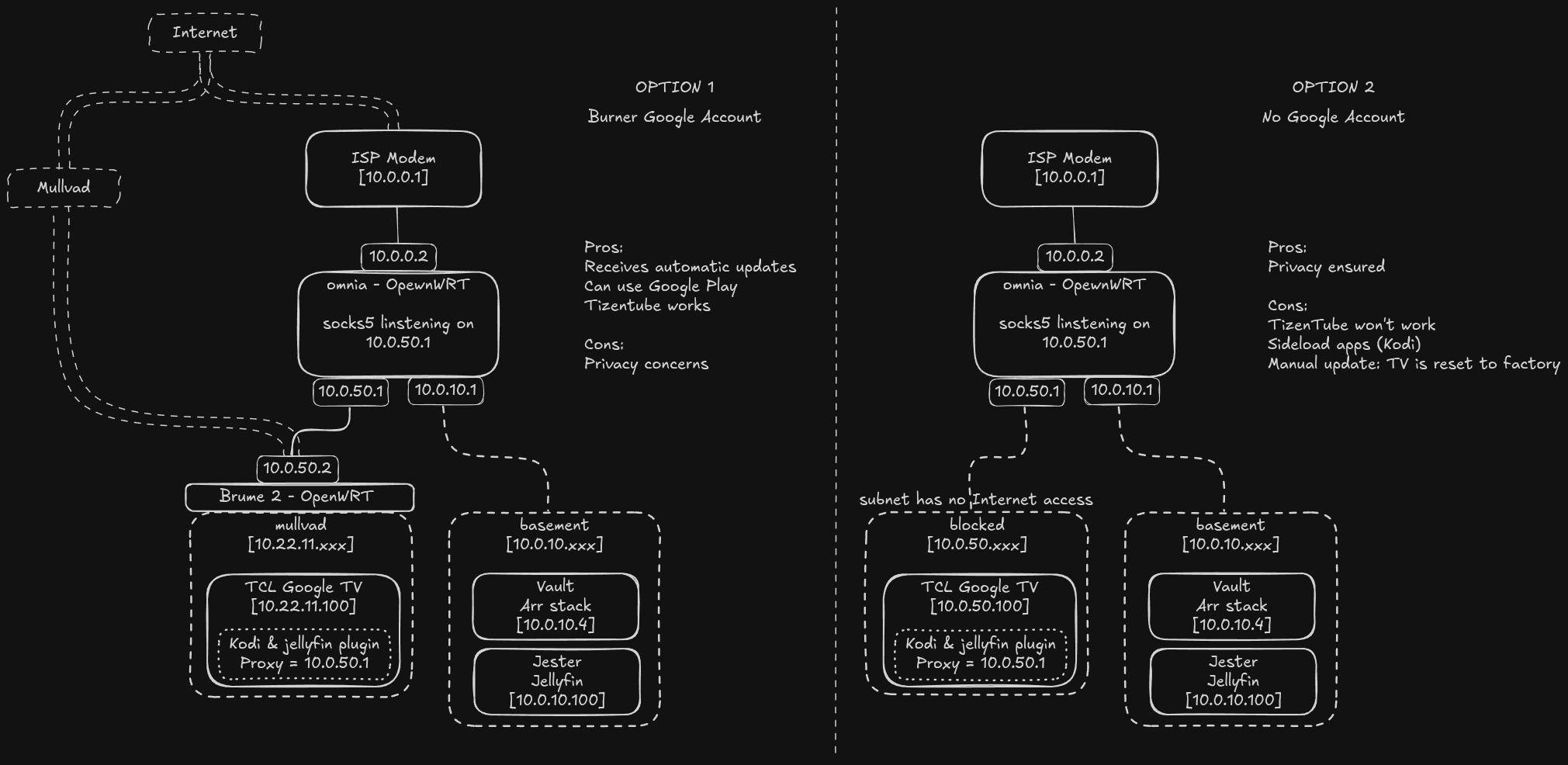
I got a new Google TV that is yet to arrive and I’m considering my options on how to connect it to my network.
My main requirement is that the TV must be able to access my Jellyfin instance that is hosted on a different subnet. A secondary but not as important requirement is for youtube.
The 2 options I’m considering are:
Get a VPN gateway and create a new google account for use only with the TV
Block the TV from the Internet entirely
Kodi can be configured to use a proxy server so I’m confident I can get it to access the Jellyfin instance without port or inta-zone forwarding on either OpenWRT device.
Each has its pros and cons as listed in the diagram below. The main con for option 2 is that manual updates reset the TV to factory and I will have to set it up (apps + settings + calibration) all over again every time.
As a result I’m leaning toward option 1 but I want to listen to the opinions of others to see if it’s a valid strategy or there’s anything I haven’t taken into consideration.
Network diagram for both options:
(Option 1 may require a proxy server to listen on the Brume 2 device as well but I won’t know until I get one)
Bad wording on my part. I mean create a new google account just for the TV. Will never purchase any apps, send an email or do anything other than receive updates for the TV and download a few apps from Google Play.
I think this is always the best option. TVs are simple monitors and should not need any updates. Isolating these devices from the Internet seems essential considering that they have microphones (often in the remote) and sometimes cameras, and that updates are often hostile to the user (introduce unwanted features like AI). A throwaway Google account won’t help against that. Much like modern cars, TVs are incredibly privacy invasive.
I am not sure about the Kodi/Jellyfin setup. My approach is to use a separate “top box” to stream as I often rely on the Web browser for my content (I find Kodi boxes too limited).
Modern TVs defintely require updates if you want to get the updates for HDR, DV, HDR10+ specs as well as firmware updates for the local dimming algorithm etc.
I was using the set top box approach (rpi4 + libreelec) with my old TV but the ones supporting the propriatery HDR formats + jellyfin compatibility are usually Google TV as well so I don’t know if that’s any better. Libreelec was lacking in that regard. Coreelec seems to be better but there are other factors to consider.
For anyone looking at this in the future this is the approach I will probably take:
I will be doing both connectivity options. Ethernet for the VPN connection which will be enabled at initial setup and then only to install apps and receive update for apps and the OS. Wi-Fi will be the default connection with no Internet access behind a socks5 proxy server for access to the Jellyfin instance.
The TV doesn’t have a camera. As for the microphones, it has a built in switch to disable the ones on the panel. I don’t know how to confirm they are actually disabled but I’ve yet to look into this.
The microphone on the remote is push to talk. I presume this is to minimise battery drain when always listening. I will also remove the batteries from the remote when the VPN connection is live. Another option is to unsolder the microphone itself from the remote which I will probably do. Or I can get a universal remote without a mic.
What about the middle-ground option? In other words, you disconnect TV from the Internet most of the time and only connect it to the Internet for a very limited amount of time for updates.
Even if that’s true, that should be fine when you do it for the first time. If you want, send me the link to the website. I don’t understand why a USB firmware update would reset your TV, but not an online update.
If it was just the apps that I would have to set up again I would be OK with it, but I will be paying someone to calibrate it for me. If I could backup and restore the calibration it would be great but I doubt the option exists.
It could be that the calibration can be input manually after a factory reset but I will have to consult with the calibration guy about this.
Ok, the reason why is because the manufacturer would have to send you a USB with the update. Normally, you can search for your model number and click on Downloads, for example:
But it looks like you can only download manuals for the TVs. As for calibration, the calibration guy should give you the settings so that you can calibrate the TV yourself.
Creating a google account might be complicated actually. You need to provide a phone # most of the time which would then be easy to link with your real google account or any past ones.
Unless you use a service like smspool or jmp.chat, creating a simple account is more complicated then you might think.
I actually just finished a setup with Google TV and for now I plug in my PC to the screen when I need to.
I’m waiting for the steam machine and will use that to connect to Jellyfin/Plex/Kodi.
Is the market so bad that you need to buy a Google TV? I didn’t even know Google sold TVs. My rule for big screens is to never connect. I don’t know about updates but if that was my only option I’d rather not have one. A connected Google product is incompatible with privacy.
Wait, is GoogleTV a box next to your TV (like AppleTV) or an app on the TV?
Either way, I’d recommend DIY your own mini PC and not relying on some random software running in the background 24/7 from Google.
Less headaches and you probably are 90% there already.