So does this basically mean that BitLocker has an inherent backdoor that could easily be abused? (Although wouldn’t be that surprising)
No backdoor per se. The recovery keys to decrypt the data was stored on Microsoft servers automatically, not because of any backdooring, but because the person encrypting their data did not account for it when setting up their Bitlocker drives.
Both Green and Granick said Microsoft could have users install a key on a piece of hardware like a thumb drive, which would act as a backup or recovery key. Microsoft does allow for that option, but it’s not the default setting for BitLocker on Windows PCs.
It is insofar as most people are unaware of how the default settings work against them. For one, Microsoft has fought against offline account usage for Windows in the past and increasingly required online accounts. Because of this, a person will inadvertently have cloud storage even if they don’t necessarily want one, in virtue of having a Microsoft account. Secondly, the article claims that the default setting for where your recovery keys are exported to is the cloud.
So if most people have cloud storage due to Microsoft requiring accounts to use Windows, and if the default location for exporting Bitlocker recovery keys is the cloud, most people will have their recovery keys sitting in the cloud, likely unaware that their data is accessible to other parties.
It’s more of a front door, in my opinion, and you can’t really blame Microsoft for handing over encryption keys in response to a court order. The real issue is that Microsoft is in any position to hand over encryption keys in the first place. Escrowing plaintext encryption keys is an awful idea.
What should the end user have done to avoid this? My understanding it is not intended to be optional while various workarounds do exist - I don’t think the end user is provided with a choice.
Veracrypt is your friend.
The major issue is Windows 11 and OneDrive is really sneaky in the way it pushes to your Explorer (file browser) bookmarks. You can’t tell it easily from address bar either, that the directory you’re using is being exfiltrated to Microsoft in real time.
VeraCrypt is more than fine but ideally you should just keep your private life on FDE Linux and just run the occasional game or 3ds Max session or whatever you need on Windows from separate disk, and then have a DMZ flash/external/internal drive for Win/Linux shared files.
What should the end user have done to avoid this?
Exactly what PrivacyGuides says: Use actual BitLocker (called “BitLocker Drive Encryption”) and when asked where you want to save the recovery key, select anything that doesn’t read “Save to your Microsoft account”:
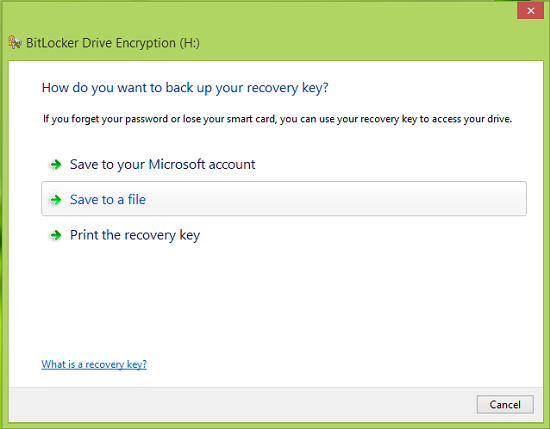
It is as optional as it can be. The user from OP likely was using “Device Encryption” instead, which is automatically enabled, usually for people who otherwise didn’t even plan to encrypt anything, and accordingly backs up the recovery key to Microsoft.
Correct. I hate when people spread bitlocker FUD. Bitlocker is legit when used correctly. There’s a reason the US gov themselves use it on their systems (even the classified ones).
I honestly think it’s severe enough where we probably shouldn’t be recommending BitLocker, especially if it’s because it’s so easy to default to Microsoft servers without new people even realizing it. If we are going to keep hosting it, we should make a giant note about that.
One critical aspect of encryption is misuse resistance. Having the first option be slightly more honest:
“Add a backdoor for government: send the backup encryption keys to Microsoft and FBI goons appointed by Trump should they come asking.”
would probably make people consider twice. I wonder how many people click that because they don’t realize the implications, e.g. that Microsoft account means cloud, it’s not some local Microsoft account. Also, it’s not delivered to the server in password-protected state, like you might backup your PGP keys to your cloud storage.
I really wonder what kind of damage does accidentally clicking that option cause. Will it re-encrypt the entire disk if I press some go-back button, to ensure Microsoft doesn’t get a copy of the key in use, or is it too late?
It’s easy to blame the user but can you imagine some open source privacy application doing this?
Then don’t enable the FDE in the first place? Makes it nice to be able to access Windows files from dual-boot Linux. I get that there’s plenty of work computers that people don’t mind have centrally managed keys but the IT-departments handle the Entra ID stuff themselves.
If users fail to read “Save to your Microsoft account” where they even have to click, why would they read your passive warning?
It just sends the recovery key protector to Microsoft. The master key is never shared. Key protectors are the BitLocker terminology for what would be keyslots in LUKS. You can simply remove your recovery key protector and add a new one.
Do you seriously think that there is no privacy difference between “the user and Microsoft can access data when having the disk” vs “literally anyone who steals your shit can access your data”? For the average normie (who’d be affected by automatic Device Encryption) it’s a massive upgrade. People are already conditioned that setting a PIN on their phones is an actual security feature, Windows was arguably the odd one out.
Alarm fatique is real. I see people click through GDPR warnings all the time. “Go away stupid box” is all they care about. They don’t expect there to be consequences to clicking something. Also, it’s a “do you have a printer or USB stick at hand” to which many people will answer no.
Yeah that should make the rekeying part easier if you misclick, good.
Of course I see the benefit of encrypting disk to protect from theft. But it’s not like Microsoft is helping out with threat modeling by being upfront about who has access to the encrypted disk. Some of the criminals who want your data are now in power. If that window would openly communicate even the basic version of “Key is stored into cloud, and is subjectible to legal requests” I’m happy. But it doesn’t. And normies just might care about that in the current political landscape.
And the worst part is that if you are into privacy they treat you like a criminal. This shit does not make sense.
People really need to drop Microsoft.
I don’t know how to quote yet, but to answer your question, the warning would be for those people who have no idea that this is a thing, so they would be happy to be warned by it. I know this because I’ve had to inform people when this article came out about what happened and they were very thankful that I told them.
Your use of the term “normie” is why we don’t have good privacy in tech. Corporations love you because of it.
They do, but for a lot of different reasons there is a minority use case where they’re unfortunately locked into his ecosystem and not by choice. This is why I’m all for providing tools that will mitigate those people while they’re stuck there and then giving everyone alternatives. Who can make the jump. To me excluding someone will shower everyone, this is literally why the Linux Community initially could not get off the ground.
I’m not sure I understand. You want to warn people “If you didn’t encrypt your disk, it is possible that Windows encrypted it for you and sent the key to Microsoft, making it more secure than otherwise” ? How is that a warning? What’s the point of it?
To reiterate the point: The manual enablement flow for Device Encryption will inform you of, while the BitLocker flow will need you to explicitly select the sending of recovery keys to Microsoft. The only people who unknowingly sent keys to Microsoft are the ones who never planned to or intended to encrypt their disks.
Most corporations will use the built in bitlocker. The threat is corporate espionage or random thieves grabbing a laptop.
Having encrypt keys uploaded to another server works fine for every threat outside government warrants.
This is a confusing comment, both actual BitLocker (dubbed “BitLocker Disk Encryption”) and Device Encryption (built on BitLocker technology) are built-in. The later is the one unconditionally uploading keys to Microsoft accounts. The former one is the one enterprises use, and they generally disallow uploading your keys to personal Microsoft accounts, as opposed to your post. They will usually use Group Policy to force uploading of recovery keys to either Azure AD or their on-prem AD server.