before everything, im aware that not using it at all would be best; but I want to install windows strictly to run games that otherwise wouldnt work on linux, and id like to reduce tracking and telemetry as much as possible without actually breaking stuff.
from what i ve found, windows 11 ltsc iot would make my life easier by being less bloated, but i think thats still not enough.
I ve seen multiple options on the net such as chris titus’ tool, windows privacy dashboard, windows spy blocker or tinywall to only whitelist connections i want.
I will admit, i dont fully know what each does, so which ones should i actually use?
i ve also made some slight changes beforehand in group policies and registry to the more obvious options
Welcome to the forum.
There is much information on this on this forum itself so I suggest you research and learn as much as possible.
Your question/such questions for Windows is always going to be hard to answer well because MSFT sucks so much and they keep changing things so one thing that would have worked earlier this year may not be optimal now.
Also, to what extent we can make it “private” is also up in the air because there is no tangible metric against which we can measure this. So, I suggest you learn of those tools and what they do to then decide which one works best for you.
If you’re honestly just going to be using Windows to play those select games and use another OS for your everyday/other computing needs, you may as well leave Windows alone and not bother much. Just turn off whatever you can find in the settings and not continue to struggle to find the best tool to use to minimize said tracking and telemetry.
That’s my advice. Others may have their own. Good luck to you.
I’m going to risk sounding like an LLM, but you’re absolute right to use/consider Windows 11 LTSC IoT. It’s illegal for regular users to get it, which is why it’s probably not mentioned around here.
There are no other sensible privacy options for Windows afaik unless you like constantly patching and re-patching your system. Windows likes to mess with settings on updates, so it’s unlikely that anything will stick and you can’t (shouldn’t) turn off updates for the sake of good security.
The vast majority of games run on linux either natively or through proton. If you still have to use windows then I recommend dual booting. LTSC is as good as it gets imo and it used to be my daily driver. Due to the fact that you have to pirate LTSC, I don’t think anyone here can really recommend it in good conscience as you could potentially be pirating a compromised version.
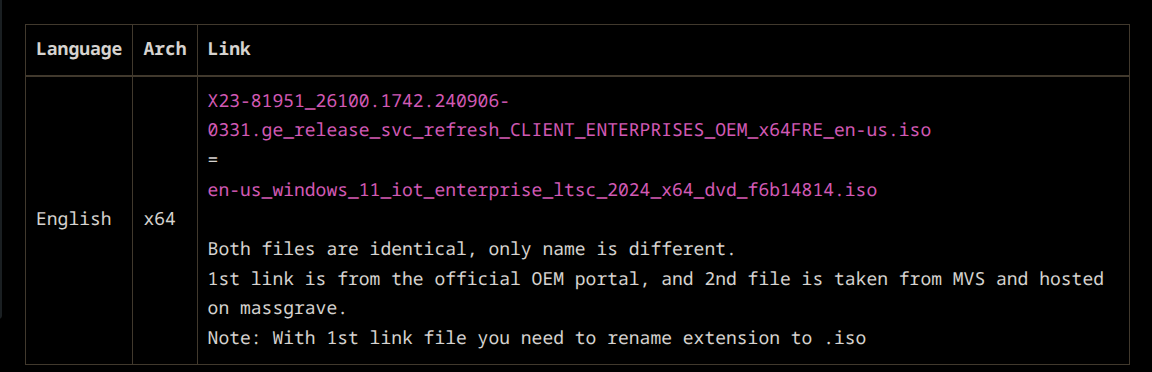
there is a safe source (try searching around on pg if it exists, if not, gl), that even links to a microsoft provided url to download the iso so I wouldn’t necessarily worry about installing a compromised version but it is possible so I wouldn’t rule it out but I would say you have to be intentional to do that
I’m curious if PG cares at all about us talking about illegal stuff on here. There’s no way that Windows is cool with regular users installing and using its LTSC. AFAIK it’s meant to be for enterprise customers only and it should be a pain to legally active it. massgrave.dev is the shit for that though.
I just noticed massgrave has its own LTSC recommendations with hash verification here: Windows LTSC Download | MAS I guess I was out of the loop and LTSC is not considered private according to massgrave. It recommends doing Telemetry.md · GitHub although those should already be doable via its activate scripts.
Yes, LTSC is an old r/piracy and r/privacy recommendation that became pervasively popular across the internet. My understanding is that it is very use specific, and any privacy/security benefits can be had with Enterprise. The only problem then being how to legitimately source Windows 11 Enterprise.
Agreed. Some relevant learning sources on the forum for OP:
- Choosing your Windows Edition
- Group Policy settings to improve privacy/security
- Minimizing Windows 11 Data Collection
- Windows Privacy Settings
Check out @jonah’s reply here:
With respect to telemetry options, this is true. As discussed above, telemetry options are identical between LTSC and Enterprise edition.
If OP is still unconvinced not using LTSC IoT, the best we can help them is to ensure they get the correct iso. @Uhhhidk notes here that…
Once you do find the ISO, make sure to verify it. You can do this by comparing the SHA output of the downloaded file to the official, untampered one. Based on a PDF file linked by a Microsoft LTSC article, the SHA256 output for Windows 11 IoT Enterprise LTSC 2024 (x64 edition) is…
8ABF91C9CD408368DC73AAB3425D5E3C02DAE74900742072EB5C750FC637C195
This may or may not be the ISO you are looking for.
Interesting as that’s one of my main reasons for using LTSC over GAC. I didn’t have ads in the start menu, cortana, copilot or recall. Windows releases anti-features, not features.
I liked that it didn’t automatically bundle things that I might not need (arch user btw).
You can achieve the same with the Pro version, I don’t see any real benefit to change but if you start from scratch I guess is ready ootb.
If you, or someone you know, are enrolled at a college that has a Microsoft volume licensing deal, you may be able to obtain an official Windows 10/11 Education license and installation. It’s almost identical to Windows 10/11 Enterprise and doesn’t require a subscription like Enterprise editions do. It is also a non-LTSC edition, which is better for typical home use.
I’ve been using Windows LTSC IoT for a few years now (both the Win10 and Win11 editions of it) and it’s been really good.
I haven’t noticed any improvements in the performance, though I have a pretty beefy desktop so that might be why. Having all the bloat removed and only get stability and security updates is great tho
Privacy is mostly the same between the regular consumer and Enterprise /LTSC are mostly the same AFAIK, but the latter has some extra settings for disabling some telemtry not available in GAC. I used this rentry guide (mind you, got it from the Windows thread in 4chan lol) for my LTSC install, skip to the Task Scheduler section and start from there.
thanks everyone, in the end,i decided to drop windows entirely since on top of it, i eould have played games that needed kernel access anticheat, which i wasnt comfortable with, even with dualboot.