If you’re going to use arkenfox’s user.js, then don’t expect to just start using it as is. You WILL NEED TO CREATE OVERRIDES, and FULLY read this wiki.
People keep on mentioning Librewolf will break sites, but in my personal experience, I haven’t encountered any sites breakage yet and I now use it as my main. It doesn’t mean it won’t happen, but it’s easy to understand why I’m skeptical here.
In Librewolf, you don’t have any expectations to change about:config page. You can tweak settings as you would normally do in any programs.
So from my understanding, and personal experience, using Arkenfox as is will breaksites, but using Librewolf as is won’t. I might be wrong though.
Back when that Reddit post was originally posted, Arkenfox used RFP by default, which, while fixed for most sites relatively easily by setting a site exemption for the randomized canvas, could still cause issues by default. A couple weeks later (Release that made the change), the default was changed to FPP, which is far less prone to breakage than RFP was, at the cost of being less thorough in it’s ability to resist fingerprinting. While not explicitly recommended, using Arkenfox’s user.js by default now, especially with the recent change of history being retained on exit by default, should be fairly smooth.
Addendum: Arkenfox and LibreWolf also had (in LibreWolf’s case, has) WebGL disabled by default, which can also break things. For Arkenfox, this was changed at the same time as the transition to FPP. The logic given for it being disabled before (and why you should disable it if you’ve configured your overrides to reenable RFP) was, and I quote, “webgl, like canvas, is the intersection of a lot of entropy (math, gpu, anything fonts, anything css eg colors, etc) along with other entropy such as your graphics card info, parameters and values. As such, since it’s barely protected by RFP, it’s better to disable it.“
Well, LibreWolf has used RFP at any time (as far as I know), and it uses it also now. So if RFP in LibreWolf doesn’t made any breakage for @win11.shading291 while being much better in terms of fingerprinting protection than FPP, I don’t see how your argument weakens the argument of @win11.shading291 .
It’s a misconception to think LibreWolf doesn’t cause any breakage, the breakage users reported having issues with in the past (before the aforementioned change to FPP by default for Arkenfox) were likely issues with RFP, issues that would persist on LibreWolf. However, not all sites break while RFP is on, so I assume @win11.shading291 simply visited sites that don’t break with RFP enabled.
Oops! I forget to the “for @win11.shading291 “ between the “breakage“ and “while being“! You’re right. I will add it.
But can anyone please mention a few websites that break with LibreWolf? Arguments, that have to assume that, like that @anon30836186 mentioned, are pretty often used, but I didn’t find any example, so this argument is kinda house without foundation. All, what I found, was an issue on Codeberg of LibreWolf where Spotify didn’t worked, but since I think pretty much everyone using Spotify use it as Application, this isn’t that relevant, I think
(Most of my browsing has been with FPP ever since the Arkenfox changes, save for sites I already knew worked completely fine like Invidious instances (which I use Mullvad Browser for rather than Arkenfox, in case anyone is confused on if it’s possible to use RFP and FPP at the same time, it’s not) but…)
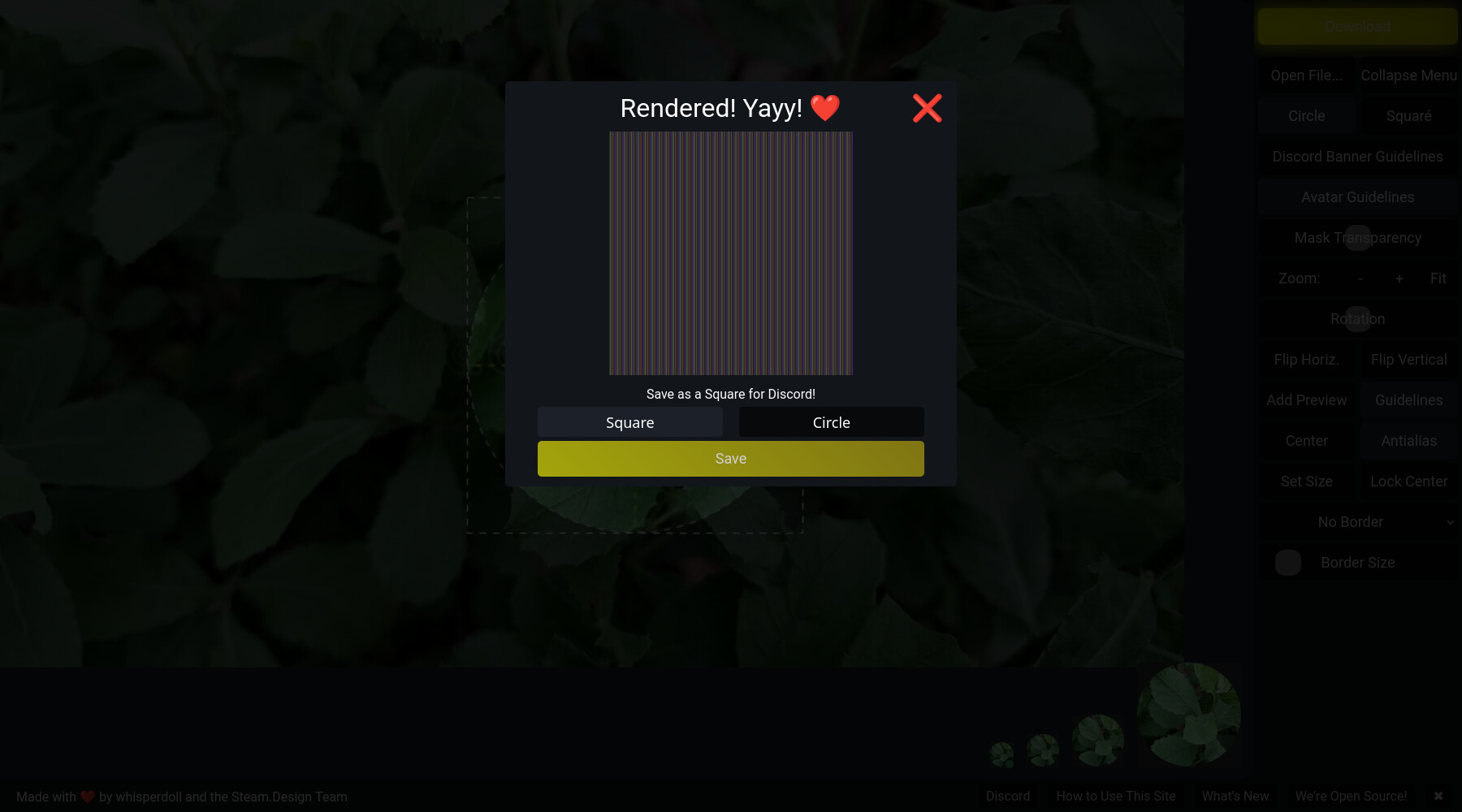
If you want any random example, the site avatarcropper.com is the first thing that comes to mind. After you finish cropping your chosen image, rather than exporting the cropped image, if you have RFP enabled (without a site exemption for the randomized canvas), this will display instead.
In my experience, RFP is mostly pretty useable, but does come with some annoyances and hiccups. Full on breakages (as in ‘this website is unusable’) aren’t very common (in my experience), what you are more likely to experience more commonly are websites not displaying properly or not functioning well or other things that I’d consider closer to ‘annoyances’, than full on ‘breakages.’ But breakages can and do happen occasionally.
I’d put it like this. Enabling RFP doesn’t necessarily mean you will encounter breakages. But when you do experience issues and glitches, RFP is commonly found to be the culprit.
Here is what some relevant projects say about RFP:
Here is Firefox’s disclaimer:
While this may be ideal for those prioritizing maximum privacy, it can cause some websites to function improperly. For most users, Mozilla recommends Fingerprinting Protection mode in Firefox Settings for Enhanced Tracking Protection, which blocks invasive tracking methods while maintaining compatibility with most websites.
Due to it’s nature, which is effectively breaking web standards whilst protecting 100+ metrics, RFP does cause the odd issue… [canvas randomization] is responsible for 99% of it.
It is possible that users will experience breakage because of RFP: usually this is caused by canvas access, which can be relaxed on a per-site basis […] Other common problems brought by RFP include: spoofed timezone, forced light theme, smaller and fixed window size on startup, suppressed keyboard modifier events using alt-keys… These annoyances are intended to protect your privacy.
As to specific examples, I think a common issue encountered with RFP are problems with videoconferencing tools like Zoom or Teams (example). Apart from that here is a comment from an engineer at Mozilla who has collected a few examples of other RFP related breakages, here is one more example from Mullvad Browser. You can find lots if you look through the Librewolf or Mullvad Browser issues, but that doesn’t mean you personally will necessarily encounter any dealbreaker-breakages.
I see RFP as a personal choice (outside of TB or MB where it is mandatory), use it if you don’t find it problematic, or relax settings back to FPP (Arkenfox’s default, Betterfox’s default, Firefox’s default in ETP strict mode and private browsing mode) if you want a more comfortable but effective middleground.
edit: you can filter by the label ‘webcompat’ on Mullvad Browser’s bugtracker to see issues that are more likely related to RFP
This come from disabled HTML5 canvas image data and can be easily turned on per site.
If you encounter such things, left site of the URL there is a toolbar (inlc. Shield, lock, settings icon) there will pop up a new icon, which looks like a picture, where you can click on an activate HTML5 canvas.
Here is how this icon looks in Mullvad (will nearly look the same all Firefox based browser)
Now just click on the new “image-like”-icon and then press the “allow” button. After that reload the image or the whole page with the “reload”-icon.
Due how powerful canvas image data are it can lead to more sophisticated tracking and even exploits. Therefor most secure browser like Mullvad-Browser, Tor-Browser or LibreWolf, disable canvas image data per default.
EXPECTATIONS