RTINGS.com’s video on browser fingerprinting, how VPNs are ineffective and the usual high quality testing from RTINGS I suppose and their recommendations.
Privacy Guides was given a shoutout for guide on Configuring Tor properly! Nice one sp
@sp_rtings is the main test developer and open to answering questions or feedback you may have!
I can’t see the text, but I can guess what it probably says. Google is blocked so badly that the pages won’t even open, and I’m so tired of fighting with it that I can’t manage to remove the blocks again.
tl;dr: Fingerprinting is very well explained by the Privacy Guides video. When visiting a webpage, your device sends information on its configuration to the website, so the website can send back the proper information to be rendered. Why is your device sending the info first? It was just built this way… and now we pay the price The amount of information your device sends create a unique “fingerprint” which can be tracked through your web browsing, and data brokers are well equipped to do that. They don’t know your name, but they can track your interest and sell that info to advertisers. In our article, we test how much you need to tamper with your fingerprint to “blend in” or be random enough not to be trackable, with the goal of better understanding what fingerprinting is and how powerful it is. Learning by experimenting!
I’m happy to discuss any questions that anyone might have!
It’s a bit sad that in the video, you’re talking about websites being fully non functional and that rtings.com is one of them.
Wish you could use a bit less JS given that the website is still more of a blog rather than an app. Paywalling the content could also be done on the SSR side of things but I guess that the stack is already set in stone (can’t double-check with Wappalyzer but I remember you using VueJS).
Tbf to sp I don’t think the design of their website is within fully in their control considering RTINGS.com is consists of a team but I also don’t see anything wrong with suggesting as such to the developers/engineers
I would imagine it’s perhaps becomes a separate site like nojs.rtings.com with an onion link having the same no JavaScript design if they could spin up a tor site
I am indeed not sure who I am talking to above, but it’s a general advice yes.
I would imagine it’s perhaps becomes a separate site like nojs.rtings.com with an onion link having the same no JavaScript design if they could spin up a tor site
Lol no, we have the tech to allow for no-JS websites especially given what rtings.com is.
It’s just trendy to spray JS for quite a few years on the Web platform.
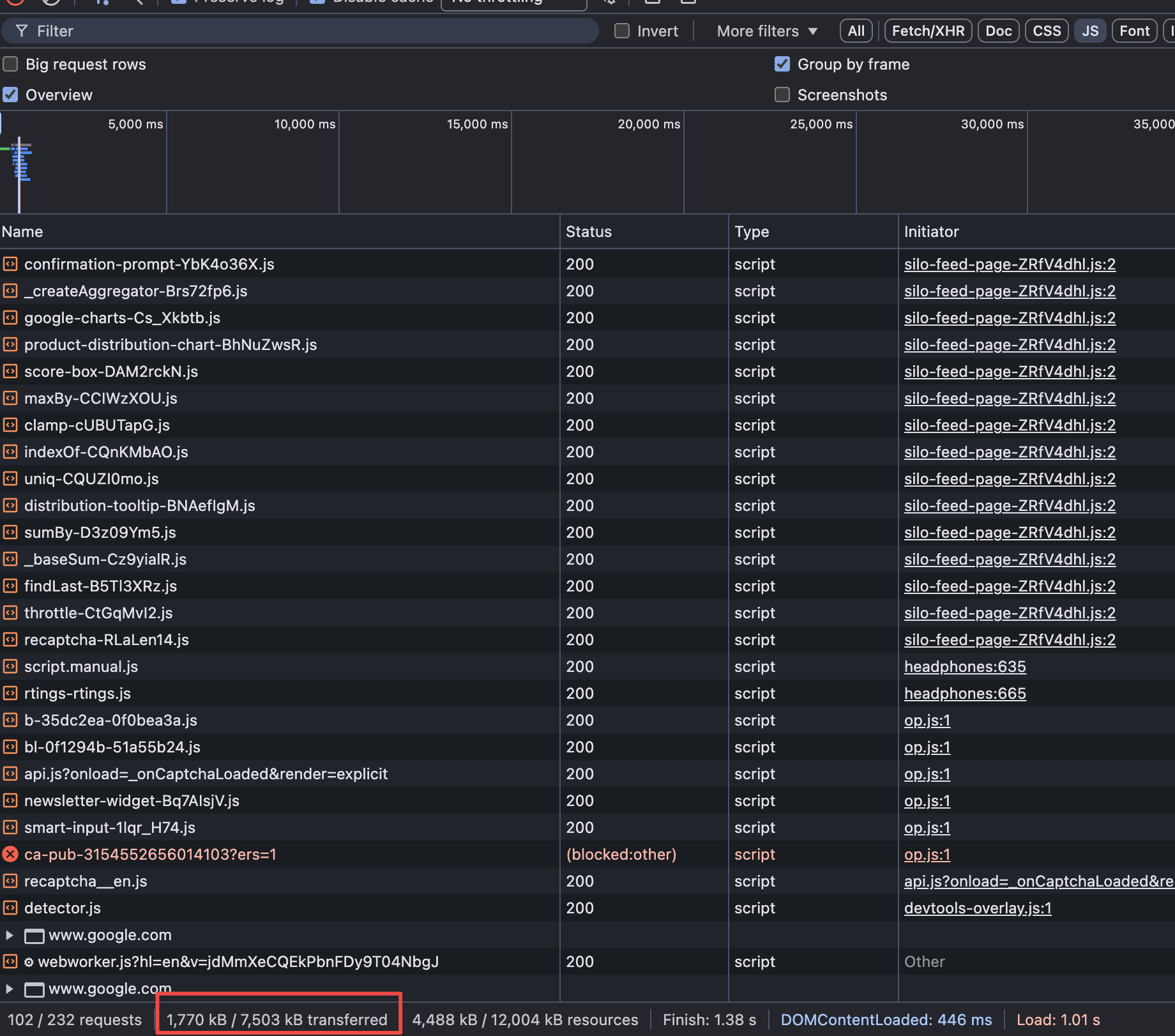
I meanwhile do not find ~1.8MB of JS acceptable for this page
Because again, that page is a wall of text with images and no needed interactivity at all.
But yes, JS is not used as progressive enhancement anyway nowadays unfortunately…
Of course that all assumes it is even possible
Yes, you can go a long way with vanilla HTML + CSS and some server, especially given the capabilities of the Web platform nowadays.
Anyway, a bit of a rant because I do like the website (thought of even applying there back in the day). Just wish it could be better.
EDIT: what am I even downloading a recaptcha there??? I’m just reading content.
No, it’s the opposite actually.
Client-side paywalling is one that you can bypass by…disabling JS.
Only server-side streaming is actually useful paywall: you don’t ever send the content until you’re sure that the user is a member.
Which is quite different from: send everything to everybody and switch a toggle to hide it. The content is still there because it is populated on request form the server.
And again, plenty of technical solutions available here for your average developer.
It’s a decision, not a limitation.
EDIT: client-side paywall available here. Disable JS? You can read all the content for free.
Magic huh? No need to download 2MB of JS to see an actual article with images and text there either.
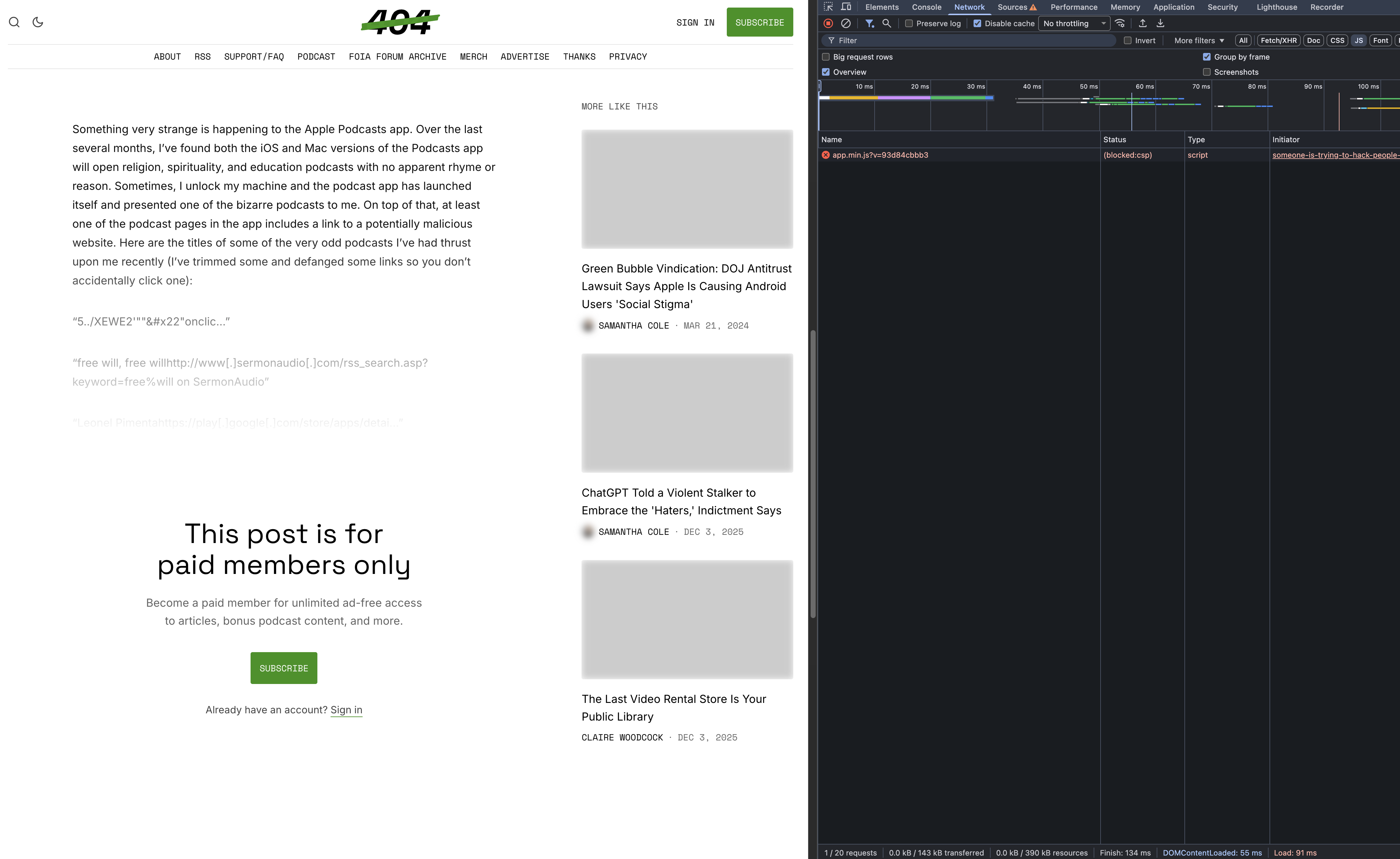
EDIT2: good example on how to do it right. Brave shields + JS disabled 0 kB of JS downloaded + content is paywall’ed on the backend. Images are non working in that situation (again, decision and not a limitation here, maybe just a bug/miss too) but at least, the entire webpage is around 140kB (all assets included).
@kissu It is a fair point that the experience for no-js clients has degraded completely as we started leaning more into Vue for the frontend. We have looked and set up a bit of prerendering, but only through the lens of making sure the content is crawlable. That step being enabled for all users made it actively worse (more data transmitted, flashing of content) for javascript users. You can see it with ‘archive.org_bot’ user agent (and plenty others).
The next step would be to replace that with better prerendering and vuejs hydration instead of rendering. There’s no timeline for it, but I will still share this post with my team to expose them to the real issues experience by some of visitors.
You’re also right that this comes down to our decisions and not technical limitations.
Thanks for listening to the feedback.
Let’s make the website fast and amazing for everybody!
PS: if you can, just skip hydration whatsoever.
It might not be needed here at all. Consider Islands with either Nuxt or even better: Astro (won’t require a huge rewrite).
I design tests and investigate the interesting aspects of products we review. @vince_rtings is the lead for the web development department. You can geek out a lot more with Vince than me for Javascript!
And we always welcome the general advice! Thanks!
The key info is that amiunique.org was used and it checks for about 1500 (!) unique identifiers. So in short, there is no way you cannot have a unique fingerprint and that’s what they found.
They mention that Tor and Mullvad browsers “reduce” the fingerprint but it is not quantified.
General question: isn’t there anyone working in the “tracking industry” to inform about the real mechanisms used and the impact of it? There has to be a whistleblower on this, right?
I don’t think it’s “worth” a whistle blower. It’s “widely” known how data brokers work, even if we don’t have the specifications. I don’t think it’s worth a whistle blower since the data is not tied to your name. Most data brokers care about your interests, psychological profile, your potential needs, all with the goals of selling you stuff (or when it goes bad to steer your political allegiance).
Don’t get me wrong, this is bad. Even with no ties to your name, that is an awful lot of information about you. But… sellers are not interested in really knowing who you are. They mainly want to target you with Ads, or page suggestions, or “things you might be interesting in” for your feed. Things like that.
The “good” thing is that fingerprinting as a pretty big error margin. So, the information is not trustable to try to track your personal activities directly. If the FBI/NSA/hacker wants to know what you are doing online, there are much easier and better ways to do that.
Makes sense from that perspective. And thanks for the study!
However, reading online about privacy since several years now I’ve come across the whole spectrum of opinions: from “don’t change any setting as it will make you stand out” to “does not matter what you do, they identify you anyway” all the way to “don’t trust the fingerprint tests, like amiunique, as the sample size is too low and results do not mean anything”.
That’s why I am wondering which fingerprints are really checked by tracking companies, as loading all the results on amiunique.org for example takes about 10-15 seconds, which seems to be too long of a check for regular pages in the web.
The article talks about it a little bit. There are two strategy: Blend it, or be random every time. Mullvad browser and Tor try to blend in. If you really want to blend in, you shouldn’t even be changing your window size while browsing. Brave instead randomizes all the most important values that it can, and that won’t mess your browsing experience.
In both cases, I trust that the browser developpers properly chose which elements were important to mess with. They know way more better than anyone of us do.
I can’t speak for other browsers, since I have tested them directly.
If you use the same browser, with cookies, and log into your Google or Facebook account…you are leaving traces of data that they will eat up. I don’t have the link at the moment, but the CEO of Firefox had a recent interview with Techlore going on this subject. Really interesting interview! The best is to have two browsers setup (which is what is recommended here). One for your everyday browsing, the other were you want to leak less data.
Take any result from amiunique with a grain of salt. It’s a really good eye opener on the amount of data that you are sending when connecting to a site, but they take ALL the data available, and there are a bunch in there that is unreliable like your battery level. They also check your IP address… so if you are not using a proxy or vpn, your household will be unique. The 10-15 seconds to load is most probably just the polling to their database and compute the results. The actual exchange of data for you to them is a simple packet… like 1 millisecond to send. Data brokers most likely have computing nodes that skim through the data pretty efficiently.
@sp_rtings If you really want to stake a claim on privacy testing, fork JSCreep and get a new API going that will tell someone if their fingerprint has been seen before or not over the previous 90 days. A few months ago the original dev dropped it, which was an incredibly useful metric.
Otherwise, to be fair, browser fingerprinting is such a basic tenet of privacy and tracking that posting this here is like going to a forum for butchers and posting a video that’s like “You won’t Believe What’s in Hot Dogs!” This is good info for reddit or facebook users, who already submit to 1800 trackers anyway and think VPNs are magic.
Also, Brave doesn’t spoof enough to be 100% effective either, IIRC. The only effective strategy is to cycle through Brave, Mullvad, and like 3 other browsers that all look different. Using only one browser for everything is the only way to mess it up.
I don’t think sp has developed it to say that Brave is effective at combating fingerprint like Mullvad and Tor. I think the message is clear that Brave randomizes some fingerprint aspects mostly ones naive servers would use and is enough to use for daily browsing needs while using Mullvad and/or Tor for the rest and it depends on your threat model
 The amount of information your device sends create a unique “fingerprint” which can be tracked through your web browsing, and data brokers are well equipped to do that. They don’t know your name, but they can track your interest and sell that info to advertisers. In our article, we test how much you need to tamper with your fingerprint to “blend in” or be random enough not to be trackable, with the goal of better understanding what fingerprinting is and how powerful it is. Learning by experimenting!



 0 kB of JS downloaded + content is paywall’ed on the backend. Images are non working in that situation (again, decision and not a limitation here, maybe just a bug/miss too) but at least, the entire webpage is around 140kB (all assets included).