Update to this news,
In June 2021, Apple announced that it will no longer send Siri requests to its servers, but instead will process them at the device level.
If you read the study
Ive read the study but even the text you quoted says that google tv is privacy friendly and it only got a “warning” label because of their bad track record.
This also basically ignores the fact that Apple itself has a bad track record.
In terms of privacy this study simply is not in the slightest meaningful.
It is not a privacy-friendly list.
It definitely is, it lacks the warning triangle which Apples streaming box also doesnt have which is used on the site to mark the not privacy friendly streaming solution.
Update to this news
Youv’e got an excuse for every incident about privacy violation of Apple but just the sheer amount shows the are not trustworthy. They simply fail to stop their mistakes and do them over and over again. So even when one mistake is corrected the next one waits around the corner.
Just for anyone checking this and considering android TV box…
The author recommends
To avoid such risks, you can pick streaming devices from reputable vendors like Google Chromecast, Apple TV, NVIDIA Shield, Amazon Fire TV, and Roku Stick.
Note: Installing custom OS will not resolve this as it seems malware are baked on the firmware level.
I propose the solution; instead of buying a TV, buy a projector - if you have wall space, and install a rock64, raspberry or equivalent with choice of OS. Then, we have control of the hardware and firmware, then it is just a matter of porting these tv apps.
What you think?
2 Likes
Alternatively, one can just buy a Smart TV and never connect to the internet. I’ve read there are some TVs that fuss about it, but all of the ones I own and have interacted with work just fine without any net access.
Then you can use whatever streaming device you wish.
4 Likes
That’s what I do. My TV never had a chance. I use Apple TV as my top box.
tvOS 17 add support for VPN apps.
1 Like
That is great news! Curiously, I discovered a few weeks ago that you could get the same effect of a VPN on the AppleTV with a proxy like the ones Control+D provides, but this means you can now bypass geolocation without the extra cost (if you already have a VPN).
2 Likes
I used Android TV’s, boxes and Apple TV (first gen 4k). Apple TV is far better than any other Android device I used (performance-wise). I am currently using it with my ControlD DNS (installed as profile). VPN support is coming with the next tvOS update.
Only issue with ControlD is Disney Plus and Paramount streaming. They are awfully slow for some reason. NextDNS has no issues with them, and can be also installed as a profile into ATV.
2 Likes
Does NextDNS work for bypass geoblocking or it is just adblocking?
Only adblocking. It doesn’t have redirect capability like Controld, but it is faster than Controld. It also has more 3rd party lists compared to Controld, and logging is much better on NextDNS.
6 posts were split to a new topic: What’s the best way to maximize privacy while streaming on an LG smart TV?
HDR and Chromecast do work
Im able to stream 4k prime video on a shield tv with Lineage so I guess it works
This was recently published and might be helpful to this discussion: Your Smart TV Knows What You’re Watching – The Markup
1 Like
I ended up ordering an Apple TV box because Android OS has felt like a privacy nightmare for a long time now. At first, I was thinking about buying a new TV, but there wouldn’t have been any real upgrades to my old 75" model, and almost all of them use basically the same operating system. And it feels like the situation with privacy is just getting worse year after year.
Is there any difference whether NextDNS is set up on the router or if I create a separate NextDNS profile for the device itself?
Also, I want to watch the NHL and F1, but in my experience, it’s not possible through any app on the TV itself if a VPN is active, and I believe I’ve tried all the service providers. It works, but with terrible quality, not in 4K. It feels bad to pay almost 50€ a month for a service like that. I do understand it from a contractual standpoint, though.
edit. I do understand that you can’t have all the bells and whistles if you want to maintain simplicity and quality, but I just had to say it, even though I pretty much know the answer already. I was mainly just asking in case someone had figured out a way to do it. Just using NextDNS will be sufficient for me going forward. That’s really the only reason I’ve given up on tweaking WireGuard configs.
1 Like
It’s the first time I read about this. I thought Nvidia Shield was the gold standard? I was planning on buying one on black friday next month.
Also, most good projectors now also come bundle-in with all this crap. I’m not going to connect the projector to the internet and was thinking of going with Nvidia Shield connected to Plex, but this threw me off.
Is the study valid? I’ve seen elsewhere that Nvidia Shield was the way to go…?
I really have to say that Apple certainly knows how to make devices and operating systems. Now that I’ve installed this Apple TV, it feels like it has upgraded my entire television. I’ve tried the “best” Android boxes, but they are significantly slower than the TV’s own OS. However, this new device beats it 100-0 in every aspect. I highly recommend it!
2 Likes
You can degoogle the Nvidia Shield using LineageOS, but issues remain with certain features being lost that are exclusive to the stock Shield device. It’s still a good alternative if you do not care about having a hardened system for media purposes. Works better than most Android TV boxes out there.
I say, the Apple TV is best if you still rely on modern streaming services or YouTube. If you’re planning on self-hosting content via Jellyfin or another platform, Libreelec on a mini-pc or Raspberry Pi can work decently. You just have to deal with Kodi’s clunkyness but that is my opinion as someone who had used it in the past
3 Likes
I would think a small HTPC is still the best way, privacy-wise to stream from your tv. There really isn’t a streaming device that is going to offer anywhere near the flexibility.
1 Like
In the picture is an Apple TV with NextDNS (HaGeZi Multi Pro) after 30 minutes. It’s so tolerable that I can’t be bothered to put in any more effort beyond the basic adjustments. The situation is completely different from Android boxes, no matter what you do.
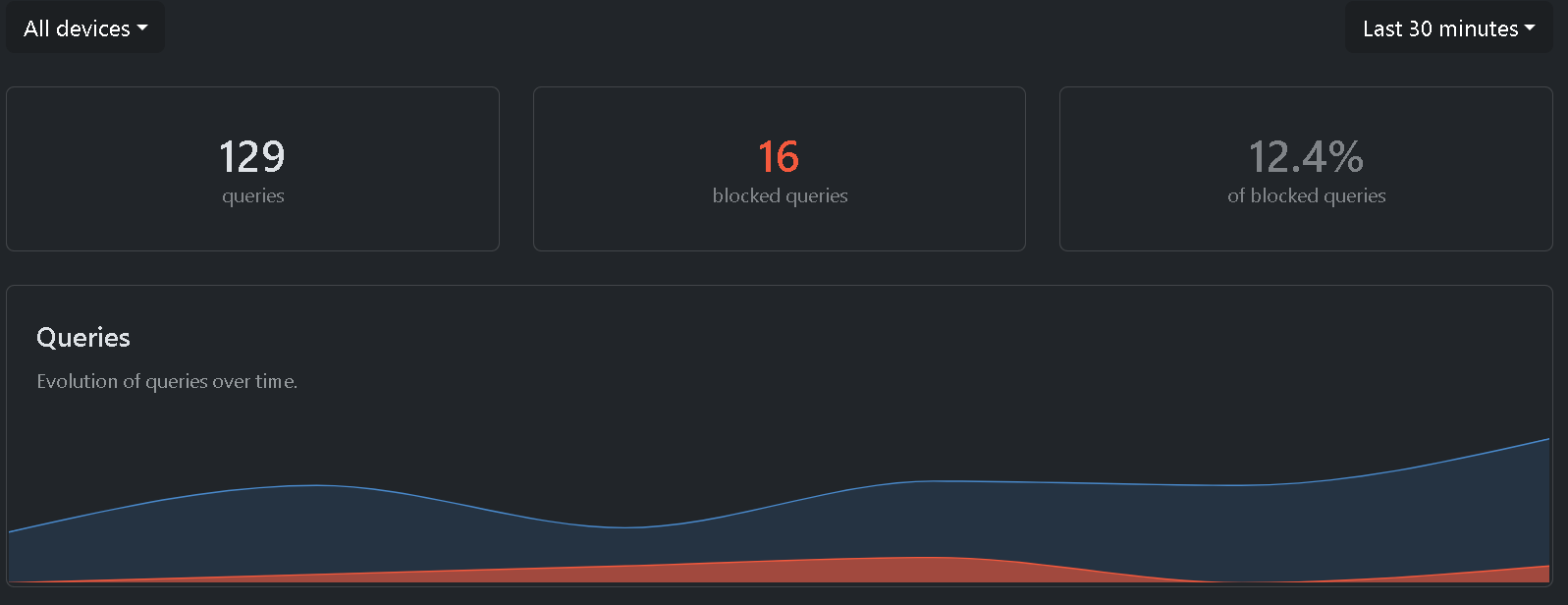
edit. If I have to mention something, setting up the device was challenging since I don’t currently have any Apple devices or an account. Fortunately, I found a computer in the closet that I could use to create an account. I do understand that my own devices in use prevent all forms of identification (or I hope so). After that, everything went smoothly!