Thanks, that makes sense. I’ll set the original install (in my social profile) to always run in the background, so that even if I’m on another profile in Graphene, I’ll still be notified that I have a message on Molly (assuming I’ve understood you correctly). Thanks so much
yes in Manage users turn on send notification to current user, that will basically send you a notification of which app it got on the owner profile and you can switch back to check
Apologies for one further message. I have Molly on as always running in the background, however, it won’t allow push notifications to the owner profile on GrapheneOS. I have inotifications via Web socket, but in order to have push notifications via Unified Push, I need access to a Molly Socket server to link my Signal account. ‘Start by scanning the QR code provided by your server’ - Could someone explain to me in plain english (!!) what I need to do as I saw a couple of things online which look like coding of some sort, which is way above my pay grade! Is this an easy fix or not at all? Thanks again everyone and apologies
When something is used or tried to use in a way not as intended or designed, one will have problems (to say the least). Your use case or the way you want to use it very peculiar and niche, and hence doesn’t appear to have an easy solution if any.
I don’t really have an answer for you because I’m losing track of what exactly you’re trying to do and why. But thought I’d say this anyway.
@anon39279085 knows about Android more so he can most likely help you out better.
Thanks for the message, and with respect, I probably made things much more difficult for myself. Having used Molly yesterday, it seems to me to be a clearly better option than Session for me, and I had confused the privacy/anonymity issue. In hindsight, I should’ve downloaded it to my main profile on Graphene OS rather than the social profile I have. I followed the advice for notifications (ie having Molly always running in the background), but this still only notifies me of a message when I’m in my social profile but the phone is ‘asleep.’ I normally leave the phone asleep but in the main profile, and that’s why I’m not getting notifications coming through )and why the Unified Push thing appears to come into play). Again, thank you to your for your messages, and to @anon39279085 - as you say, hopefully he can help with this one final issue.
My final suggestion is to clear the board. Remove all numbers from your Signal or Molly apps. And restart again now that you know what’s what and how and why.
Trying to fix the problem is not going to work out and won’t be sustainable. There should be no problem in the first place so just start over. It’s simpler and you’ll thank yourself in the future.
I personally use the WebSocket notifications not UnifiedPush, you have a server in mind that has unifiedpush? If not if you have sandboxed Google play install the Non FOSS Version and get notifications through there without Molly needing to run in the background
Otherwise run the WebSocket notifications
At the cost of some battery drain WebSocket notifications basically runs on your device and not involved on a server
I do have sandboxed Google play, but there is no option to download Molly from within, only the normal Signal app. The only way I can get Molly it would seem is through Obtainium.
Can you access GitHub? Molly has a built in updater when installed from here, eliminating the need for obtainium
Alternatively you can get Molly off accrescent or F-droid repo
GitHub and Accrescent are generally recommended but any option is a ok
Accrescent is the best way to get apps in terms of privacy and security, but they don’t have that many apps on there. It’s available from the GOS app store.
I recommend self hosting your own mollysocket and ntfy server if you can for Molly + UnifiedPush. They’ll help prevent metadata leaks (your ip, timing of notifications, etc…) to Google and will be easier on your phone’s battery than WebSockets. If you can’t/don’t want to self-host https://molly.adminforge.de/ is a commonly used public instance for the mollysocket and ntfy have their public server too that’s used by default (ntfy.sh).
There is no best way to obtain Molly
Anything supported is good (I would have excluded F-Droid but since it’s a separate repo it is not an issue).
If you still don’t wanna deal with unifiedpush, I still recommend using WebSocket or sandboxed Google play, Molly’s recent updates actually now has it internally in an open source way:
This release unifies the previous Molly and Molly-FOSS apps into a single fully FOSS app. All proprietary dependencies (including the Play Services SDK) have been removed, while FCM push notifications continue to work via a fully open-source implementation. The dual build variants have been consolidated into one FOSS build.
While supporting UnifiedPush and WebSocket as well
Considering the newbie status especially, sticking to WebSocket or FCM Push is just enough to get started
I don’t have issues on my side with using WebSocket, The battery drain is not as of a big deal as people will make it out to be
It’s the best according to the GOS team afaik, which is why it’s the only 3rd party app store included in their own app store. GOS are anti fdroid and the inconvenience of obtanium/github downloads is that you should verify their signing certificate on the first install which is annoying: GitHub - mollyim/mollyim-android: Enhanced and security-focused fork of Signal.
Downloaded on Accrescent and apart from a few issues with the verification failing, all is now sorted. Thank you all so much.
Again doesn’t matter especially when it is the Molly f-droid repo and not the main repo
GitHub
Accrescent
F-droid Molly repo
All are valid options
Accrescent and F-Droid rely on the respective apps to update
The one on GitHub releases has a built in way to auto update by enabling the option, eliminating the need for obtainium (see below image)
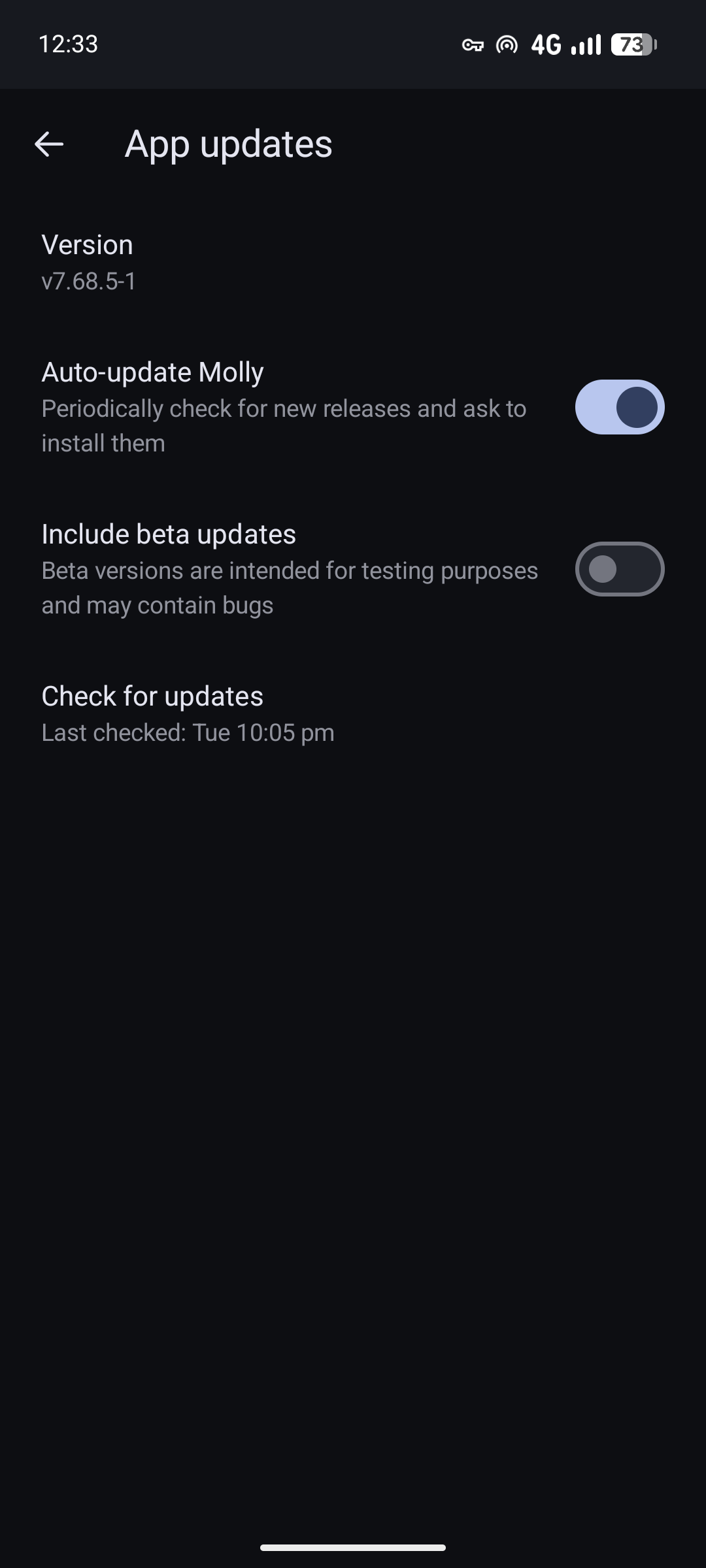
also newbies do not need to go as far as to check signatures, just download and install them from the official sources and you should be fine
Question why not GitHub?
Obtainium isn’t required
Not that accrescent is invalid just curious if the false statement of obtainium got into you or something else.
if you’re using Accrescent exclusively for molly at this point I’d just download it off github to have one less app but that’s just me for this reason
Though I have github access, I’ve not really ‘looked around’ it yet, so didn’t want to add another layer of confusion to the process!
All right no problem
From a usability + privacy standpoint, as in considering those two factors together, Signal is indeed the better app. I use as my default messaging app. It has way more features despite requiring a phone number. Once you are set up, you can create a username, and just share your username with people. But it would make sense that the people closest to you would also know your number.
I am amazed that you were able to do that. I use Sessions too, but for me, it’s an app I only use to talk to complete strangers on the internet. I prefer not to talk to strangers on the internet with Signal for various reasons. First because I don’t want to use the same app I use to talk to my family to talk to strangers from a forum. I want those to be separate.
Secondly, I don’t want to buy another SIM to create a 2nd Signal account on a 2nd phone, just to talk to strangers. That’s partly because I live in a place where SIM registration is required via KYC, and I can’t be bothered to do that again. At least not for now.
I don’t consider journalists and organizations with public profiles to be strangers, but I admit that I think it would be better to have a separate Signal account to talk to them to avoid mixing it with the friends and family stuff.
Session Missing Features
For me, Session is missing basic key features I want. The top ones being;
1) Ability to create groups of chats where I am the sole member.
I send myself a lot of stuff on Signal. At some point, point I realized that it was easier to organize that into separate chats. So I created groups chats where I am the sole member. Sessions doesn’t allow that. You need to invite someone else in a group in order to create it, which sucks.
2) Rich text formatting
3) Larger file size limit
If you are on GrapheneOS, obtaining molly via accrescent is the best option.
It is faster for sure but I personally prefer the download from GitHub, enable auto update and forget method, no accrescent or f-droid needed regardless of Graphene or other