It is generally recommended to use robust built-in browser protections (RFP/FPP), which already cover these metrics. Your IP not matching your time zone is not what most sites would use to detect whether you are using a VPN. They instead see that the IP is not a regular residential IP or is coming from a known VPN network provider.
This would be the only recommended use case.
Once you allow/spoof your location, you are already doing worse than just using the prompt.
They instead see that the IP is not a regular residential IP or is coming from a known VPN network provider.
Yes that is correct. At the end of the day there is no way to get around server side checks like this
Once you allow/spoof your location, you are already doing worse than just using the prompt.
This isn’t necessarily true. Denying the geolocation prompt on a site that requires it means you can’t use the site at all. Spoofing with plausible coordinates is better than giving your real location or being locked out entirely.
Man.. that’s such a conclusive statement that no way applies to all objectively.
I can think of so many reasons and use cases for such a tool when coupled with a VPN.
What if you want to browse a webiste, social media platform, or a specific forum where you don’t the website to learn anything from you or your browsing activity including them inferring your general area - for the purposes of ensuring there is only going to be an inaccurate profile they may still build for you for advertising purposes. No PII whatsoever, or even close to it if using this tool, as I see it.
I don’t think you’re getting the point of why one may still want to use such a tool. I see value in it. It’s okay if you don’t. But let’s stop going round in circles.
It should probably be noted that if you are already using RFP/FPP then also using GeoSpoof would make you worse off. Same would go for installing GeoSpoof in Tor/Mullvad Browser.
Like @parkerchandler1979 I can think of a lot of reasons GeoSpoof would be useful if you aren’t using RFP/FPP though.
I had another comment too but I’ll leave it on GitHub for you.
I still don’t know what this is and how to ensure of it without this tool. But that’s the point. Very few or only the very tech savvy are going to know this. For the average person out there, this is very useful nonetheless.
I said inferring. It means them trying to deduce even if location is not allowed access to - through time zone or city you may have selected to set your time zone.
Follow this guide. Then you can go to about:config in Firefox, search for privacy.fingerprintingProtection.overrides and add +JSDateTimeUTC into the box.
If you encounter issues because of it now having a different timezone, you can selectively turn off the protection per-site by clicking the shield icon in the search bar.
This is a good discussion, I’m in agreement that if you use FPP then the only use case for GeoSpoof is to align your browser geolocation/timezone data to that of your public ip to get around site restrictions, or for development/QA purposes. Using it for fingerprinting with FPP would simply just be a worse version of FPP.
The only minor thing I would say is FPP sets your timezone to UTC. This is a possible inconsistency that may allow websites to detect you are using VPN. But then again there are probably many heuristics sites use that I’m not covering in GeoSpoof either. But that is part of my longer term goal.
| API                                               | Behavior                                                                                                         |
| ------------------------------------------------- | ---------------------------------------------------------------------------------------------------------------- |
| `Date.prototype.getTimezoneOffset()`              | Returns the correct offset for the spoofed timezone, including DST transitions                                   |
| `Intl.DateTimeFormat()` constructor               | Injects the spoofed IANA timezone into all format options                                                        |
| `Intl.DateTimeFormat.prototype.resolvedOptions()` | Returns the spoofed timezone identifier                                                                          |
| `Date.prototype.toString()`                       | Outputs `{weekday} {month} {day} {year} {HH:mm:ss} GMT{±HHMM} ({timezone long name})` using the spoofed timezone |
| `Date.prototype.toDateString()`                   | Outputs `{weekday} {month} {day} {year}` formatted in the spoofed timezone                                       |
| `Date.prototype.toTimeString()`                   | Outputs `{HH:mm:ss} GMT{±HHMM} ({timezone long name})` using the spoofed timezone                                |
| `Date.prototype.toLocaleString()`                 | Delegates to `Intl.DateTimeFormat` with the spoofed timezone injected                                            |
| `Date.prototype.toLocaleDateString()`             | Delegates to `Intl.DateTimeFormat` with the spoofed timezone injected                                            |
| `Date.prototype.toLocaleTimeString()`             | Delegates to `Intl.DateTimeFormat` with the spoofed timezone injected                                            |
Will there be a variant for Firefox derivatives like Librawolf and Mullvad
Yes, so the extension is compatible for all Gecko and Chromium browsers. I have explicitly tested it on LibreWolf, Firefox, Waterfox, Brave, Google Chrome, and Firefox for Android without issues.
I do want to support Safari on iOS and macOS in the future, but today it is not supported.
There are some deeper issues with Mullvad browser. Mullvad Browser uses Firefox’s resist fingerprinting (RFP) which forces UTC timezone at the engine level. No extension can override engine-level protections, and the two would conflict creating a detectable fingerprint.
Do you know for sure that this will enhance our privacy in practice, or is this just theoretical in nature?
It depends on your threat model and tolerance. Use Mullvad or Tor if you cannot allow any adversarial fingerprints from any api on your browser. The tradeoff is that you will always be stuck in UTC+0 timezone.
If you want to spoof any timezone you want, you can use my extension. The tradeoff is that advanced actors or scripts can detect your true timezone offset and that you are lying (they most likely cannot detect your true geolocation if used with VPN). Though for common use cases like avoiding georestrictions, ad-trackers, etc this is fine.
Some open questions I need to think more about:
It may be possible to set your system clock (maybe use a VM for this) to a different timezone and use this extension to more credibly spoof your location
You may be able to spoof a different geolocation within your timezone without any adversarial footprints.
I am considering an allow-list feature so that users can reduce blast radius if they really want to get around georestrictions for only a handful of sites but otherwise appear like a regular Mullvad user to all other sites.
1) Does it automatically set your time zone to your VPN’s location or do you have to manually do it yourself by checking your chosen location’s time zone?
It is my understanding that by default Firefox automatically offsets your time zone. However, what is unclear to me, is if the default time zone is the same for every FF user, or if FF adjusts it for each user according to their location.
From my experience, having FF change my time zone has never rung any alarm bells with websites. However, I wonder if that is because it never sets it off too far away from my actual time zone. I say this because I strongly suspect that if you live in Australia, and set your time zone to the UK, which can be 10 to 11 hours, it will almost certainly ring alarm bells with websites.
Even if you adjust your time zone to match your VPN location, I worry that some websites may lock you out if they see that one minute you’re in the UK, and the next you’re in Australia. I guess if you are already logged in, it might not be an issue, but if you’re logging in multiple times a day into the same account from different locations that are very far from each other with a matching time zone, that’s likely a different story.
I thought Android support meant you have an app for Android, but I see that it just means your add-on works with Firefox’s Android apps?
I really need a geo-spoofed for my phone. I’ve noticed that every geo-spoofed apps requires you change certain core settings on your Android phone, and so far it hasn’t really worked for me.
An app I use frequently requires I share my location to perform certain tasks, and I don’t want to, so I do those tasks on desktop which is very frustrating.
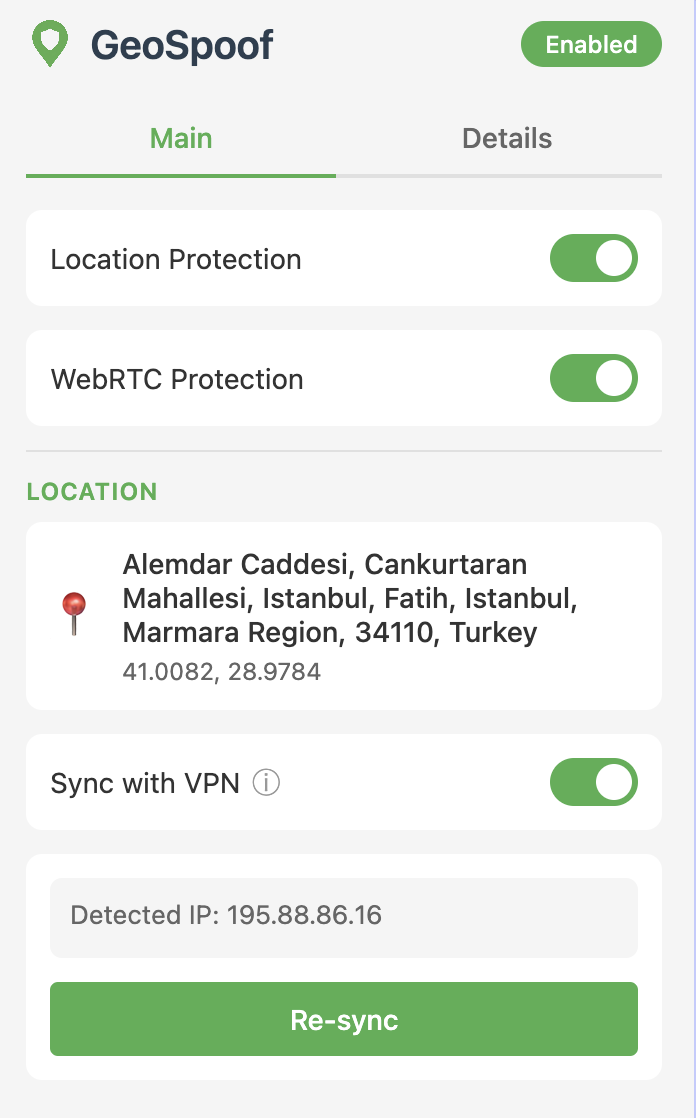
1) Does it automatically set your time zone to your VPN’s location or do you have to manually do it yourself by checking your chosen location’s time zone?
Yes there is a convenience toggle to sync with VPN:
However, I wonder if that is because it never sets it off too far away from my actual time zone. I say this because I strongly suspect that if you live in Australia, and set your time zone to the UK, which can be 10 to 11 hours, it will almost certainly ring alarm bells with websites.
It depends on the service. Yes if you access a site under one timezone then re-access it with spoofing faster than one could physically travel to that country, then you could be detected. This is a classic speed-of-light problem. It is up to the user to consistently apply spoofing for the website of choice. I am planning an allow-list feature to help users always present a geolocation per site.
2) Do you plan to develop an Android app?
Not on my roadmap but that is an interesting idea. Right now I have only been targetting the browser. But I could do some exploratory research to see what is possible on the device level.
Mullvad has an extension for Firefox where you can set a different proxy for different domains. There’s also more generic extensions for this functionality, like FoxyProxy. Can the VPN sync take that into account and spoof the geolocation depending on the website you’re on? I wouldn’t think so, right?
Also, is “Access your data for all websites” needed as a permission?