Not to be off topic but I sincerely hope folks at Ladybird have and are taking notice for all the things users want from their modern fast privacy respecting browsers and that they deliver more than just an MVP when beta opens. Those are all great ideas for small and niche features people may want in their browser.
3 Likes
It’s been almost a week and I still don’t have the new UI & UX on FF 144.
I don’t get it. What’s even weirder is that I just downloaded Waterfox to test something that is completely unrelated, and I see that it has the new UI for FF profiles.
I am getting the sneaky suspicion that, just like with tab groups, I am not going to get it until months after the official release. 
1 Like
This is why I dislike these types of progressive rollouts. You need both telemetry and Studies enabled to get these features, and people with these disabled only get them when it’s enabled by default for everyone or by changing about:config values.
I have fingerprinting off in my FF settings, but I have also been using profiles for years, so I don’t know what’s the hold up.
Those of you who used FF profiles prior to this new update, did you get the new UI or are you still waiting like me?
It’s been over a month. We’re on FF 145, and I still don’t have the new UI & UX for profiles. 
Don’t know what to do at this point. I might write to them.
This is something I did not know. Thanks, learn something new every day!
1 Like
You have fingerprinting off, but do have telemetry and studies turned on? It seems that is the only way you’ll see the changes right away.
The only setting that I remember manually changing is fingerprinting. I see that there are multiple studies and telemetry settings. Some are set to true, others set to false. These are default settings.
What I don’t understand is, the release of the new profiles UI is now official. It’s been official for over a month. It was announced with FF 144. We’re now on FF 145. I should have the new profiles settings by default, yet I don’t have them.
Did you try deleting the app in full and reinstalling it? There must be something causing the issue. This is not ideal but an option nonetheless. I recommend Pearcleaner to do this.
No. I am definitely not going to try that. FF is my default browser and I have 2 profiles with tons of settings in each that date back years. I’m not gonna start again from scratch just for this.
1 Like
Okay.
Well, some particular change or setting in your FF set up may be causing this. That’s what I can think of.
Why don’t you make a new user on your computer and try it there with a fresh FF install to test it. That’s the only other option I have.
You could also make a brand new profile so you get one that’s akin to a fresh new install of the browser to see if you have what you want.
1 Like
edit 2: Hold off on the below until Purple Dime’s issue is figured out
We all have it, we just don’t all have it enabled by default yet. If you are eager to use it now, The new UI can be enabled manually in about:config. [edit: BUT backup your profile folder first, and be cautious, consider creating a fresh profile before testing]
The about:config option that controls the new UI is: browser.profiles.enabled to true
https://inv.nadeko.net/watch?v=8_NsR4ZhOOA
That’s pretty logical though. That’s kind of what opting out of studies is meant to do. By opting out, you are specifically opting out of being on the leading edge of emerging features like this one. You are communicating to Firefox you don’t want to participate in testing/feedback or be on the leading edge of gradual rollouts of emerging features[1]
When rolling out something to 100’s of millions of users, a gradual rollout, with a decent bit of time to gradually gather user feedback and technical feedback from an increasingly larger and increasingly less technical set of users makes sense, and helps squash bugs and address user feedback or problems before the feature is introduced to the entire userbase.
“Studies try out different features and ideas before they are released to all Firefox users. Using your feedback, we can make more informed decisions based on what you actually need.” ↩︎
6 Likes
I just tried this solution and I just got a huge scare. After I enabled the new browser profiles, I closed and re-opened FF, only to find that my 2nd profile was gone. I had the new UI, but when I went to profiles, it didn’t show any of my 2 profiles. I was logged into my 1st profiles, but it didn’t show up as an option in the new UI, and either did my second.
This terrified me, because it looked like my 2nd profile was deleted.
So I disabled the new profile UI and restarted FF again. To my surprise, despite disabling it, I still had the new UI. Now, when I open FF, it asks me if I want to create a new profile or open with my original profile. It doesn’t show me any of my 2 profiles as an option. Even when I go to the profiles settings.
The only time I see my profiles is when go to about:profiles
When I open my 2nd profile through the old UI, I notice that I don’t have the new UI in that browser. So I have the new UI in my 1st profile and I don’t have it in my 2nd. And in my 1st profile, I don’t see any of my profiles in the new profile UI.
It’s a mess and I don’t know what to do at this point.
I have manually backed up my bookmarks for both profiles just in case, and both my profiles have an account for which everything should be synced .
This is really weird.
For starters, not stress about a feature in software. Relax and take a breath. This is a first world problem of first world problems.
1 Like
Yeah, you’re right.
I like being on the bleeding edge, but also disable telemetry for some installations. What they do makes sense, I was just venting about a “me” problem  .
.
1 Like
From what another user said, if you don’t have telemetry and studies both enabled in the settings, you’ll probably have to wait until the new profile UI is enabled by default. I understand it may be official and all, but it may not be enabled by default. If I were you, I would make sure telemetry and studies are enabled before updating the browser again and see if you get it then.
Let me try to replicate your experience and see if I can find a solution. Let me make sure I have the details right.
-
You have 2 profiles (let’s call them old-1 and old-2)
-
You enabled the new profile UI via about:config in the old-1 profile
-
You then created a new profile (let’s call it new-1) from the new UI in your old-1
-
When you look at the new profile UI you see only the new-1 and old-1 (maybe renamed to ‘original profile’) but not old-2
-
When you look at the old profile UI [1] you see only the old profiles but not the new-1
-
When you switch to old-2 the new UI isn’t visible (this is expected I think, since you never enabled the new UI in this profile)
-
Then you disabled the new UI (without first deleting the new profile you created) in old-1 but it didn’t go away.
Does this all sound accurate? If so I’ll try to replicate following those steps.
by right clicking on the Firefox desktop Icon and selecting ‘open the profile manager’ or in about:profiles ↩︎
You’re very close, but I need to clarify a couple of things.
Correct.
I did not create a new profile. When I relaunched FF, I was presented with the new profile UI had I had 2 options.
- Original profile
- Create New profile.
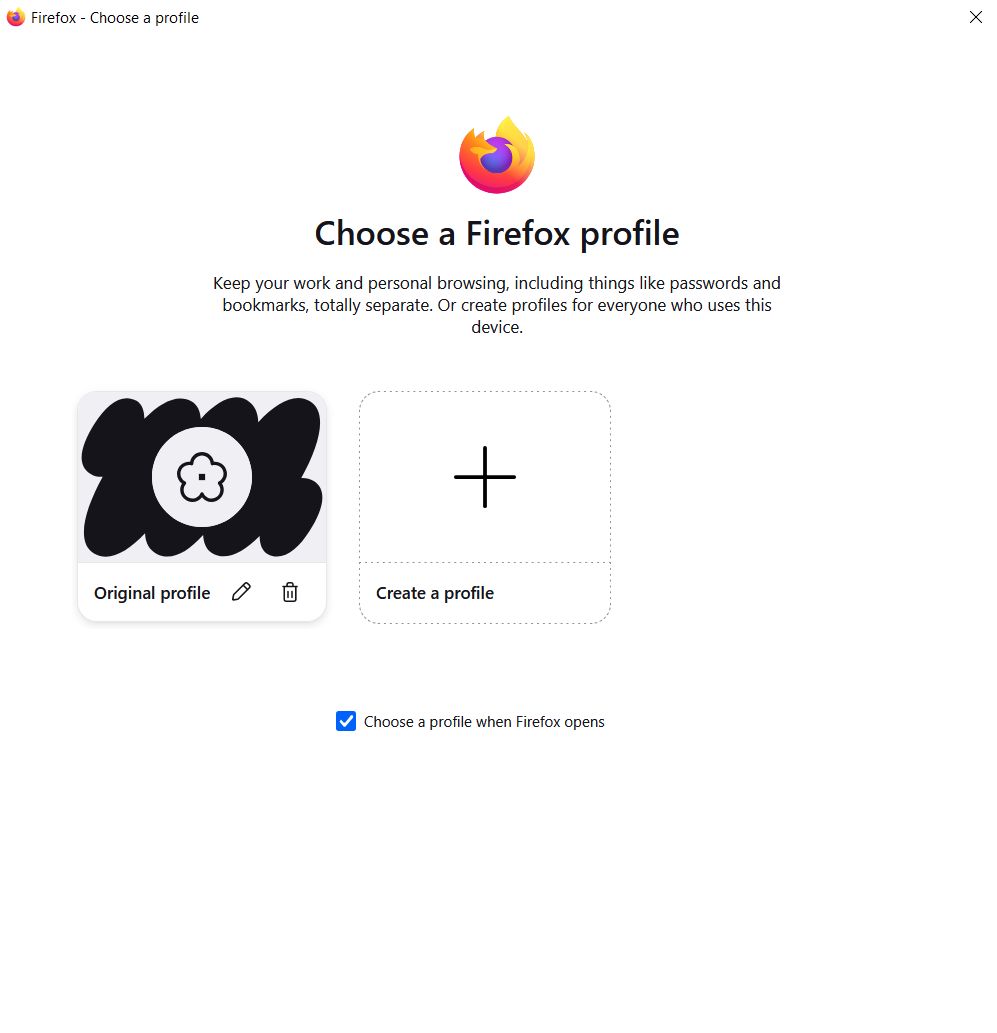
I clicked on “original profile” which opened my default profile which you called Old-1.
What I don’t understand is why Firefox didn’t present me with my 2 profiles when I relaunched. What FF presents as “original profile” appears to be my default profile, Old-1, but it doesn’t have its names, which tell me that something is wrong.
Anyone who use FF has a default profile. I suspect that someone who uses FF without a FF account will be presented with the same 2 options between “original profile” and “create new profile”. And if they choose the first option, FF will show them all the customized settings they already had before.
I see all the settings of my default profile (Old-1): bookmarks, extensions, containers… However, if I click:
profile picture (old-1) > profiles (new UI) > Manage Profiles > Nothing happens
I believe this is because I disabled the new UI. If I enable and perform the same task:
profile picture (old-1) > profiles (new UI) > Manage Profiles
I am presented with the same screen I get when I launch FF:
Note that the new UI is currently disabled, but as previously said, it doesn’t seem to have disappeared.
When I type about:profiles on FF (old profile UI), I see my 2 FF profiles Old-1 and Old-2.
I don’t see New-1, but I don’t think New-1 is a thing.
New-1 (original profile) is the original profile you had before the new UI. In my case, it’s Old-1. FF should have conflated Old-1 and New-1. They should have the same name. But they don’t.
I wonder if it’s because by default, profiles are not linked to a FF account.
My profiles Old-1 and Old-2 are linked to FF accounts, and they have distinct profile pictures.
That is correct. To me, this is weird, because it’s literally the same browser. It’s a second profile in the same browser. I had to wait a long time to see the new group tabs feature in FF. I waited months after it was officially released, despite always being on the latest version of FF.
And similarly, I first got the feature on one profile, and had to wait longer to see it appear in the other profile. The only difference is that the feature appeared in my 2nd profile first.
I disabled the new UI and indeed it didn’t go away. I didn’t create a new profile though. There was nothing to delete. As I said earlier, what you call New-1, is what FF calls “original profile” in its new UI. It appears to be Old-1 in every single way, except it doesn’t have the same name, which is weird.
PS: I haven’t read your DM yet, but will do that now.
It’s been 2 months, we’re on FF 146 and I still don’t have the new profiles UI. 
As a reminder, it launched with FF 144.
I am curious, those of you who are on FF 146 (the latest version) do you have the new profiles UI?
@xe3 I responded to your DM.