Brave Launches Paid, Bloat-Free "Brave Origin"

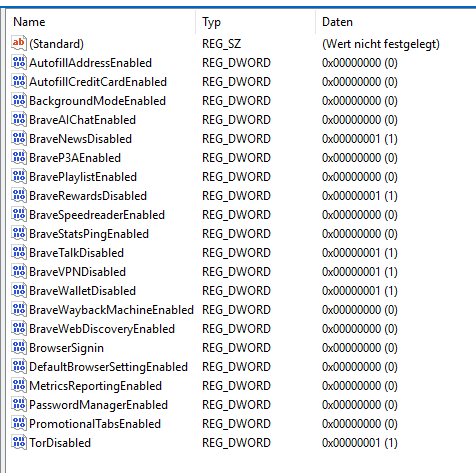
$p=“HKLM:\SOFTWARE\Policies\BraveSoftware\Brave”; New-Item -Path $p -Force | Out-Null; $d=@{BraveRewardsDisabled=1;BraveWalletDisabled=1;TorDisabled=1;BraveVPNDisabled=1;BraveNewsDisabled=1;BraveTalkDisabled=1;BraveP3AEnabled=0;BraveStatsPingEnabled=0;BraveWebDiscoveryEnabled=0;BraveAIChatEnabled=0;BravePlaylistEnabled=0;BraveSpeedreaderEnabled=0;BraveWaybackMachineEnabled=0;PasswordManagerEnabled=0;AutofillCreditCardEnabled=0;AutofillAddressEnabled=0;BackgroundModeEnabled=0;BrowserSignin=0;MetricsReportingEnabled=0;DefaultBrowserSettingEnabled=0;PromotionalTabsEnabled=0}; foreach($k in $d.Keys){New-ItemProperty -Path $p -Name $k -Value $d[$k] -PropertyType DWord -Force | Out-Null}; gpupdate /force | Out-Null; Stop-Process -Name brave -Force -ErrorAction SilentlyContinue; Write-Host “Brave policies applied. Check brave://policy after restart.”

Run this as admin in PS. Does the cleanup and you don’t need to pay 60 USD for it.

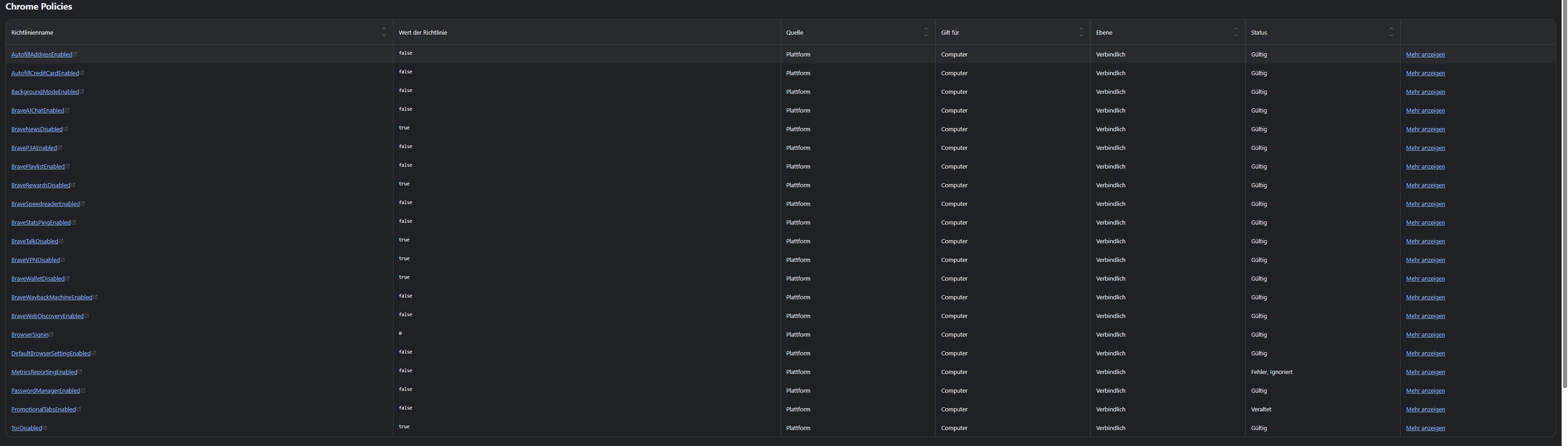
Result is below

1 Like

Please share screenshots of the browser, whether or not they’re hidden, and if possible, provide performance metrics from before and after the patch…

If I see that it works as I expect, then Brave is easy to manipulate via commands without self-protection.

PS commands are just adding group policy settings, nothing fancy.

Where did you see this text? I think Brave has been pretty clear there is not a limit on personal activations. They rate limit activations so one person can’t just share their key with the whole world.

It would be nice if they planned to provide APK distribution somehow, via F- Droid or maybe a self- updating mechanism.

Or maybe they are, and I’ve just missed it? I don’t think so.

Here is a community poll I made to show collective opinion. Please feel free to vote.

The exact quote is from here

1 Like

Based on the translation into my language of the second and third images, it seems to work; however, we’ll have to see if it continues to function smoothly in the long term, how it performs, and other factors.

If it works with those commands, then it’s easy to manipulate Brave without its self-defense mechanisms. It’s clear—more than clear—and who knows what else might be hidden beneath the surface with further exploration.

Thanks for sharing.

I think it was mentioned in an article. I do remember seeing a limit of ten.

If you are against typing PS commands, you can add registry entries manually.
Computer\HKEY_LOCAL_MACHINE\SOFTWARE\Policies\BraveSoftware\Brave

Could be wrong, but I think they publish them on their GitHub repo. If you use something like Obtaniun, it would be pretty easy to set up auto updates without having to use the Play Store.

If not, I think FF Updater has all Brave variants.

Yeah, you can use Obtainium to fetch Brave browser updates. Though I do believe for it to work smoothly more configuration is necessary than just pointing Obtainium to the GitHub release page. see: https://apps.obtainium.imranr.dev/ for a more detailed configuration.

It is important to note that I do not believe that Brave has yet released a standalone .apk for Brave Origin, though you can still “upgrade” regular Brave nightly/beta[1] to Brave Origin on Android.


  1. and presumably stable once Origin reaches a stable status ↩︎

Maybe we aren’t in the target market for Origin. I’d imagine this would fit in small offices where the tech users don’t want to use main browsers (Firefox, Safari, Chrome) and the IT crew doesn’t want normal Brave with it’s extra features that aren’t that professional.

Although I do get a lot of ooo’s and ahhh’s when I’m sharing my desktop and do a new tab - with the random image and the stats of saved traffic and time.

As the title says, Brave Origin on Linux has daily usage ping ON by default, and it turns out that there’s only one chance to disable it in-browser.

Here’s my setting. I fresh installed the latest version of Brave Origin on my Linux Mint(I didn’t upgrade it from Brave), and activated without using the activation code(since it’s free on Linux.) The support page clearly states that Brave Origin has daily usage ping, crash logs, P3A, etc disabled by default.

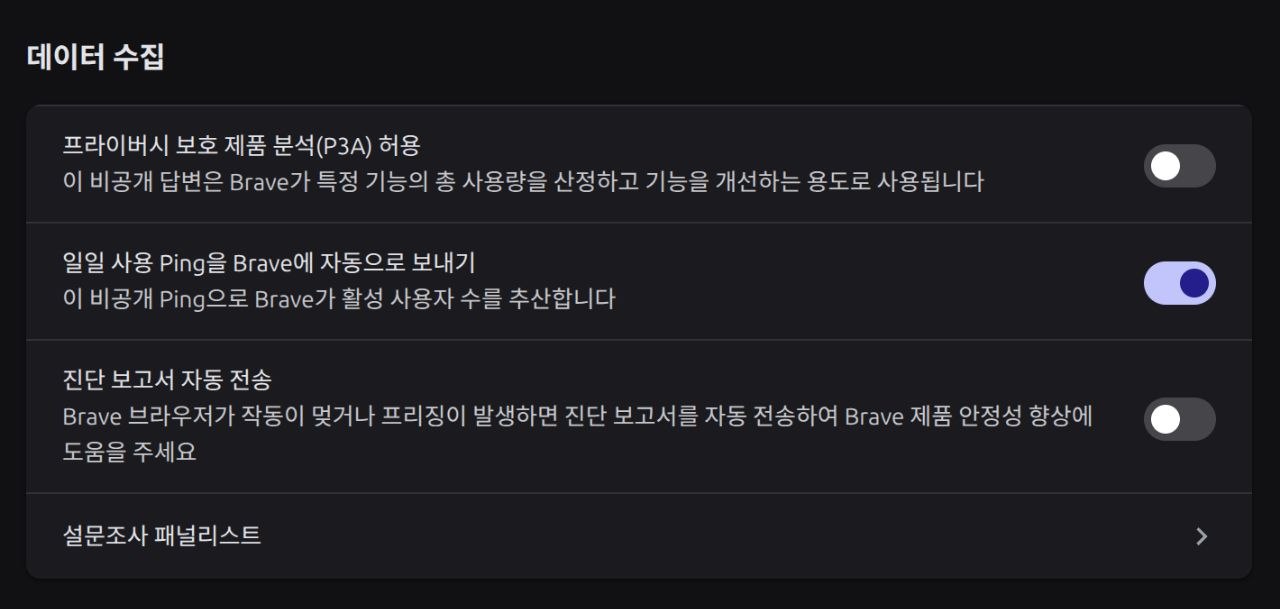
However, this is what shows up when I open browser settings for the very first time after finishing install.

For those who are unable to read Korean, this is the “data collection” section.
The one on the top is whether to enable P3A (which is disabled), the one in the middle is whether to send daily usage Ping to Brave (which is enabled), and the bottom one is sending diagnostics(which is disabled).

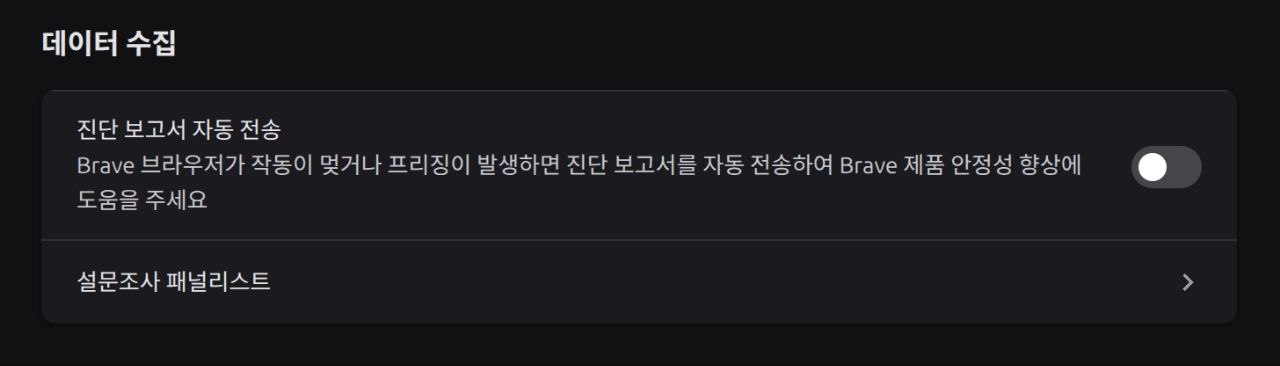
Despite the support page, the ping option is enabled by default. And things get worse when I close the browser and restart it. This is what it looks like when opening the same settings page after restarting the browser.

As you can see, two options(P3A, daily ping) are removed (or hidden) from the menu entirely. And it does not appear again afterwards.

Since I can’t even see them from the settings menu, the two options should obviously be turned off, right?

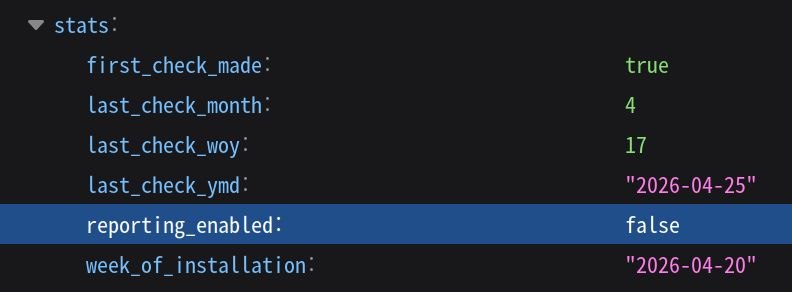
Well, No. If I don’t manually turn off the send ping option, it remains enabled indefinitely. This can be confirmed by checking the local state file in /home/user/.config/BraveSoftware/Brave-Origin-Nightly/. When truly disabled, the reporting_enabled should be set to false as in the image below, which is not what it looks like when the menu is simply hidden.

To summarize,

  1. Brave Origin on Linux has send ping option enabled by default.
  2. It can only be disabled in-browser during the very first session, when installation has just completed. After that, the menu just disappears so you probably won’t even know that it’s turned on.
  3. To disable it, you manually have to edit the local state file, by adding the reporting_enabled entry and setting its value to false.

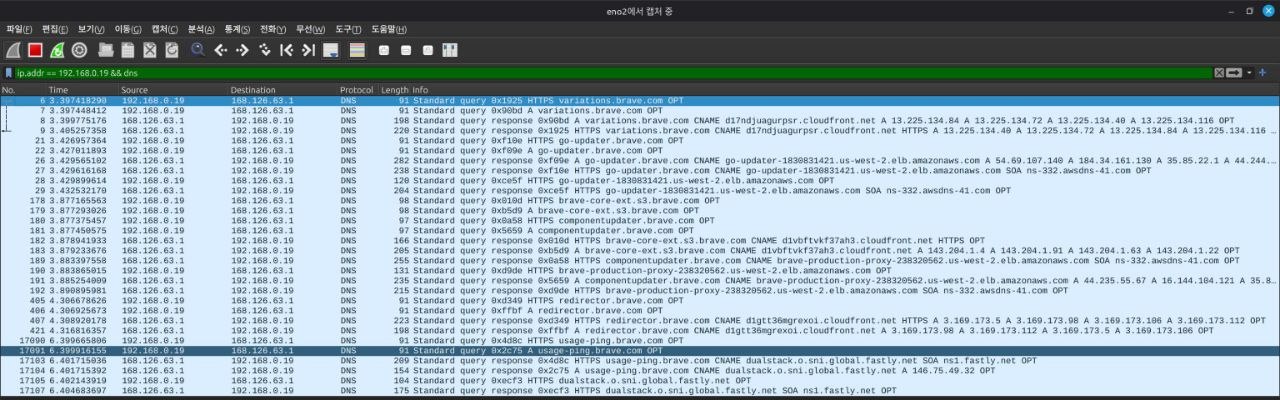
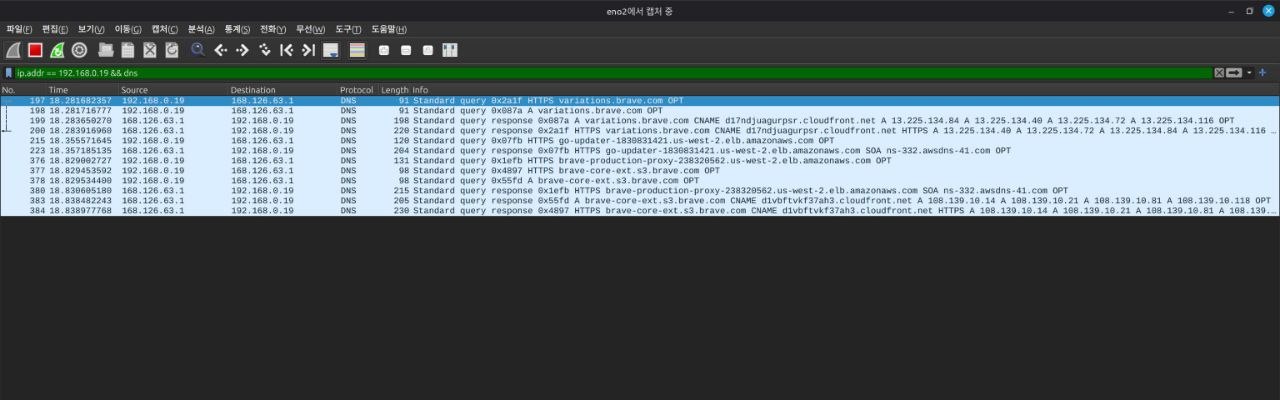
I also confirmed with WireShark that the Ping option does function properly, and actually sends user data.

This could very well be a bug, but personally, I think there’s a lot of malice behind it.
5 Likes

Perhaps nust a default of it being the Nightly browser. I mean that is for testing after all?

I can also confirm that the “automatically send daily usage ping” setting GUI has disappeared from my install of Brave Origin Nightly on Linux.

Though I did explicitly disable this setting on first run.

I would also like to say that for Brave Origin full release I do hope the daily usage ping is disabled by default.

1 Like

What about KYC angle of this purchase? Is there a crypto payment option available? I’m asking since I don’t see any relevant information on their support page.

1 Like

And you still can’t disable variations, even in Origin, it’s so stupid.

Sadly not. I remember people asking them for crypto payment options when it comes to Brave Search Premium, but as far as I am aware, it was never implemented

1 Like

I would also like to say that for Brave Origin full release I do hope the daily usage ping is disabled by default.

It is. I don’t know if it was from the Nightly Twitter account, or one of the devs, but an official source did confirm that telemetry is disabled by default.