Well, when email management becomes better, then having the app makes it easier for everything and I imagine would be better than the website. But if the website and the native app can have the same functionality and feature sets, then the website should be enough. I guess it then depends on which version of Aliasvault is best to work work and view your info in to manage your data.
Hi @nblke72 thanks for your suggestion. Yes organizing credentials with tags/folders, and more sorting options will be added in one of the next releases that focuses on the datamodel and usability improvements. It’s on the roadmap, so I expect this to be added in a month or so.
@lanedirt thank you so much! Also, it would be great to have the option for emails to be displayed as plain text by default instead of HTML (security purpose).
So here is my feedback as I continue to test the new improvements and updates from months ago. I’ll have more feedback later but thought I’d let you know these right away as they feel easier to resolve.
Request: I need multiple service URL options for multiple links. Please add this.
Request: I need custom options that I can make with additional info within each account to add more details you may have related to the account. I don’t want to simply use the Notes section for this as I want the option for the text to be hidden.
Request: It would be nice to have the options for generating password to also include Latin characters and letters to make a password with overkill strength (similar to how Strongbox provides this option). This is not necessary but would be cool to see.
Issue: When trying to add software passkeys on iOS from a website directly, AliasVault app is not recognizing the credentials/account of the same website and is creating a new credential for passkey. This leads to duplicate listings of the same account. Please see to this.
Issue: I use a strong and long password as my master password. And on Android (Graphene OS) there isn’t an option to use a PIN code to quickly log in after your first initial sign in after the download. It would be nice to simply enter a 4 to 6 or custom PIN quickly to log in to copy what you want when trying to sign in to websites and apps. It’s annoying to enter the super long strong password every-time you enter the app. This is for me the biggest point of friction and is discouraging use of AliasVault on my GrapheneOS. Please see to this. This should be a request but is very annoying and hence is an issue to me.
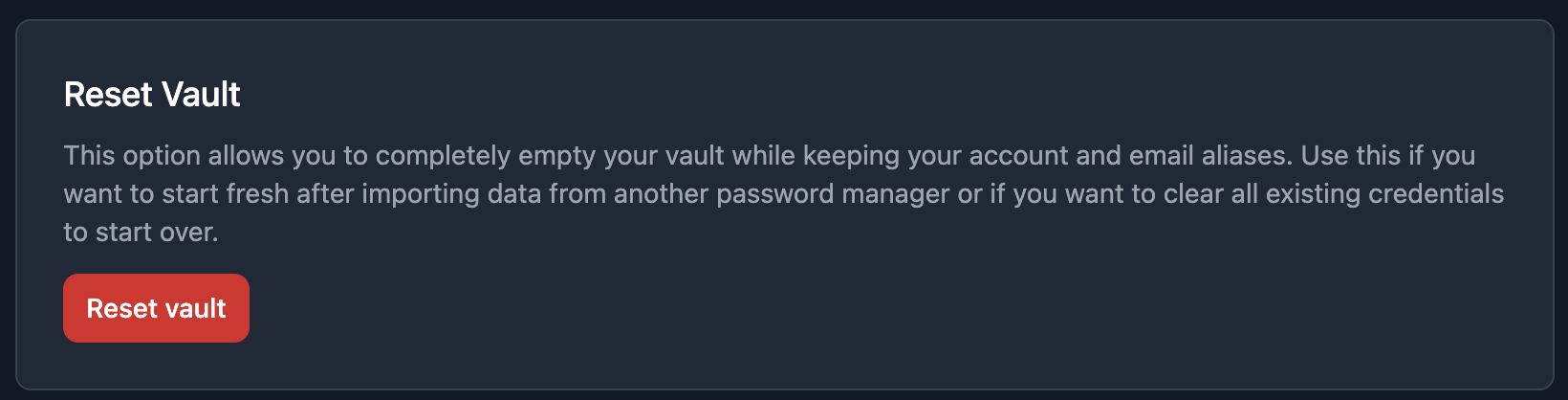
Request: A niche request to have a “clean slate” option where if you enable it, your AliasVault account will be wiped clean with all credentials deleted permanently such that you have a brand new account. I would also like to have this wipe out log in history and whatnot with this option. I do have a use case for this but I’d rather not share. I don’t want to delete the entire account every time I want a clean slate.
Issue/Request: When signed in to the web app, it should sign you out after a period of inactivity. It currently does not. Please add this option in for enhanced security in case you leave your laptop/computer open.
For now, these are it. I await your improved email management as that’s the only major part that I feel is lacking AliasVault from becoming a lot more viable of an option for your credential management needs and as an app that that works with all the functionality and features you’d normally expect from such a service.
I will continue to test and will get back with more feedback. Thanks for all your improvements thus far - the app and extension is a lot more stable now from my last testing. And as always, let me know if any feedback is unclear.
Hi @anon57862721, awesome, thanks for trying out and testing the updated version of AliasVault again! I appreciate your time and getting back to me with your detailed feedback.
–
1 & 2: Both options are being worked on and will be included in the 0.26.0 release most likely as part of the (larger behind-the-scenes) datamodel change update.
3: Interesting, I’ll check how Strongbox does this and add this as a feature request to the GitHub backlog.
4: That’s a really good idea! Having the ability to manually merge passkey credentials with normal credentials has actually been requested a few days ago on Discord. But having the passkey flow detect any existing credentials and suggesting to save it there from the get-go would be even better. I’ll look into this!
5: I’m happy to say that PIN unlock support has been worked on for both browser extension and mobile app this past two weeks, and work on the feature was finalized yesterday. So this will be available very shortly and included in the next 0.25.0 release .
6: In the web app when you go to Menu > Import/Export and scroll down there already is an existing option for resetting your vault, without having to (re)create your account. Does this cover your usecase?
7: Good idea, I’ll add the auto-lock timeout feature to the web app too. It’s already available on the other platforms, makes sense to have it everywhere.
–
Email UI improvements are indeed still on the todo list, and will be looked at together with other requested email features like email forwarding, optional integration with existing mailservers etc. I’ll post an update here when there is more news to share on this front.
This seems like a great idea. I gave it a trial via the android App. Unfortunately, it didn’t work out as expected. Here’s why:
I created a Facebook account and a Twitter (sorry X) account. However neither of these accounts sent me the expected verification emails. Is it possible that Facebook and X are blocking aliasvaults emails to prevent anonymous signups?
That is absolutely possible. But social media platforms are also notorious for shadow blocking access to their service with a VPN or other proxies so that could be another reason if you’re using a VPN.
Never expected to see you on this forum. Nice to meet you. I have been using AliasVault since the last couple months and have been loving it a lot. This is my very first Alias service I have ever used and is working great!
Hi thanks for trying out AliasVault. I just tested it, for me creating a Facebook account works fine (from a mobile 5G connection). I just received the email confirm email in AliasVault. So perhaps it has something to do with other things like @anon57862721 suggested.
Of course there is always the chance that services may start blocking AliasVault domains in the future, but in case that happens structurally I’ll make more domains available to choose from.
Few things missing in the android app that [I think] have not been mentioned.
Generate passphrases.
No option to add 2FA TOTP. Available on web.
A toggle to bring the search bar to bottom. (Nice to have feature)
[Settings > Appearance > …]
A toogle to “Block Screen Recording”, which also hides app-contents on recents page.
[Settings > Security > …]
Option to block Auto-fill on some websites/applications
[Settings > Autofill > …]
Option to automatically open search + keyboard when app is opened. (Nice to have feature)
Credentials directly get deleted. I think there needs to be a move-to-trash option.
When clicking on plus button it directly goes to Random, an option to select the default behavior to open Manual would be nice.
Some suggestions -
i.) “Vault Unlock Method”, “Autolock Timeout”, “Clear Clipboard” and “above mentioned point 4.” could be moved under “Security” section.
ii.) A new section named “Appearance” could be introduced at the very top which will include “Theme”, “above mentioned point 3.” along with “Language”.
Because the website also recognizes that you are using a VPN and they don’t like that you are using a VPN because they want your info from the get go of who and where you are.
@lanedirt not sure when the replying-from-alias function will be possible, but would you then also be able to reply to emails which you already received now? Or will this only be possible for emails that you received after this feature was added?
Thank you for using AliasVault and for your feedback and suggestions! That’s greatly appreciated!
For #2: I’m happy to say that 2FA TOTP management will be included in the next 0.25.0 release which I expect to publish later today or tomorrow.
I have took note of your other suggestions. I agree that adding appearance and usability customization would indeed be a powerful feature in the app. Some current defaults might not be the most convenient for everyone. I’ll look into these while preparing work for the (large) datamodel and UI improvements, where these kind of changes could also be included in.
not sure when the replying-from-alias function will be possible, but would you then also be able to reply to emails which you already received now? Or will this only be possible for emails that you received after this feature was added?
Yes when the reply feature will be added, the goal is that it will work for all aliases that the user has, both existing and new ones.
Request/Issue: I want to be able to add my credit cards/other banking account details and whatnot. Please develop different account types to add the type of details you want. This will immediately become a tool for more than your account and alias management so I hope you have plans to get this included too. This also includes other types of info like how Proton Pass and 1Password has options for. But please get the banking account type added first (and quick if possible).
Request: Perhaps an option to make a completely custom account details page where you add everything - type of info, hidden or text, etc. Like a blank template where you make your own. This gives even more freedom to add any info you want.
Request: Different account type icons - different ones for logins, and other types of accounts you add to better visually separate the them. This is not necessary but is nice to have.
Issue: When logging into a new website, the extension is not auto recognizing that the credentials for the website don’t exist in the vault and is not prompting to add them. Please see to this.
These are what I have observed and thought about this week. Will keep testing and get back with more. Thanks again!
Hi @anon57862721, thanks for the additional feedback. I’ll look into the points mentioned!
For #1 as clarification: could you elaborate on your usecase for the banking account details. How should this work? In my home country The Netherlands most online payments happen through an online account with the bank, which in the end is just a username and password. Credit cards is clear to me in terms of autofill purposes, but how would banking account details need to work? Do you mean just the ability to store the data in a separate category, or also do you expect the autofill to recognize this?

 .
.