AliasVault: Open-Source E2EE Password & (Email) Alias Manager

Hi everyone,

I’m happy to announce the new AliasVault 0.25.0 release which is out now! This release now allows you to login to the web app and browser extension using the AliasVault mobile app, which alleviates the requirement of entering your full master password every time you login on or want to unlock another device.

Furthermore this release adds PIN unlock support to the browser extension and the mobile app, adds 2FA management directly in browser extension and mobile apps, and identity generator enhancements including age preference and German language support.

Website: https://www.aliasvault.net/
GitHub: GitHub - aliasvault/aliasvault: Privacy-first password manager with built-in email aliasing. Fully encrypted and self-hostable.

What’s new in version 0.25.0:

  • Login with mobile device: You can now login to the web app and browser extension using your AliasVault mobile app. This new authentication method provides a secure and convenient way to access your vault without typing your master password on every device. Simply scan the QR code displayed on the web app or browser extension with your native smartphone camera or from within the AliasVault app. The login process is fully secure with end-to-end encrypted data exchange between your mobile device and browser

  • PIN unlock support: This release adds optional PIN unlock to the browser extension and mobile apps, giving you more flexibility in how you access your vault. Ideal for users who cannot or prefer not to use biometric unlock on their mobile device, especially relevant when traveling to countries that are known to do searches.

  • 2FA management in all apps: By popular request from the community, you can now add and edit 2FA (TOTP) codes directly from the browser extension and mobile apps, making two-factor authentication management more convenient than ever.

  • Identity generator enhancements: Set a preferred age range for generated birthdates, giving you more control over the identities you create. This is useful when you want the aliases that AliasVault generates to match a specific age requirements. Also added German language support to the identity generator (thanks to our community!).

You can find the full changelog of this release here: https://www.aliasvault.net/news/aliasvault-0.25.0-released

6 Likes

Clarification:

Well, for online payments, auto recognition and auto-fill would be fantastic. But not a deal breaker as I can copy paste things just as well. For banking details, I just want to store these details safely. It’s not for any auto-fill purpose.

Yes

Not necessary

Yay!

Small typo.

Thanks again! I’ll update the app and continue testing.

1 Like

I discovered it on F-Droid. Back then, I just found out about Alias. So I was searching for which ones to use and which ones are the best among the free options and that’s when I discovered it on F-Droid. I discovered it by searching up “Alias" on F-Droid search bar.

1 Like

@lanedirt I have noticed several emails not going through to aliasvault, even though the inital sign up process on the website/service works. What could be the cause?

Hi @nblke72, I am not seeing any issues with email deliverability in general for aliasvault, so it might have something to do with the specific service, i.e. they could be blocking the aliasvault domain.

Or it might be related to what JG mentioned earlier:

But social media platforms are also notorious for shadow blocking access to their service with a VPN or other proxies so that could be another reason if you’re using a VPN

If the service you’re using is publically available, you can always share it with me in a PM and I’ll happily test if I can see if anything is being blocked.

@lanedirt I messaged you :slight_smile:

1 Like

Hi! I’ve been using AliasVault web version and enjoy it a lot so far. Is there any way I can turn off the loading of remote content when I check the email? I’d like to prevent certain sites from knowing my IP address. My current workaround is to turn on VPN whenever I check emails on AliasVault, but it would be awesome if I can just turn off remote content completely.

Is there a reason you can’t always have it on? That’s what I suggest doing unless its a deal breaker somehow for you.

Thanks for the suggestion, I think I can do that but I will need to tweak my current setup a bit, so the split tunneling and my different browsers/profiles work as I want. There are sites I use that will block me if I use VPN no matter what server choose. Or sites I would get into trouble if I use VPN, for example, I recently got flagged as spam and banned on reddit just because I use VPN, although the account is 10 years old and I rarely comment or post.

I still think being able to turn off remote content is going to be a huge plus for AliasVault, because not everybody can afford or is willing to pay for a paid VPN subscription to have split tunneling (it’s usually a premium feature in my experience).

Is there any way I can turn off the loading of remote content when I check the email? I’d like to prevent certain sites from knowing my IP address.

Hi @unseen, thanks for using AliasVault, and happy to hear you are enjoying it!

Currently when opening emails they render in HTML, which indeed also loads any tracking pixels in case emails have them. A feature to configure whether to open emails by default in HTML or plain text mode has been asked before, and a issue exists for this on GitHub: [Feature Request] Add default email formatting option to all client apps · Issue #1378 · aliasvault/aliasvault · GitHub

So I’ll try and get the “open in plain text” (by default) option included in one of the next releases.

Currently a lot of work is being done on improving the core data model of AliasVault, which when finished will add support for multiple URLs, custom fields, field history, full offline mode including offline mutations in browser extension and mobile app, being able to recover deleted items and more. So it can take a few weeks before the next release is ready, but after that these feature requests will be looked at. :slight_smile:

Hi everyone :grinning_face: ,

Just in time before the end-of-year holidays, I wanted to share an update on AliasVault’s progress so far and what’s coming next.

2024 in numbers:

I’m very happy about the growth that AliasVault has seen this year, and am looking forward to 2026! This year:

  • GitHub stars grew from under 50 in beginning of January to 1.8k+ now
  • ~10k users on the cloud-hosted server
  • 45k+ email aliases created
  • 30k+ self-hosted downloads
  • Monthly active users and self-hosted deployments continue to grow every month

What’s coming next:

A major update is in the works that includes significant architecture improvements. Here’s a preview:

  • Full offline mode with offline editing capabilities
  • Folder organization for credentials
  • Custom fields support
  • Additional credential types
  • Field-level history tracking
  • Recently deleted items (trash/recovery)

You can find more details in the blog post I just published: https://www.aliasvault.net/blog/upcoming-major-update

Thanks to everyone who has tried AliasVault, provided feedback, or contributed. Wishing you all happy holidays!

9 Likes

Hi privacyguides,

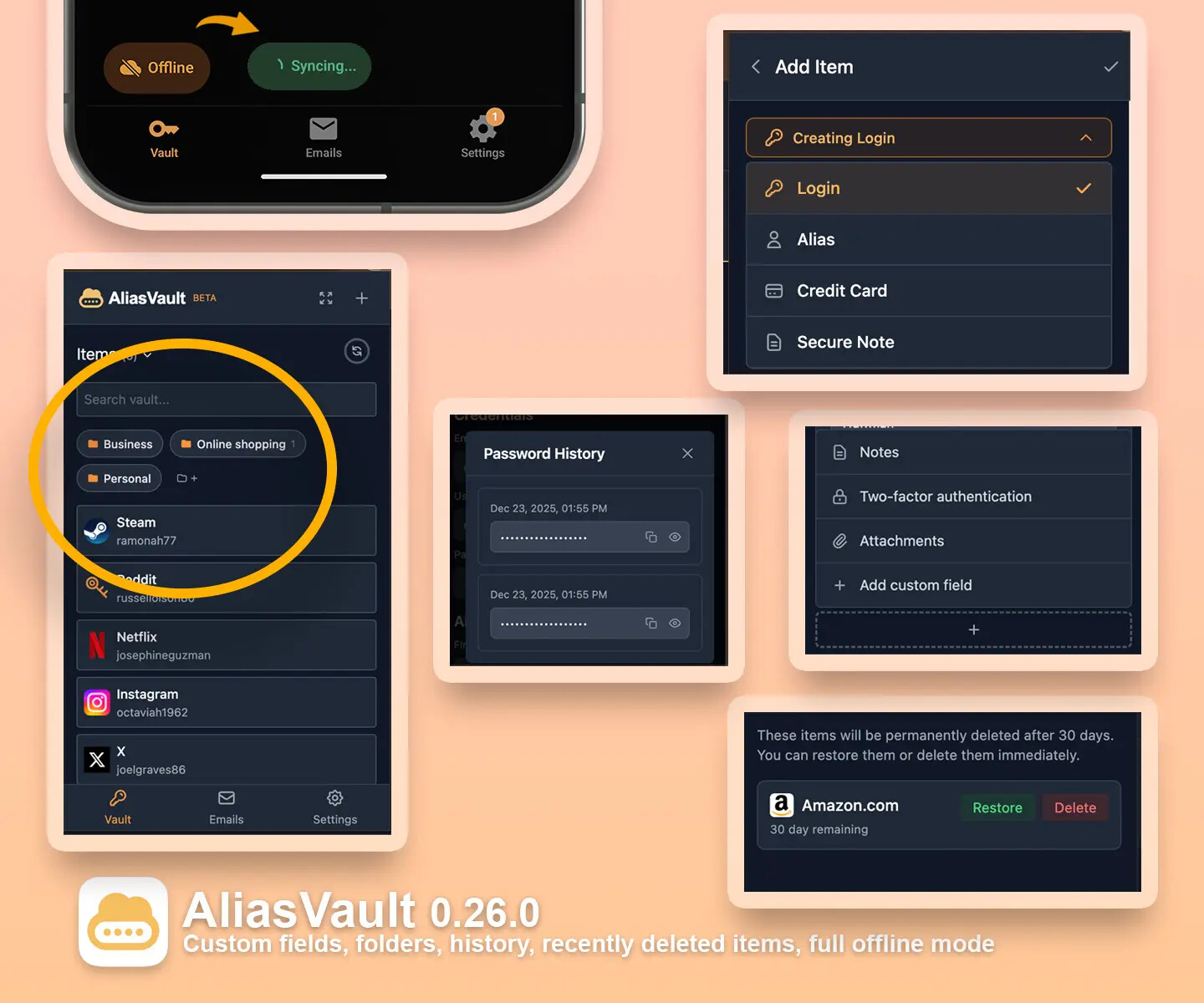
After almost three months of continued hard work, I’m proud to announce the latest AliasVault 0.26.0 release! This is one of the biggest releases yet with a major architecture upgrade that unlocks long-requested features by the community like custom fields, folders, new item types, history tracking, recently deleted items, and true offline vault access and editing with automatic vault merging. This new architecture will also allow us to more easily add new features in upcoming releases.

Alongside these major additions, this release includes security improvements, performance optimizations, and many community-requested fixes. And as a cherry on top: we also just yesterday crossed the mark of over 2.000 GitHub stars! :smiling_face_with_three_hearts:

Website: https://www.aliasvault.net/
GitHub: GitHub - aliasvault/aliasvault: Privacy-first password manager with built-in email aliasing. Fully encrypted and self-hostable.

  • New vault architecture that now enables: item types, folder support, custom fields, field history tracking and recently deletd items
  • Full offline mode for the browser extension and mobile app: view and edit your vault completely offline, changes automatically sync when you are connected again
  • New language options: AliasVault is now available in a total of 14 languages thanks to our amazing community and contributors!
  • Improved autofill accuracy thanks to a new cross-platform Rust core library that makes sure autofill works the same on all platforms.
  • And many more community requested tweaks, general security hardening and other bugfixes

You can find the full changelog of this release here: https://www.aliasvault.net/news/aliasvault-0.26.0-released. Happy to hear your thoughts and also happy to answer any questions!

8 Likes

Just want to thank you for all the wonderful work that you do. :smiling_face_with_three_hearts: :smiling_face_with_three_hearts: :smiling_face_with_three_hearts:

Although I have been using AliasVault sporadically, it has been extremely useful to me when encountering websites that reject the domains of most aliasing services. I worry that, once your app becomes more popular, some of the websites I use with it will block it. Right now, I feel like I am part of a privileged secret club that gets to enjoy this gem, but I am sure that will change eventually because you’re doing good work. I just don’t want to see more websites block you.

I remember reading you were working on the ability to send emails. Is that still planned? If yes, how do you intend to make it work when not email address are linked to our AliasVault accounts?

2 Likes

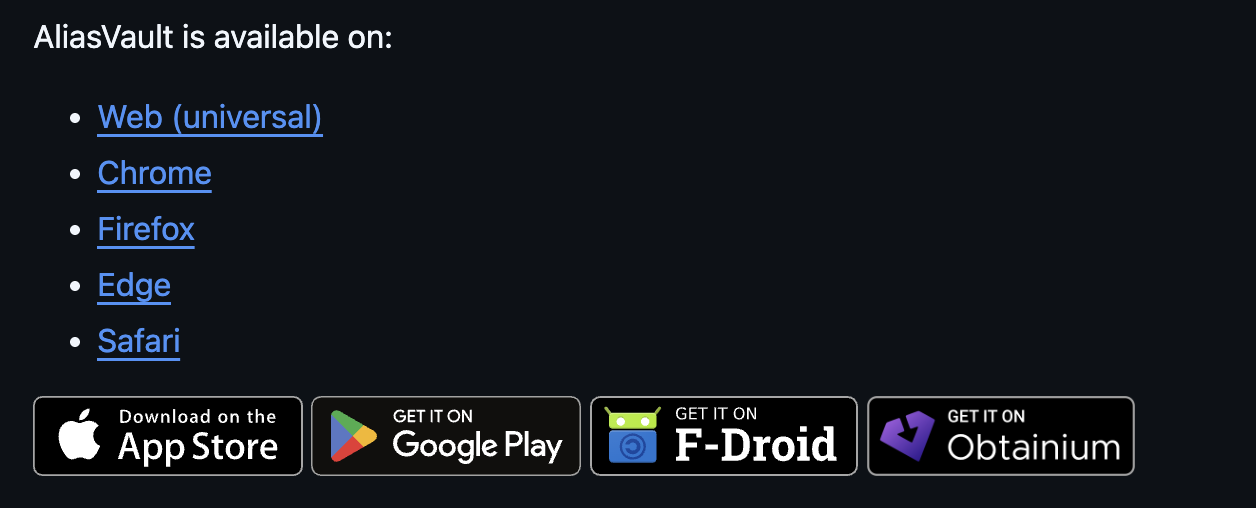
I would love to see an Obtanium link on the website so one can directly use that source to install apps without an account.KYC/etc on their Android or GrapheneOS.

I hope this is a simple enough thing to add so hope you do soon. Thank you!

First of all thank you for your kind words and being an AliasVault user! Yes email domains getting flagged is a real thing, and a bit of a cat-and-mouse game at that. However the system already technically supports having multiple email domains, so I will make available new domains in case the current ones get flagged (too much). Also the idea is that later, as part of the optional premium features, users can either buy their own domain and connect it to the AliasVault cloud, or get access to “VIP” alias domains that only get assigned to a low amount of users and are not publicly listed, hence reducing the risk of them getting flagged at all.

So solutions for this are already standing by, and will be activated when they’re needed. :grinning_face:

Yes, this is still planned as part of the 1.0 roadmap. The exact way of how this is going to be implemented technically is still up for investigation. In order for this to work properly there may be need for extra failsafes and perhaps things like account verifications to prevent spam and abuse. However nothing is set in stone yet, so once more details are available I will share it here.

I’ll look into this! AliasVault already publishes the Android .APK in every GitHub release assets, and also you can download the latest browser extensions and .APK’s via the official AliasVault downloads subsite: Index of /releases/. So integrating this with obtainium should be feasible. Thanks for the suggestion!

5 Likes

That’s all you need to do to “support” Obtainium.

I think they want a button like this

4 Likes

Dear lanedirt,

I intended to write you an email. But this community seems awesome and committed, so maybe my ideas can be used/destroyed by the whole community.

First, what you are doing is awesome, by its breadth (visuals, communication, website, front-ends) and its depth (from hosting to browser plugins). I wish there were more IT professionals of your caliber. But I guess you’d get bored to death if you had to do the sort of tasks that many IT people have to do, maintaining legacy stuff in corporate constrained environments :wink:

Anyway, I fail to really see how AliasVault fits in the landscape, and wonder if it’s as safe as we’d like. I guess you didn’t need to know that I don’t use your tool yet. But maybe my point of view can be of interest to some users, and to you to define your “market”/target and maybe even prepare that future security audit.

So, AliasVault emphasizes things like
“End-To-End Encryption. Your data is fully encrypted on your local device before backed up online. Your master password is never transmitted to the server. No one, except you, can see inside your vault.”

All this might be true. But you do get unencrypted emails from websites. So, all that technology only makes sense if we trust your promise that
“Email Contents: When emails are received by the server, their contents are immediately encrypted with your public key before being saved. Only you can decrypt and read them with your private key.” I’m not sure how that architecture would be assessed in a security audit.

You seem to have an excellent track record. Spamok seems to be “old” and reputable. But E2EE is meant to create an environment where, if I trust the client, I don’t need to trust the backend. That reliance on those unencrypted emails mean that, if I don’t trust your back-end, then the whole system is not OK. Also, even if the back-end was OK in the past, if it/you go rogue, then because any future received email indicates a sender and a recipient; a “password reset” flow could be started at the site and the password that was so wonderfully protected by encryption can simply be replaced.

I understand that spamok (or YOPmail) has users, even though those emails are almost “public”. So maybe that’s not a big concern for many people. But unless special circumstances, I never felt confortable with that approach. I have used spamgourmet since almost 20 years though. They could have been rogued too and kept the emails. But their promise was to simply forward and destroy the email. I was more confortable with that behaviour/promise.

Also, while people might be OK with the trade-off for some accounts, I feel that AliasVault somehow aims to be a solution that would replace Bitwarden and apply to all accounts. And I wouldn’t like to have that sort of mix between my high value accounts (for which the alias on your own controlled domain aliasvault.net would not be desirable in my eyes), and low value accounts. Probably I’m not forced to have an alias for all accounts, but I don’t feel confortable with that sort of mix.

Anyway, I hope I’m just being paranoid/stupid, and your solution can be greenlighted by real security professionals, and liked by many users.

Best regards

PS: I also really appreciate you’re making it open source and self-hostable. Although self-hosting would only alleviate my fears if email was using another domain, not the alaiasvault.net domain that is controlled by you. And I’m not sure how it could integrate with a real email provider. (I have Fastmail in mind because that’s what I use.)

3 Likes

Thank you for taking the time to write this out. Also thank you for the kind words and compliments! Happy to answer your questions and address the questions and points you raise below.

To get to the core of your point: email, as it exists today, is fundamentally a weak link: it’s largely plaintext, server-handled, and outside the user’s control. Aside from niche PGP setups (which remain fragmented to an extent), there’s simply no way to send or receive email without it transiting through a server in readable form at some point (where you don’t know whether they keep backups or not). That part of the threat model can’t be eliminated, only constrained. What AliasVault aims to do is try to reduce exposure as close to the user’s end as possible: emails received by the AliasVault server are only ever stored on disk in encrypted form. Only the recipient can actually access the contents, even if they haven’t synced their mailbox yet.

However you’re absolutely right about the core E2EE principle: ideally, trust should not need to be placed in any backend at all. That’s exactly why AliasVault is fully open-source (therefore auditable) but also offers class-A support for self-hosting. If you don’t want to trust the cloud or any AliasVault provided email domain, you don’t have to, including for email handling.

A few clarifications that may help:

  1. Email contents are encrypted in memory immediately upon receipt, before any storage. This flow is intentionally simple and auditable in the codebase. This can be assessed and verified relatively simply in any (security) audit. Relevant lines are here: aliasvault/apps/server/Services/AliasVault.SmtpService/Handlers/DatabaseMessageStore.cs at 5d7af1d1232b3a278e0a20551bf58a8d8cb2c376 · aliasvault/aliasvault · GitHub
  2. Email aliases are optional. AliasVault can be used purely as a password manager vault, alongside your own existing email addresses. You can choose if and when to use an alias: e.g. only for obvious throwaway accounts, or not at all.
  3. When self-hosting, you can use your own email domain, with no dependency on aliasvault.net infrastructure.
  4. For the hosted version, we’re working toward allowing custom email domains as well, so users can connect their own domain names to use for aliases, which also allows them to take their domains with them if they want to no longer use AliasVault anymore.

So rather than asking users to fully trust us, the goal is to provide real choices:

  1. Full convenience: Use the fully managed AliasVault cloud, with end-to-end encryption that can be audited and verified. Aliases are optional.
  2. Convenience and control: Use the AliasVault cloud but connect your own email domain: (support for this is coming in one of the next releases)
  3. Full control: self-host AliasVault and maintain your own hardware, software and email domain(s).

I don’t think you’re being paranoid at all :). A healthy sense of skepticism is really a strength in the privacy/security world. AliasVault is designed to be open-source and community-driven, so we actively try to learn from feedback and address any questions people might have. Questions, suggestions and improvements to the core security model are also always appreciated.

If you have any follow up questions, feel free to let me know!

6 Likes

Thanks @anon80329175 for the suggestion. And thanks @jerm for the example. It took a bit of time before I could get around to it, but I have just now added the Obtainium download option to the AliasVault GitHub and website :grinning_face: :

10 Likes