Configuration to auto delete email after a time period like 7 or 14 days
Does the chrome extension auto detect and fill up the activation codes received from the websites. That would be very cool cause lots of time is wasted on copy / pasting the activation code
Login using passkey
Shared accounts / team members - In small companies people do share SAAS product subscriptions like Zoom so this will be very useful. We need a way to remove ppl no longer in the company from access and also reset password sometimes
Wouldn’t this mean AliasVault having full read access to your emails? And would this not be a privacy violation for you? Don’t think this would be a good idea.
@btcenigma Thanks for the suggestions and feedback, really valuable to hear what people would like to see!
Auto-delete emails: At the moment, AliasVault stores emails indefinitely. For self-hosted setups, there are already admin options to auto-delete emails after X days (globally or per user). For the cloud hosted service, this could become more relevant once premium features with storage limits are introduced. I am curious though, in what cases would you personally want emails auto-deleted after a certain time if not technically necessary?
Passkey login: This is already on the roadmap and will be added in the coming weeks.
Shared accounts / team members: AliasVault is primarily focused on individuals and families rather than businesses, but sharing credentials between accounts (in family settings) may well become part of the family/team offering. This is also in part already included in the roadmap.
Activation code autofill: This has come up before (see GitHub issue #1049 for OTP codes). Technically, the browser extension (once the vault is unlocked) can decrypt email contents client-side and attempt to extract activation codes for autofill. The server would never see or process these codes, so nothing changes in the data model or privacy guarantees.
@anon57862721, you raised a valid point. Since all of this happens client-side, the server doesn’t gain access to email content. But I’d love to hear more about your concerns: is it the principle of a password manager reading email content, even locally, that feels uncomfortable? Or more the risk of accidental overreach?
Personally, I could see it as a potentially useful and unique feature, especially for quick alias sign-ups. It would be kind of unique as other password managers with non-built in email aliases won’t be able to do this as easy. But whether it’s actually pleasant and wanted in terms of privacy is something I would like to learn from users here
I think both. But it’s also me not knowing if this is even possible all while maintaining and privacy and security in the best way possible. Also, I wonder if this will actually work that well seeing how different services, providers, etc. have different ways they share their one time codes in their emails so the app should be able to recognize the right numbers/code for this to work, again, in the most privacy respecting manner. For example: sometimes a service will send more details than just the code like your IP address along with the requested code so the user can decide based on the IP address and the request for the code if the email is indeed legitimate. So.. it’s kinda all those things/factors.
But if made or done well, it will indeed be useful if it works well. I’m just not sure it will with all the variables in play.
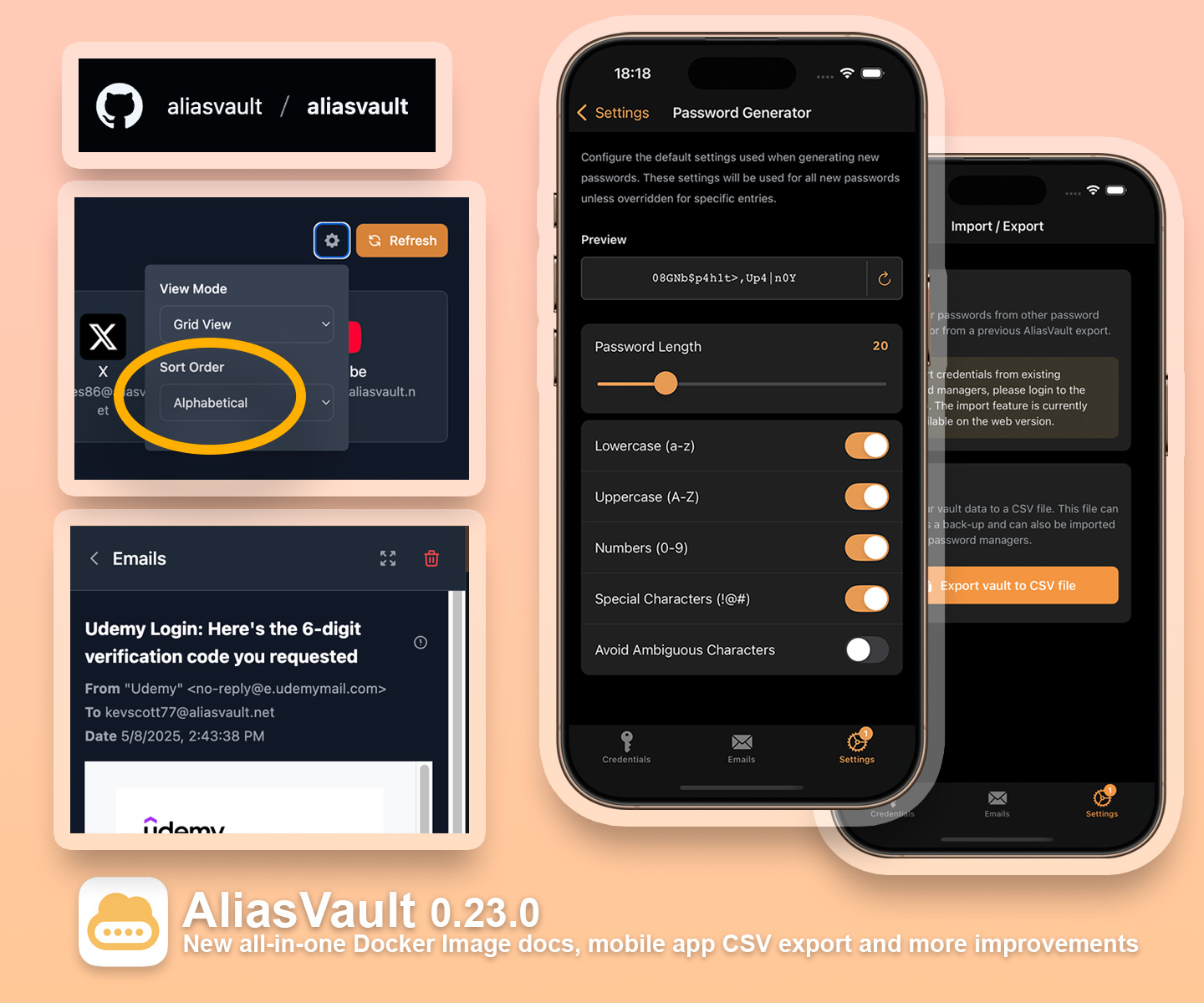
The new AliasVault 0.23.0 release is out now! This release makes the new all-in-one Docker image fully available, improves mobile apps with new backup and customization options, and brings a lot of UI and usability upgrades across all platforms. Plus, AliasVault has officially moved to its own GitHub organization!
All-in-one Docker Image: The new all-in-one Docker image which was heavily requested by the selfhosted community, is now fully available. Perfect for NAS setups (QNAP, Synology), simple Docker/Docker Compose installs and for integrating with existing Docker hosts. You can find the updated install instructions here: https://docs.aliasvault.net/installation/.
New GitHub Organisation + OpenCollective: AliasVault has migrated from lanedirt/AliasVault to aliasvault/aliasvault. This affects selfhosted users as new Docker image releases are now published under the aliasvault organization. AliasVault is now also on OpenCollective: AliasVault - Open Collective which enables ongoing support with transparent donations.
Mobile app upgrades: Offline CSV export for backup, migration or emergency access. Works even when you don’t have a connection to the server. Configurable password generator (configure length, complexity, etc. right from the app). Improved touch & trackpad handling for smoother interactions.
UI & usability improvements: Standardized font sizes in browser extension, added password visibility toggles to login forms. Improve email preview UI in browser extension to make better use of the available space. Added alphabetical sorting to credential dashboard in web app. Show app version on login page. Improve responsive design of admin panel for improved accessibility on mobile devices.
Number one priority for next couple of weeks is to include the highly requested support for passkeys, as well as continue tweaking the app based on user feedback and working through the general backlog of improvements (which include many ideas suggested in this topic ).
Thanks for your continued support! I’m really proud to see that the project keeps growing, with increasing visibility and increasing active user counts week over week!
Hi, thanks for trying out AliasVault! I have not tested registration via Tor, but I don’t know of any reason in particular why it wouldn’t work. The only thing is that the web app is built in WebAssembly and it requires a modern browser to run.
Do you get any specific error when using Tor with the settings you mention?
Functionality for replying to emails received on aliases will be added in one of the next releases. I’m currently busy on wrapping up the 0.24.0 release which will include support for long requested Passkeys. It’s already finished for browser extension and iOS app, currently doing latest touches for Android. Email reply features and other improvements will be looked at after this.
@lanedirt Thank you for your reply! I am very interested in your project and would love to help in any way by providing feedback.
Yes, the WebAssembly is what I meant. When you use Tor in medium/safer mode and try to register, you get the error:
AliasVault requires WebAssembly, which this browser does not support. Try using a more modern browser that supports WebAssembly.
Great to hear that you will be adding the reply-to ability, but what I meant was that you can actually start an email conversation from an alias to someone you have neve had contact with before. A lot of times there are no contact forms to enter your alias, so the only way to start a conversation is by sending an email.
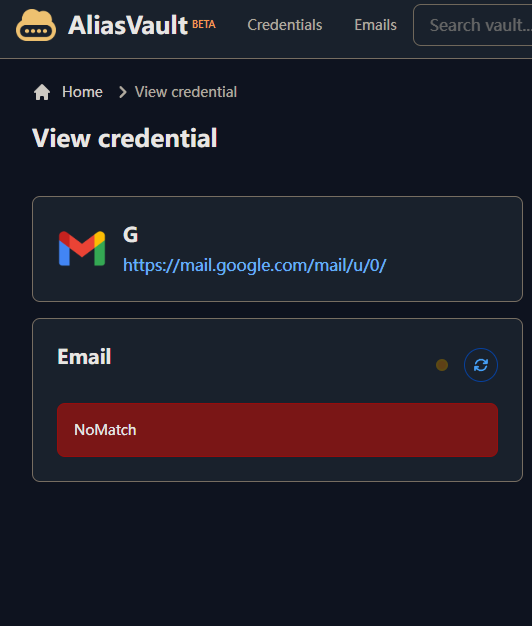
I am currently experiencing the error shown in the screenshot. Some emails are encountering this error even though I have received emails through that address normally before.
@nblke72 Yes sending emails from aliases (so initiating it yourself, without replying) will also be included in that same feature update. For that WebAssembly error, I’m guessing then this has to do with the security settings of the Tor browser itself where it might disable WebAssembly support (for whatever reason). Not much I can do for that unfortunately.
@anon7592771 That’s strange, thanks for reporting. That error does not seem familiar to me, but perhaps its a client side issue.
Are you on the cloud-hosted or self-hosted environment?
Which browser and OS do you use?
Does it happen for all email aliases, or just some? If only some, are they always the same, or does it look to be random?
Hi @anon7592771, thanks for the additional details! I’ll try and reproduce this on my end and see if I can apply a fix for this. I’ve had some other reports about edge cases where the web app did not always render emails correctly, so I’ll try and make this mechanism more robust to prevent such errors.
Thanks for testing and reporting issues, much appreciated!
Hello, is it possible to disable (block) tracking pixels in the form of images and tracking links in emails, like it is done in Proton Mail, for example?
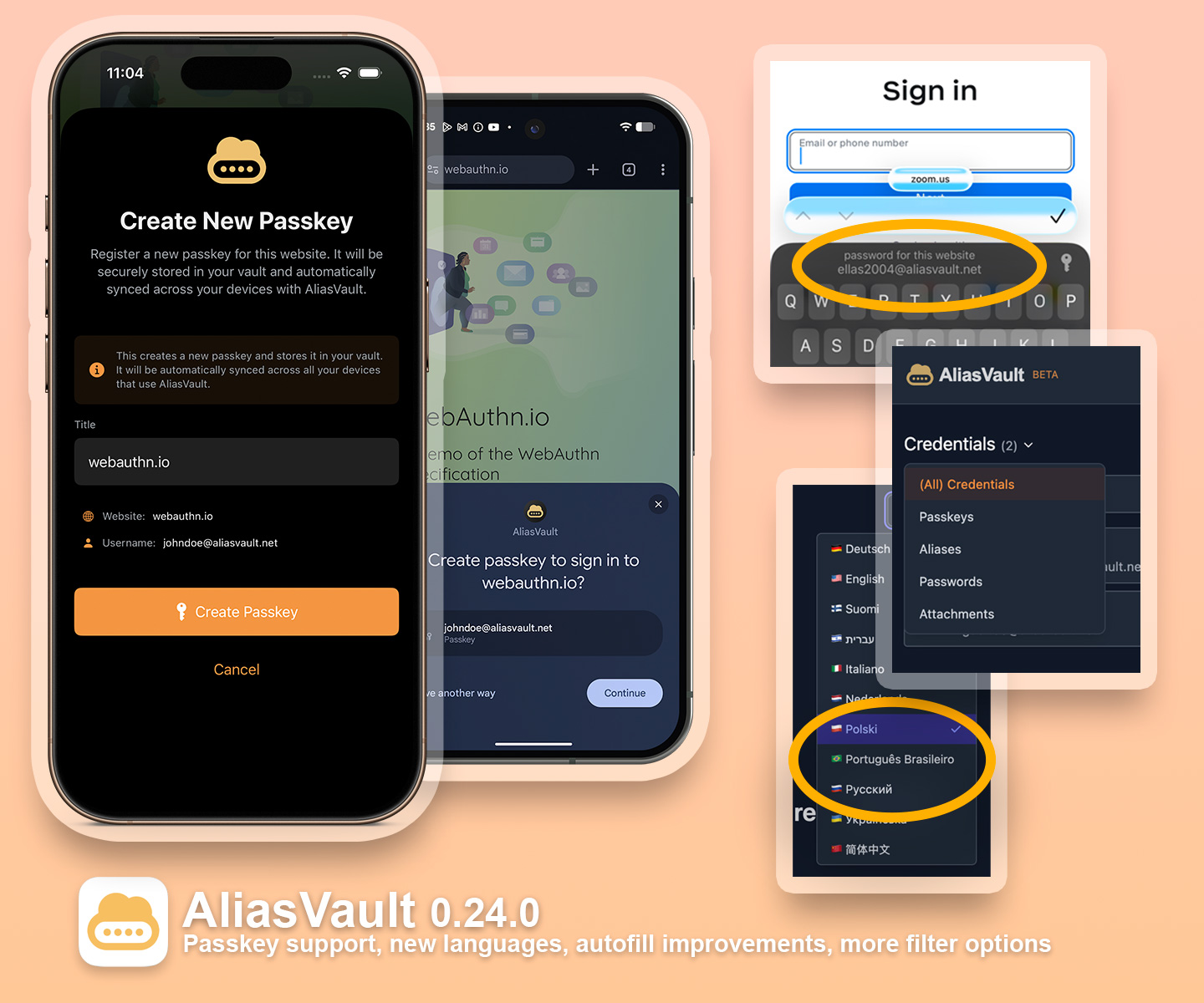
I’m happy to announce the new AliasVault 0.24.0 release which is out now! This update introduces the long-awaited passkey support, expands language options, and includes new of cross-platform improvements for smoother everyday use. It also includes several important bug fixes and performance updates across all apps.
Passkey support (WebAuthn Level 2): AliasVault now supports creating and logging in with passkeys on websites and apps. Passkeys are supported via the AliasVault browser extension, iOS app and Android app. Passkeys are safely stored in your encrypted vault and automatically synced across your devices. If you come across any bugs or issues when using passkeys, please get in contact via Discord, create a issue on GitHub or leave a reply here on PrivacyGuides.
New language options: AliasVault is now available in Brazilian Portuguese, Russian, and Polish, making it a total of (11) languages so far! A warm thank you to our contributors on Crowdin! Do you want to help improve translations and/or make AliasVault available in your native language? Check out the AliasVault project on Crowdin and apply.
General improvements: Implemented iOS app quick autofill support, showing suggested credentials right in the iOS keyboard. Improve Android app dark mode support. Explicit open vault in offline mode on mobile app if server takes too long to respond. Improved credential search logic. Added image zoom support for attachment previews on mobile. Improved UI for custom URL settings in browser extension.
Bugfixes: Fix email decryption errors in web app. Improved autofill behavior in all apps. Fix Safari clipboard clear behavior. Fix handling of multiple private email domains in self-hosted instances. Update iOS 26 layout margins.
Note: This release includes a client vault model update. After upgrading, your vault can only be opened by v0.24.0+ apps. So make sure you update the AliasVault app on all platforms. And if self-hosting, make sure to update your server too. Instructions for how to upgrade a self-hosted server can be found in the docs: https://docs.aliasvault.net
—
The next release(s) will focus on usability and datamodel improvements like PIN unlock, custom fields and to support more credential types like identities, addresses, creditcards etc.
–
@anon7592771 the email decryption issue you reported should now be 100% solved with this update.
If anyone has any questions or runs into any issues, feel free to let me know and I’ll happily look into it! Thanks for your continued support and feedback!
Excellent news and update. It’s been several months since I’ve used Aliasvault fully so I’m starting again now and will get back with feedback like I did earlier. So, stand by for that.
But a quick question for now - will there be a native app for desktop OSs for better credential and email management?
Hi @anon57862721, that’s great, I appreciate it a lot! As a FYI: larger improvements to the email interface you mentioned before are still pending, but will be looked at in one of the following releases as we’re nearing v1.0.
But a quick question for now - will there be a native app for desktop OSs for better credential and email management?
Native desktop apps are on the 1.0 roadmap for further consideration. There are quite a few benefits in having them, especially for better autofill in native apps, however it will also mean more maintenance. So I am still weighing the options on pros/cons on when would be feasible time to prioritize and start work on this. Do you have specific usecases that you use (other) password manager desktop apps for?

 ).
).