Tinfoil Chat (TFC) has been my main contribution to the secure messaging space since 2013.
Cipher suite
Like practically all messaging apps, TFC is end-to-end encrypted, the cipher-suite alphabet soup being X448/PSK + XChaCha20-Poly1305, BLAKE2b hash ratchet for forward secrecy, and Argon2id for password based key derivation for persistent data that’s encrypted with same symmetric cipher.
Onion Services
Similar to metadata resistant messaging apps like Cwtch and Briar, TFC also uses Tor Onion Services to hide the IP-address and geolocation of the user. The app runs in p2p configuration where the user’s Onion Service yields outgoing ciphertext to peers, meaning there’s no (de)centralized server eavesdropping on the metadata of the communication.
Endpoint security and Split TCB architecture
What makes TFC unique is it’s designed from the get-go to offer strong endpoint security by preventing exfiltration of keys and plaintexts with remote exploits. This sounds like a wild security property and almost too good to be true, so I’ll immediately say it comes with some caveats, and the design brings some architectural limitations to what UX features can be offered.
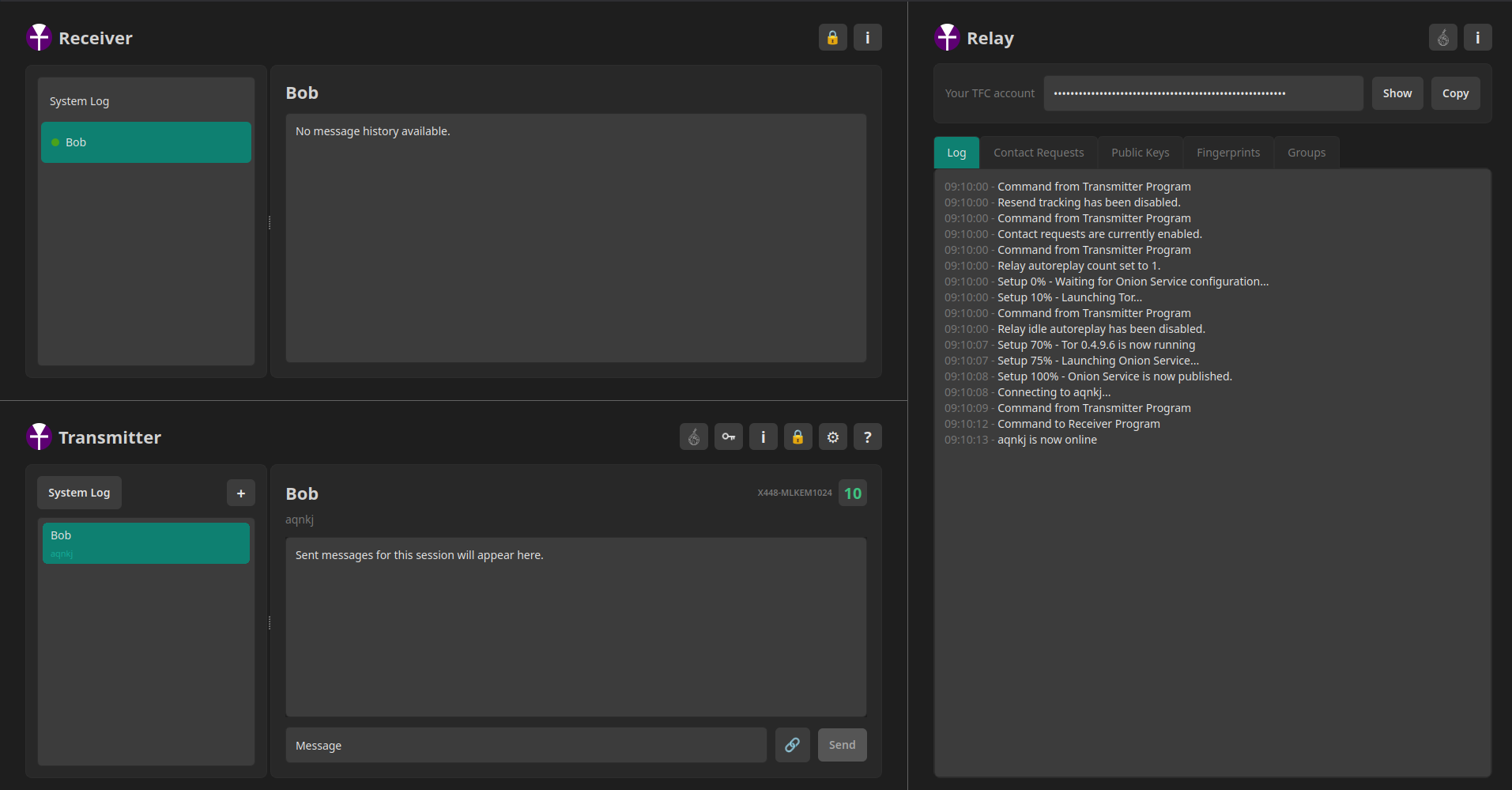
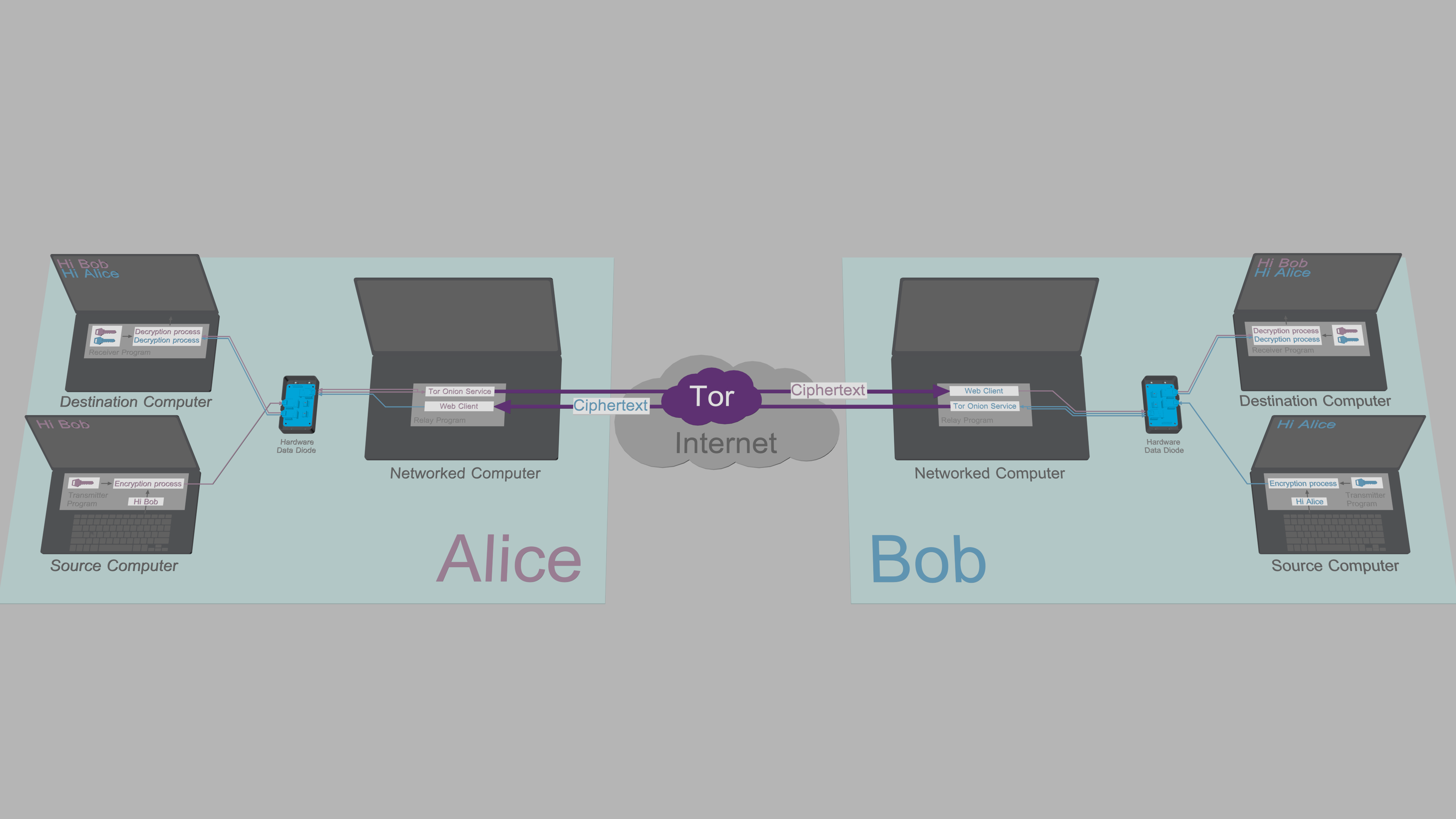
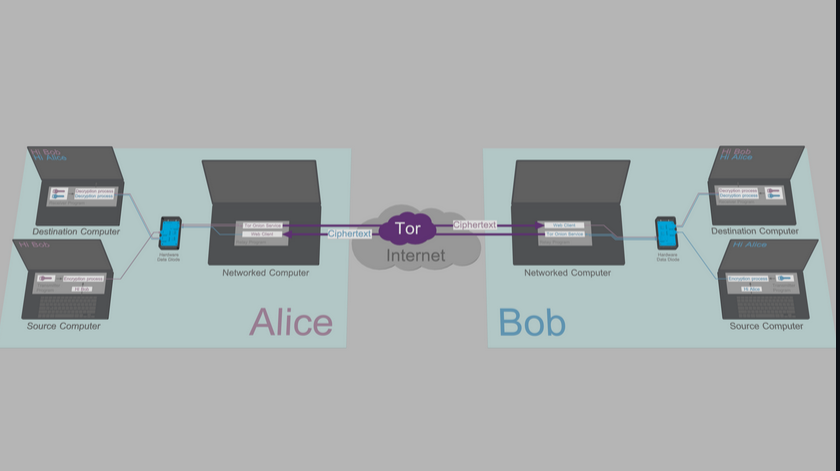
The endpoint security is provided by separating the user’s messaging endpoint into three separate programs, run on three separate computers.
- The text input window / message encryption and ciphertext output are handled by
Transmitter ProgramonSource Computer - The ciphertext input, message decryption and conversation window are handled by
Receiver ProgramonDestination Computer
These two computers are dedicated for TFC and form the so called split TCB. TCB stands for Trusted Computing Base, and is defined as the smallest set of a system that needs to be secure for the system to be secure.
The two communicate with user’s daily computer we call Networked Computer that exchanges ciphertexts with other peers with program called Relay Program.
Here’s the general layout of the system:
Data diodes
The three computers communicate through something called a data diode, that allows moving data between two computers in one way only. Data diodes are nothing new, they’ve existed about since the 1980s. TFC is just the first (at least the first unclassified) tool to use two of them for secure communication.
Data diode has very little to do with standard diode (the electrical component). It doesn’t move electricity in one way. Instead, data diode operates on optics, you have LED as a lamp, and photodiode as a lamp detector, and the same way your ear can’t speak and my mouth can’t listen, the fundamental limitations of these components enforce the direction of data transmission. Photo diode and LED are both diodes but the optical gap means there’s no electrons being exchanged by the hardware. This makes it possible to e.g. galvanically isolate the Source and Destination computer by running them on battery-equipped laptops.
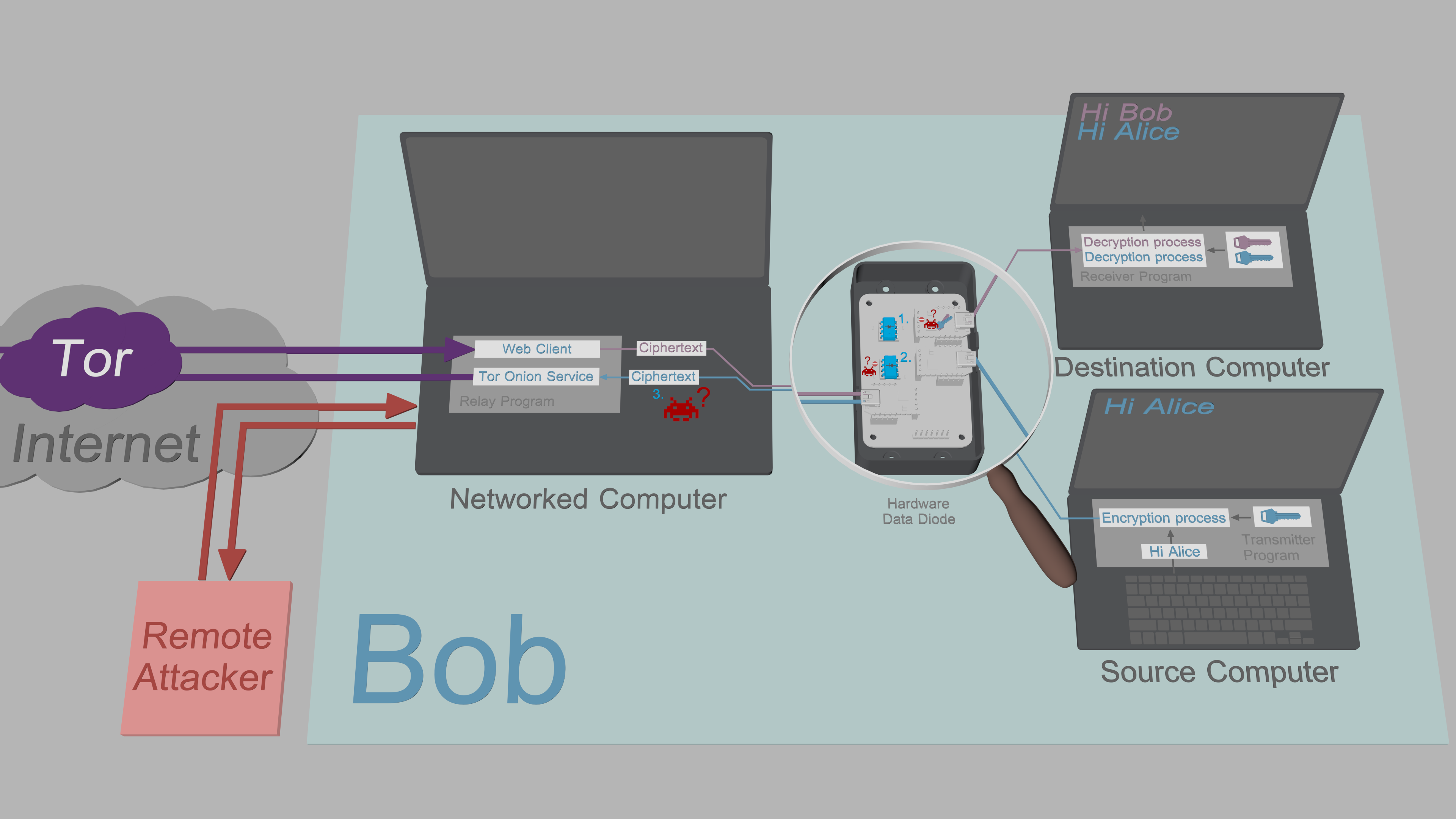
This is the most misunderstood part of the project so I’ll emphasize upfront, that the data diode does not encrypt, change, monitor, validate, or in any other way process or store data. It only makes sure that the ones and zeroes can be sent from one device to another in one direction only.
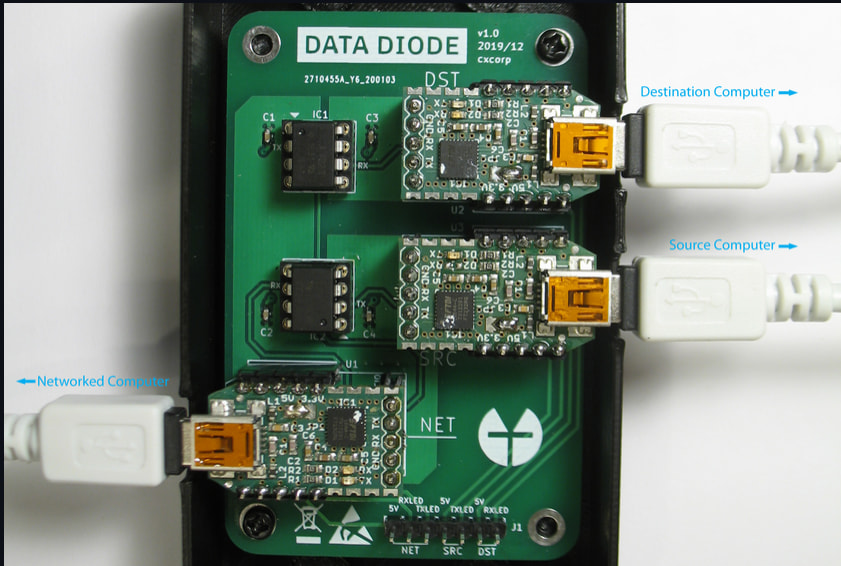
TFC uses two data diodes, but for convenience both are placed on the same circuit board, whether its breadboard, perfboard, or PCB. Each computer connects to the data diode with a USB cable, and on the data diode’s end, the USB-cable terminates into a USB-to-TTL adapter, which converts the USB signal into old-school dead simple serial traffic at TTL voltages (high = 3.3/5V, low = 0V). The serial signals are then fed through HCPL-7723 optocouplers that house the optical repeater. These components are generally used to send control signals to high voltage electronics while protecting the sending side from voltage spikes. You can find them e.g. in your washing machine’s controller circuit board. TFC repurposes the component for endpoint secure communication.
Here’s the PCB data diode for reference:
Key exfiltration security
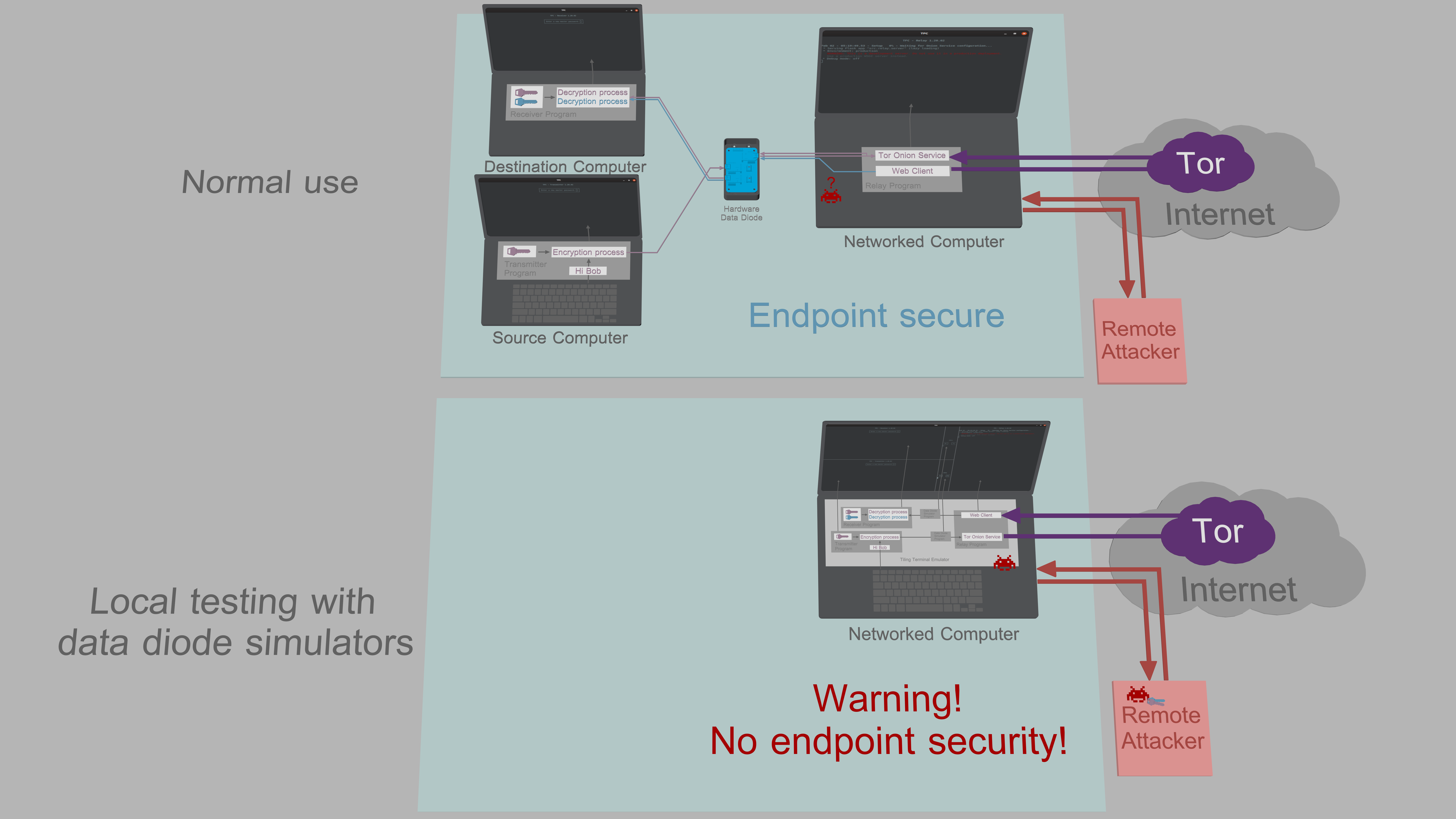
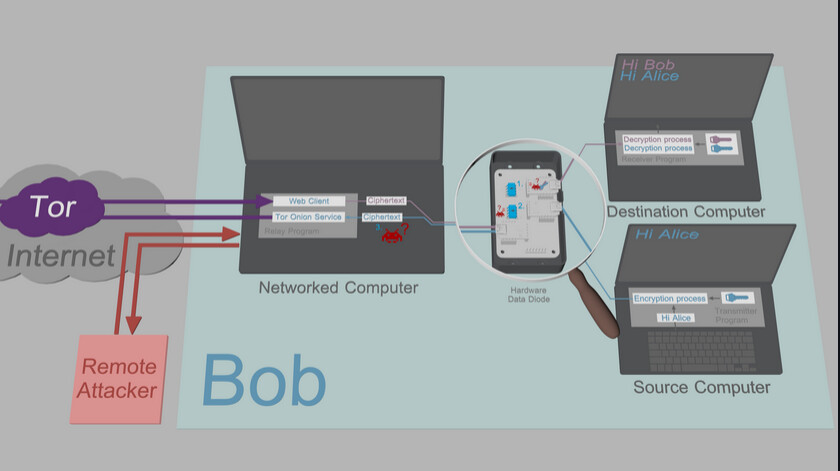
Key exfiltration protection comes from the fact that plaintexts, keys, and cryptographic operations are handled only on Source and Destination computers, and neither computer has bidirectional communications channel to the network. This means that
- The Source Computer can’t receive malware that would make it export sensitive keys/plaintexts.
- The Destination Computer can in theory receive malware, but that malware has no channel it can use to send the keys or plaintexts out.
- The Networked Computer has only access to ciphertexts and public keys.
Features
The feature set is very narrow, as primary goal and feature has been to ensure there’s a way to deliver message from user to user with maximum security. You get 1:1 messages, rudimentary groups, file transfer for both, and opt-in message logging. There’s also something called whisper messages that, unless the recipient modifies their source code, won’t be logged even if the logging is enabled. This is a convenience tool to allow saying something off the record, or if you send a decryption key that neither wants logged etc.
This isn’t a lot. But TFC isn’t intended to be a fun way to connect with friends and send stickers. It’s a tool for users that need a solution to the problem “My adversary will hack my device and read my Signal/Cwtch messages from my device, and that will have serious consequences.”
There’s one more bigger privacy feature:
Traffic masking
TFC provides something that I haven’t seen any other messaging tool provide: traffic flow confidentiality. Since that term officially abbreviates to TFC, I choose to call it traffic masking to avoid confusion.
What traffic masking aims to do, is hide when, how much, and what type of communication takes place.
TFC has two tiers of traffic masking:
By default, TFC clients connect to their peers’ server to fetch ciphertexts. The server will yield a random number of what are called assembly packets (small identically long message fragments) to the recipient. If there’s not enough real packets waiting, the server will generate a buch of them. This will hide how much data was actually being transmitted. Note that this type of traffic masking won’t necessarily hide the does the transmission contain a file information if the transmission is very large. The goal of this traffic masking type is to hide the shape of general TFC traffic to make use of the tool harder to fingerprint.
The client contributes by randomizing fetch times to some extent to try to also mask the protocol.
The main problem is, this relay-to-relay traffic masking doesn’t work at all if the attacker compromises the Networked Computer to time the traffic between the isolated computers. This type of leak is prevented by the other traffic masking:
The TCB-to-TCB traffic masking has the Transmitter Program lock into single recipient or group, and output a steady stream of noise packets to that set of recipients. Into this stream the Transmitter Program will insert messages and files as assembly packets. This reliably hides when, how much and what type of communication takes place even from the attacker that has compromised the user’s Networked Computer. Only the Receiver Program of recipient knows if the packet was a message or file fragment, or a noise packet, once it has decrypted the packet. Naturally this has the downside of you being locked into some set of recipients, because if you make changes to that, that act reveals when you are using the TFC endpoint.
Limitations and attack vectors
The first and foremost limitation for uptake is setup complexity. While the application install is trivial (just copy-paste the single installer one-liner to terminal), the data diode doesn’t build itself, nor can I ship one to you with good conscience as I cant’ guarantee some agency won’t interdict the parcel. So you’ll have to learn some very basic soldering, and how to pluck the components and wires to a bread board. The project wiki has a guide for this.
If you’re fine with less robust endpoint security, TFC also works on three Qubes VMs, where the unidirectional gateway is replaced with Qubes’ qrexec system that’s used to send data between VMs. This is an intermediate solution and since the qrexec has queue full signal, there’s already covert a return channel if the attacker manages to get Destination VM to execute attack code.
Architecture-wise, there’s also the public key input problem. For public key exchange to work, you’ll have to manually type the contact’s Onion Address and X448 public key to Transmitter Program from Relay Program’s screen. Automating the key input would introduce a channel for Source Computer to get infected, which would cause catastrophic endpoint security failure.
This public key input problem isn’t terrible right now, it’s 1-2 minutes of overhead per contact. But it will get nasty once I work in ML-KEM public keys. Figuring out how to make that as bearable as humanly possible is an open research problem. I have some ideas brewing but it’s a bigger rewrite effort and won’t be offered for a good while. For now, you get post-quantum security with people you live close to and who you trust, by exchanging pre-shared keys using sneakernet (please use drives from sealed packaging only). It’s actually more secure than ML-KEM, as you don’t have to worry about any laptop-over-the-weekend failures (which is why ML-KEM is currently being paired with classical EC-DH): Grover won’t break ChaCha20 in less than 2¹²⁸ time.
The split TCB architecture of TFC adds some some unfortunate architectural limitations, mainly forwarding messages someone else sent. Anything you want to quote needs to be manually typed to your Transmitter Program. Forwarding received files and documents is also very dangerous and the bare minimum is you should have an analogue loop, like printer on Destination Computer and scanner on Source Computer.
Finally, there’s some important endpoint security caveats:
- If the Source Computer gets compromised during installation phase, it can spit out keys on its own. This is a fundamental limitation to all secure messaging tools outside nation state-privy stuff like hardwired logic implementations.
- If the Destination Computer gets compromised at any point, there’s theoretical side channels that the Destination Computer could try to use to exfiltrate data, like blinking the monitor’s LED indicator if the attacker happens to be sitting outside your window. I try to maintain a list of the attacks in the project’s Security Design under attacks, so my advice is to review those and consider what you can mitigate, and what you can live with.
Note that TFC’s only selling point is the security, and part of that includes communicating any limitations openly. So just because there’s some attack vectors doesn’t make it useless. I just refuse to sell something this important with a fine print, which is partly why this intro post is so long.
Privacy Guides criteria
The project should probably not be on Privacy Guides recommendations, but it’s a good tool for the community know about. That improves the chances the knowledge of its existence reaches those who need it, through the grapevine.
Wrt the PrivacyGuides requirements, TFC
- is open source (GPLv3)
- has no personal identifiers (ideally you’d run Relay Program on Tails with not even personal files),
- is always E2EE for everything,
- has forward secrecy,
- is NOT audited: it makes no money so there’s no funds for this. The nice part is the HW data diode doesn’t care too much about perfect code, as long as the Source Computer doesn’t spit sensitive keys out on its own; something I’ve spent considerable time to address in the code.
For best-case criteria
- Does not support future secrecy, but actually one-ups the property by preventing the key exfiltration in the first place. Future secrecy assumes there’s no persistent malware exfiltrating future keys so it’s not a guaranteed property on platforms that provide it.
- Is p2p so open source server is part of the user’s endpoint.
- Uses decentralized Tor network by default for all connections.
- Supports Linux only: proprietary OSs with security this tight sounds weird. The Source/Destination computers must not have built-in wireless for adequate isolation, so offering phone OS support would be counter-produtive. Relay Program could work as an app but replacing one of the three laptops with phone isn’t that much more lightweight, plus you don’t want Networker device (the phone) to have a mic that can eavesdrop on the slightly unique sounds of Source Computer’s keyboard buttons (a real attack).
Media visibility
TFC has had some visibility.
The Finnish tech news site TIVI wrote a brief piece about it Suomalainen opiskelija kehitti yhden maailman turvallisimmista viestintäjärjestelmistä – antoi sen ilmaiseksi kaikkien käyttöön | Tivi
Will Scott mentioned it in his 36C3 talk “What’s left for private messaging” under the section for isolation https://www.youtube.com/watch?v=ezA01rs7n3s&t=1666s which the French newspaper Le Monde picked on.
There’s also some citations in research papers, but none have been specifically about TFC but usually about data diodes and their applications. The project also has 1300 GitHub stars, and people who like the isolation and high assurance stuff have generally liked it. I mention these not as proof of anything, only to state that this project has had some eyeballs on it already. A lot of the feedback has been positive, and I’ve tried to improve on any negative feedback.
All kind of feedback is more than welcome, but I want to emphasize that a lot of negative feedback I get these days is from someone misunderstanding the project. The project is unique, doesn’t really fit anyone’s pre-existing schemas about secure messaging systems, and communication is lossy. So if this way too long intro post didn’t clarify something, please take a peek at the documentation to see if I managed to explain it there.
Markus