Secure, 100% Privacy Conscious setup for Remote Access

Hi all,

I am posting here because I’m sure many of you are running your own self-hosted services!

I am just beginning my homelabbing journey, trying to regain ownership over my stuff and cutting down on subscription services that I can self-host. I have done quite a bit of research, but most articles/tutorials assume either 1. a lot of previous knowledge and don’t explain many details, or 2. that you’re just starting out and they don’t explain many details.

Anyways, here is what I am trying to do and the setup I have currently:

I want the ability to self-host a NAS, repurposing some HDDs I rescued from old PCs, and I want to be able to host my own photos, music and TV shows. I currently have an old laptop running Debian and have setup a local network share using Samba.

Here’s a visual graph of my setup, with everything I have installed and everything I want:
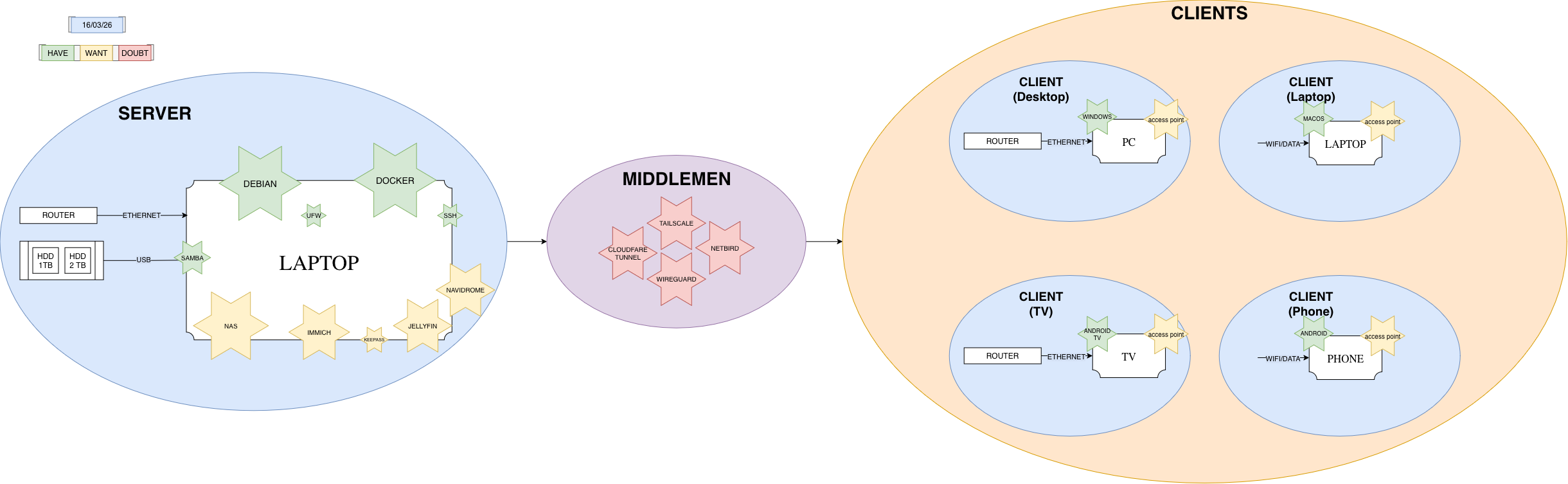
In green I have the services I have installed, in yellow those that I want to set up, and in red those that I am having trouble figuring out.

Here is my main dilemma: I want to be able to access my files/music/images from anywhere remotely without having to send that data through third party servers. I want total privacy.

I also want a setup that is completely secure and robust, meaning no outside-attackers could get my data and my local network is absolutely and under all circumstances safe.

As far as I have been able to read and understand, people concerned with the secure part of things usually set up Tailscale. However, reading their Privacy Policy, they certainly are not as respecting as I would like. Moreover, only being able to sign up using a Third Party Login is a definite no-go for me.

Wireguard seems to have a similar issue, especially when dealing with IP Adressesses.

Other options I have, admittedly, not looked into as much as I should, seem to be NetBird, Cloudfare Tunnels, NGINX Reverse Proxies…

All of this to say:

What is a 100% privacy respecting, 100% secure way to remotely access my home server? What are your setups looking like these days?

I should say, I do not care how complicated/convoluted the setup would have to be. My goal with this project is to truly learn how to master these tools, and I have enough time to do some research and truly understand how everything works.

I am sure I’m missing many steps and I’m sure I have many misconceptions, so please feel free to correct me and enlighten me with anything I may be doing wrong. I have only been doing this for a couple months, so everything and anything is welcome!

Thanks a lot in advance!

What home router do you have? A number of them can provide a VPN server. That with Dynamic DNS (DDNS) might be able to give you access to your home server from anywhere.

For example, I am running Asuswrt-Merlin on my home router with DDNS. The router runs a Wireguard server. With Wireguard clients on my devices, they can access anything I am running at home.

I believe you can setup the same type of thing using any router that can be flashed with OpenWrt. It will not, however, work if you don’t have a publicly accessible IP address. If your ISP is NATing everything (mobile carriers in the US seem to do this across the board) then you will need something more like Tailscale.

Take a look at Netbird if you have concerns with tailscale, netbird is also server/client FOSS I believe which Tailscale is not. Netbird also doesn’t have the stupid third party provider log in issue.

Impossible. To connect remotely, you most forward your request through the internet to your home network. Someone is gonna have to know you are phoning home, period, even if they don’t see the traffic and it’s encrypted. The only way to achieve that is to stay on the LAN.

You should ask what you want privacy from. Threat models!

You could open a port on your router, have DDNS on your system or router, and forward requests directly to it (say you open a WireGuard port. No third party services to deal with, but whatever current network you are on (telecom, random wifi, etc) can see you are routing requests to your personal router directly.

Another alternative is TailScale, but tailscale will know your devices and generally their connection,

Lastly, you can rent a VPS and have it act as a forwarding server to an open VPN port on your home network, and you connect to the VPS. Whenever you are on random networks, they will see you connect to the VPS, but they won’t see you connect to your home router. The VPS will see you are forwarding requests to your router. If I’m understanding right, this is likely your best bet, as I don’t recall

Any other solution will always have someone knowing that you are routing to your home network. You need to decide which one is worth the tradeoffs. Personally, I prefer the last one, as this reduces the number of trusted entities to one (VPS) vs option 1 wherever you go your are constantly advertising your home router, increasing trusted entities to quite a few places.

Impossible may not be the perfect word, but other strategies are outside my skill level. I suppose you could find a way to get Tor into this picture, but now you are killing throughput for anonymity of you connecting to your home router via VPN. This seems like a waste personally, but again this comes down to threat models and if it’s really worth killing throughout with option 1 here (even then, exit nodes will forward your request to the open port…)

This is totally possible, and quite easy with Wireguard. If you don’t want any middleman such as Cloudflare, the main requirement is a public IP (ideally fixed) for the machine hosting the Wireguard endpoint (server). Packets will necessarily travel through third party hardware (routers), but they will be encrypted. You only manage the encryption keys.

I believe you can quite easily deploy a Wireguard endpoint on an OpenWrt router, but it remains to be seen if consumer-grade devices are powerful enough to push packets at line speed. I personally use a retired gaming machine running Linux as the “router,” and it’s overkill for this task alone. The same machine can of course be used to run other services, either only exposed locally (and accessed through Wireguard) or open to the Internet (e.g., game servers).

Edit: You can also place the Wireguard “server” behind a typical consumer-grade router and forward ports, it just somewhat unnecessarily complicates the setup. I find consumer routers inadequate and prefer “real” hardware for that purpose.

Just fyi 100% secure and 100% private doesn’t exist. I agree with the other poster who said threat models are important.

Tailnet would probably be enough for the average Joe. If you end up using it take a look at Tailnet Lock

Tailnet Lock lets you verify that no node joins your Tailscale network (known as a tailnet) unless trusted nodes in your tailnet sign the new node. With Tailnet Lock enabled, even if Tailscale were malicious or Tailscale infrastructure hacked, attackers can’t send or receive traffic in your tailnet.

That said if you want to go the WireGuard route there is always the option to use DynDNS to connect to it. Most people probably don’t have a fixed IP so this would be a good solution.

That being said I’d advise you to start with hosting services that are not critical if the contents will be leaked. People make mistakes especially if you’re new to something. It’s part of the learning process and it’s probably not the smartest thing to play around with something very important like photos of yourself (Immich), other private files (NAS), or your passwords (Keepass). Even established companies struggle with security. Security is hard after all. Just keep that in mind.

  • You need redundant PSU, ECC RAM and data replication strategies in place to do this properly, unless you’re fine with loosing your data or bringing the services down. Your storage solution is subpar at the moment. Better wait for a proper dedicated NAS and a couple of more drives IMO.

  • Managing docker on a debian machine is kind of old school. It wouldn’t give you the benefits of kubernetes/2013 era VM HA with Proxmox/VMWare. I’m not sure how you’re connecting your drives to a laptop either. If disks are dumb attached, why would you need samba and “NAS” on a laptop?

  • Tailscale has an ability to insert new endpoints into your tailnet. It’s a fine product but will take out your VPN slot on mobile phones, thus making it non ideal.

On a VPS, you can do raw tcp/udp if you have a dedicated ipv6/ipv4 address or use pangolin/other managed solutions. This way, your traffic won’t be terminated on a VPS, thus shifting the trust from the hosting provider. Be aware that many cheap hosting providers have atrocious security practices and multi tenancy issues are pretty common amongst them. I found this video to be helpful when setting up a friend of mine with a similar setup.https://invidious.nerdvpn.de/watch?v=ssVtRMWy0Pg. If Wireguard is blocked by a censor/ISP you can encapsulate your traffic with sing-box/AmneziaWG.

1 Like