OK, maybe not EVERYTHING but I’m surfing the web on Fedora + Mullvad browser (standard settings, no custom blocklist) + non-Mullvad VPN with kill-switch.
Problem: some popular sites (streaming, chat-bot etc) show me interface, login pop-up or google SSO, in my NATIVE (non-English) language like they can track me regardless of all my setup. I rarely use these sites but they keep me thinking.
how can they do this?
I just tested with Tor (standard settings) too, FIXED, showing sites in random languages (maybe its German, derived from Tor exit node).
Is the VPN leaking my IP? I have checked some browser fingerprinting/IP/DNS/WebRTC sites, didn’t notice anything out of ordinary.
If you’re able to stream with Mullvad, you don’t have the security level settings high enough to prevent browser fingerprinting. Go into settings and select a level of safer or safest. The lowest setting can still give up things like language, time zone set on your machine, fonts, etc.
However, this will break many sites, including streaming sites, because it will prevent JS from loading. Which is fine, that’s how it’s supposed to work. But it’s also something you have to balance out in terms of how you want to use the internet vs. what level of privacy you need to maintain.
You can either spend time right-clicking and allowing JS on some sites temporarily and only use one browser for everything. Or, alternatively, use another browser and another VPN location for anything you need to be logged in to see, and/or streaming sites alone. That creates one browser that’s the one that works on every site and gives up data, and then a safe space back in Mullvad.
There’s a balance between security/privacy and convenience, and you need to find where you personally fall on that spectrum.
I believe that is incorrect. This is the first time I have heard that claim about Mullvad Browser. The general consensus is that using Mullvad Browser at its default settings together with a VPN allows users to blend in with the crowd.
So the thing is, Mullvad Browser is basically Tor browser, just without the Tor network. It has the same three-setting security slider that divides users into three buckets.
I ran some tests in January this year and found that both Tor browser and Mullvad have identical amount of entropy leak in EFF’s panopticlick with each of the settings:
Standard: 7.93 bits of identifying information, one in 243.48 browsers has the same fingerprint.
Safer:    9.47 bits of identifying information, one in 708.03 browsers has the same fingerprint.
Safest:   7.74 bits of identifying information, one in 214.10 browsers has the same fingerprint.
The less bits there are, the more you blend in. So the safest leaks the least, probably because there’s so little features it could be used to to identify users. Disabled JS is the biggest reason for that.
Standard is the least safe, but it leaks the second least, most likely because it’s the default: there’s more identifying information, but there’s also so many users running the standard setting with very similar hardware etc., that you blend into a bigger crowd of identical users.
The mid option is least blending, most probably because if someone cares about the slider, they might care about setting it to max. But there will be reasonable amount of people who want the balanced amount of extra privacy. In some ways, it might be also adding real security against attack code. E.g., the mid setting prevents HTML 5 media from auto-playing which will protect against zero-click attacks through the media library. Some users want that but not JS blocking, and some probably go with the “golden middle way” thinking that, that way, they won’t be in the low-hanging fruit category.
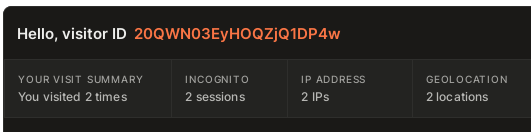
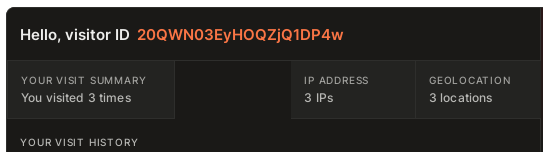
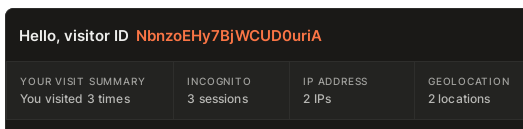
I would love to be wrong about this. However, that claim falls in contrast to fingerprint.com profiling me as a repeat visitor regardless of switching IP addresses, while using the “standard” security profile. Based on the “blending in” idea, either I should pop up as having visited 5 times from this visit, at 5 IP addresses (only 3 repeat visits pinged as repeats, 2 others didn’t) - or even far more, 20, 30 40 visits. Which is what I have seen when testing Tor when JSCreep still worked: first time was my 80th visit.
Which is fine, because if I wait 20 minutes and try it again with a new VPN location, I’ll start over at 1 visit usually. I know that Mullvad is based on Tor, but there seems to be enough of a difference that regular, no-changes Mullvad can be profiled enough. It looks like if I change around, it pins me as 2 different users, I think based on a factor of trustworthiness of my IP/VPN location.
But that means that anyone on Mullvad on any Linux distro should be able to go to fingerprint.com right now and ping for either of these hashes. And I doubt that will be the case since I’m always starting at 1, and AFAIK this is a common place to check.
The “blending in” part doesn’t apply to your OS, so you’re only “blending in” within the category of your OS. Which is fine, but if you’re super concerned about blending in, you would then want to run chrome in a Windows VM.
Are you closing the app or pressing the new identity button?
I recently learned that the new identity button does more than closing and reopening. I think they should function the same. Now I’m curious if it’s the same with the Tor browser, maybe this should be mentioned in the privacyguides.
about:config? i haven’t changed anything in browser settings and my fedora is installed as en-US language, i just changed the time zone (no NTP) which i thought is not a big deal since both browser reset it to UTC inside the browser. i do NOT even have my languages keyboard layout select in settings.
I kept testing around and my results just got switched, now Tor browser shows ads for my native language, but Mullvad browser(with ublock disabled show foreign language ads, i had to disabled ublock to see sites reaction)
Isn’t Tor and Mullvad basically the same thing? how can their fingerprint be different enough to leak my info like this? (both browser are set to “standard” settings because Tuta mail doesn’t work for anything higher
Excellent question. I’m fully closing the browser and giving it about a minute or two before changing VPN locations and going to a bookmark of the site.
For fingerprint.com in particular, it looks like their “suspect score” includes the IP as part of some reputation data, which I think jukes the stats a bit. I would be curious to see how it performs without adding that in - I do wish that someone would recreate JSCreep as it used to be with the API, it was truly amazing.
@newjohn2 For higher settings, if a site breaks, right click anywhere on blank space and you’ll see at the bottom of the menu a NoScript option. Click that and temporarily approve parts of the site. For Tuta, I’m sure it’s just them. That way even for sites that break, you can turn on the parts of JS that you want and leave the trackers turned off. Keep in mind those are typically temporary approvals. You can over-ride them and make it permanent, but it’s not recommended.
On Tor browser with standard settings i go Claude i see an Google SSO in Dutch (exit nod was Nederlands), i click on Tor circuit icon to get a new circuit (this time exit node is USA) now Google SSO is changed to my native(non English, non Spanish) language. on next try show my language even for Dutch IP.
On 22.do (temp mail) it shows ads in my native language(not in Mullvad because of ublock), some global streaming sites even as go far to suggest me tags and trends in my language. ( i haven’t created any account on these sites yet).
On Mullvad safer settings, Claude doesn’t even work gives me this output
"Claude will return soon
Claude is currently experiencing a temporary service disruption. We’re working on it, please check back soon."
Which is unusable plus not the point, i want to know what info I’m leaking , is there anything in fedora should i check??