Checking email from addresses

I want to migrate to an email service which checks

“Reply from the same address the message was sent to”

when replying to an email. I think this is an essential safety check when using custom domain aliasing and I’m surprised it is not part of any email service which supports it.

I believe fastmail does, is it the only one?

If you initially create an alias and send an email yourself from there, then when you will receive a reply to it: your reply then will be to that only email aliasing without any potential fail.
Especially if you only have 1 email inbox (and not several accounts there like Proton’s additional aliases).

It’s more of a check done on the aliasing service and not on the email service.

Addy has a few rules so maybe it can have the extra flexibility needed.
Even tho I’m sure it’s even needed as explained above.

1 Like

I’m concerned with the situation where I get an email to an alias which I haven’t configured the system to recognise. With my current provider typing a reply and sending it results in the email being sent from an address different from the one it was sent to.

My understanding is that Addy (and SimpleLogin) both automatically create the alias. However setting my custom domain up with them would result in my mailbox looking messy due to the encoded addresses.

What do you mean here?
Configured what?

Once you have an alias service in place, you don’t really need to do anything when it comes down to a reply, it will forward it for you without any possible mistakes.

The danger is when you want to write an email to someone first, there you need to be careful of not using your email provider and typing in the place you want to reach in the input field but rather: go into your alias service, type the email of the person there, then use that as your starting point in your email client.


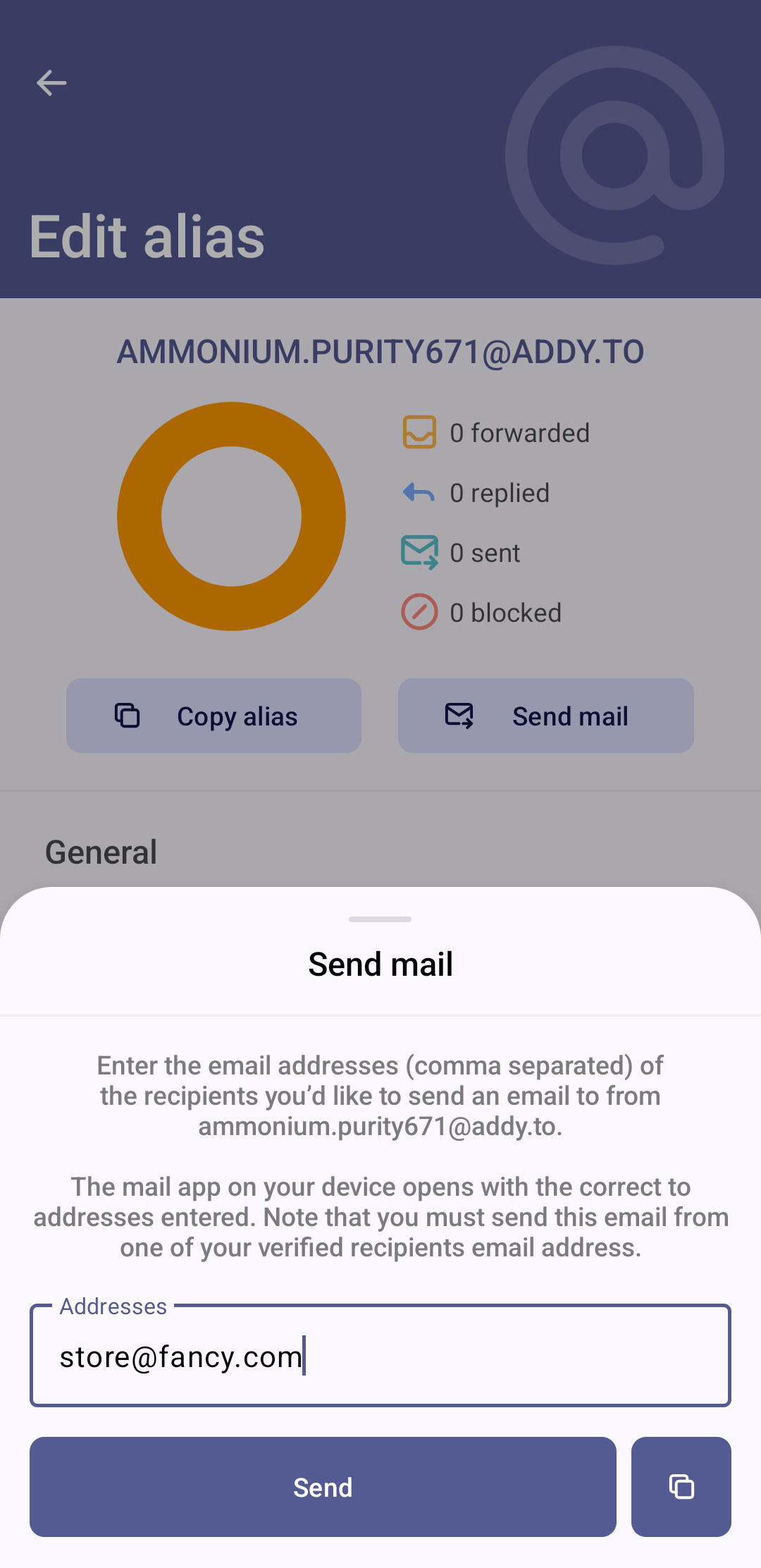
Let’s take a quick example with Proton + Addy combo[1] with the following specs:

  • your personal private email is grapeg@proton.me
  • you want to buy something from store@fancy.com

Hence, it shouldn’t be :red_circle:

From: grapeg@proton.me
To: store@fancy.com

and on the reply side

From: store@fancy.com
To: grapeg@proton.me


but rather :green_circle:

From: grapeg@proton.me
To: mmonium.purity671+store=fancy.com@addy.to

and the reply you’ll get back is as following

From: mmonium.purity671+store=fancy.com@addy.to
To: mmonium.purity671@addy.to

then of course, Addy will forward the email received

mmonium.purity671@addy.to → grapeg@proton.me

Hence, only Addy will know where you’re sending your emails from (your Proton) and to (the fancy store).

This is the step to not miss if you’re the one initiating the email.

In practice, it’s not that bad because Addy will do the concatenation of strings and once done for that specific company, it will then be transparent and you can reply further without needing those steps no more.

Group discussion side quest

Side note from personal experience, if you’re part of a discussion group by email where an email goes to 12 people. If you did your job right and gave an alias for the sender of this grouped email, you will be very (happily) surprised seeing that all the CC emails are all properly aliased.

Yet, you can be confused and have a hard time recognizing every person in that email group depending on how well the aliasing is done.

Spoiler: SimpleLogin does a very poorly job there. :sweat_smile:
Hopefully, you can still recognize who’s talking with their style or their signature.


The flow of just receiving first is overall “less dangerous” because you just paste the freshly created alias into a text input rather than doing the entire danse with your alias + email.
But overall, the tools still kinda make it easy enough by forwarding/copying/opening the apps for you. Still, might be a head scratcher, scary and confusing at first.
You might also make a few mistakes figuring all of that out in the first place, hopefully you realize the damage early on and can minimize the spread of your personal email. :grinning_face_with_smiling_eyes:


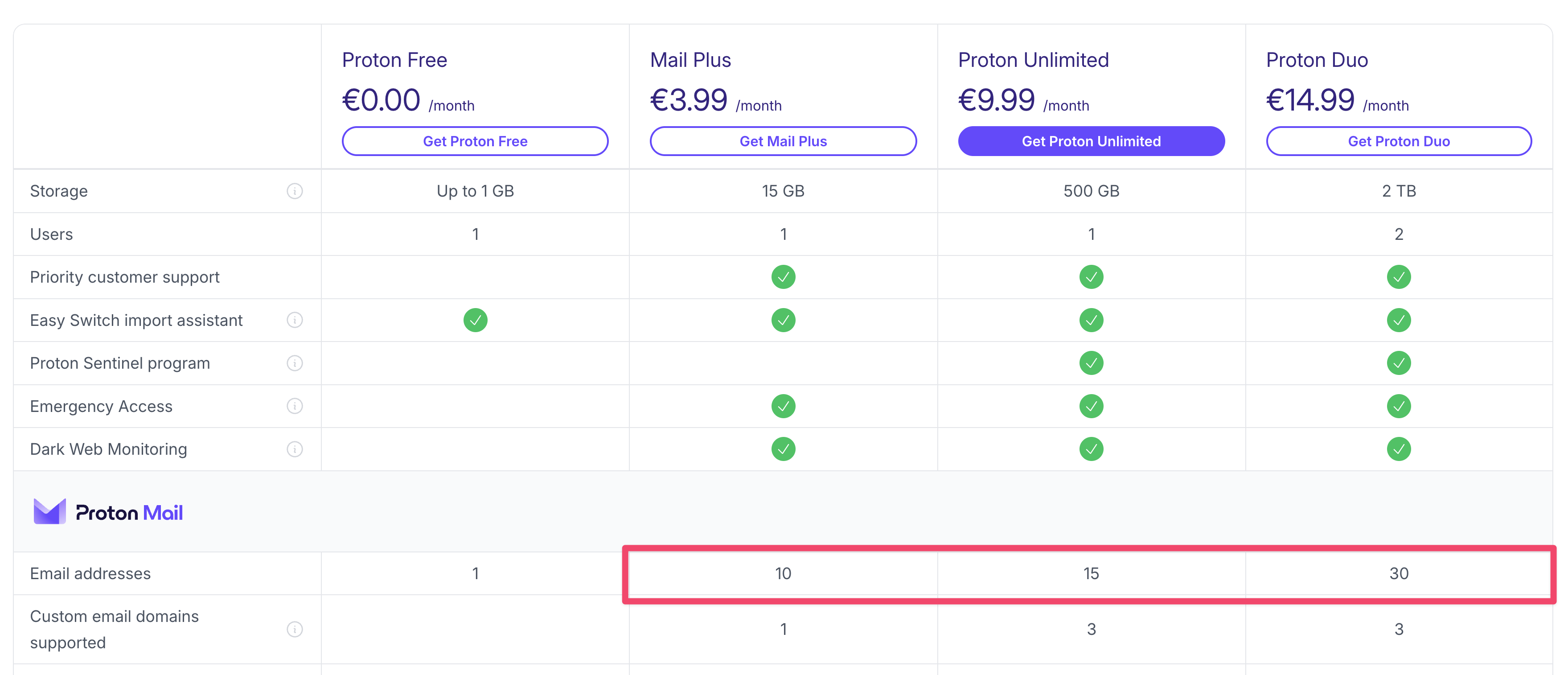
There are definitely layers of complexity if you use Proton aliases.
Those are not aliases in the sense of alias service like Addy/SimpleLogin but those are additional Proton email addresses, hence something like:

As seen here


Hence both grapeg and super.graaaap are “hosted” under the same paid Proton email account and can be accessed with either on the login page.

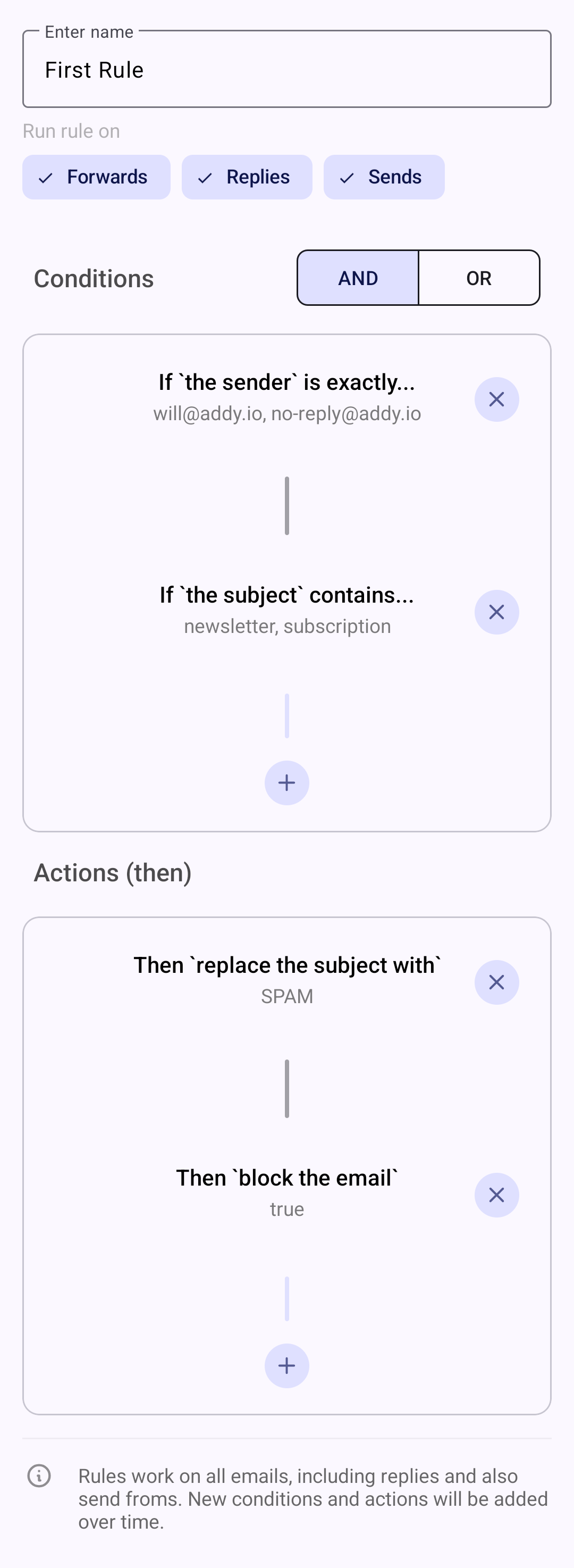
For those use cases (and if you have a custom domain for example), you could then maybe look into adding some rules to not make mistakes while initiating an email?

Not sure it’s the email service’s job to do that.
Good news is: both Addy and SimpleLogin allow you to kinda allow/block-list those based on their own ways.

Addy’s rules look like that

Now, I myself never had to use such a thing because as said above, it’s not needed to have a workflow of:

  • receiving from a company first
  • sending an email first to a company

Those are more of where should I forward from the alias to which inbox as in the example above
mmonium.purity671@addy.to → grapeg@proton.me
where you could be a power user and have some fancy rules if you’re running an empire of fast paced emails sent from anonymous aliases. :grin:


I meanwhile do strongly recommend using your own personal email’s capabilities to sort/filter/move some emails into dedicated folders so that (for example):

  • you know where your expenses are located when receiving a receipt you care about
  • don’t get notified from endless stuff like hourly notifications about services that insist sending you 10 emails for each action
  • have that annoying website that you don’t want to disable the alias for those rare times you need an info from them, yet don’t want to hear about their constant yapping about their latest and greatest products :face_savoring_food:

I know it’s a lot to wrap your head around but I hope that the explanations + screenshots helped. :slight_smile:


  1. it can of course be done with SimpleLogin and Tuta etc, mix and match your favorites here :+1:t2: ↩︎

2 Likes

Thinking about my write up above and your initial question, I guess that maybe I understand a bit more what you’re asking for here.
A way to prevent the dangerous initial email.

In which, I guess that having an email service that would allow to
block any outgoing email that is not towards a ***@addy.to domain would indeed be a good safety to avoid reaching out directly to the companies (like fancy.com) with your personal email.

Maybe it’s possible?
Not sure myself but very good thing to consider looking into for sure. :+1:t2:

Sorry 🙊

I’m myself just doing it manually by carefully reviewing where I’m sending my emails to when that happens. Definitely risky to not have an automated fail-safe but eh, doesn’t like any domain blocking on the outgoing emails is available on any of the services[1]. :man_shrugging:t2:

Feel free to let us know if that’s the thing you’re looking for and if there is a solution to that. :folded_hands:t2:


  1. based on a very shallow quick search hence take it with a grain of salt ↩︎

1 Like

Thanks, what I’m after is similar support for custom domain aliases so using your example:

I get an email from store@fancy.com addressed to fancyalias@mycustomdomain.com. When I reply I don’t want it to be sent from any address other than fancyalias@mycustomdomain.com because a. I want to preserve my anonymity and b. I don’t want to look like a fool (again). My current system does nothing to stop this error, not even a warning message. It will only send the reply from fancyalias@mycustomdomain.com if I have preconfigured this as an alias in settings.

If I set Addy up with my custom domain it will work as I want but my mailbox will be untidied by the encoding similar to that in your examples. It will also mean my emails are passing unnecessarily through Addy.io

Hence I’m looking to switch provider to one that offers more support for custom domain aliasing, ideally by populating the from field with the to address of the email to which I’m replying, but as a minimum issuing a warning that it hasn’t.

  • Sorry I started typing this before you sent your follow up so we are a little out of sync

Some mail provider do support what you’re asking, including fastmail and migadu. I believe its called wildcard sending, basically the smtp server support sending from whatever address on the domain and when replying they’ll automatically populate the From field. Thunderbird desktop can also do the auto populate using some plugin. Fairemail android also support it. Tb android can’t do auto populate but need to manually add each address for sending, theres a menu in its setting called Identity.

I believe most shared hosting provider that uses Cpanel or Directadmin control panel also have that wildcard sending activated by default. My current provider support it and its awesome when combined with Tb desktop and Fairemail android, its only 1 time set and forget, every reply will use the correct catchall alias address.

1 Like

Thanks, I was aware fairmail has this but I will check out the others you have mentioned.

If you input that specific alias on the website fancy.com, you will receive it in your main email.
You can only reply to that email as shown by this part above

From: http://mmonium.purity671+store=fancy.com@addy.to
To: mmonium.purity671@addy.to

There is no possible mistake and it’s the default behavior.

It being addy.to or mycustomdomain.com, doesn’t really matter a lot.

Meanwhile, you don’t really have anonymity in that case because the domain will be tied to you, most registrars do quite their fare share of KYC.

If you properly create the email from your service (Addy or SimpleLogin), there is no possible error then.

It doesn’t really matter IMO because you do not need to do that yourself, it’s handled for you.

That’s kinda the point of having a 3rd party alias service yes. :sweat_smile:
I’m not sure to understand if you want anonymity or just an email server at this point because if you host your own server + have your own name, then there is literally no anonymity. :grinning_face_with_smiling_eyes:

Both Addy and SimpleLogin handle custom domains very well out of the box.

When you’ll receive an email from fancy.com, it will do:

  • leaving fancy.com domain servers
  • reach Addy’s alias email address
  • Addy forwards it to you with the proper interpolation (what you call “encoding”)
  • you receive it in your mail client with the proper ready-to-reply safe target
  • this is the default behavior of any aliasing service with no additional config needed

The only exception is as I wrote above: when you do need to initialize the email at first, then you need to add it to an alias of your custom domain inside of Addy’s UI.


That’s indeed a feature available in a lot of places, meanwhile this has nothing to do with aliasing and does not add anonymity in any way.

You don’t even need to use any kind of specific service or email server for that, a registrar like Porkbun can do such a thing out of the box.

It is also something available directly from Addy or SimpleLogin if setting up a custom domain.

It will probably also auto-populate the From field properly for you, no need to lock yourself into using a particular email client for such use-case.


I’d like to still emphasize that this has pretty much nothing to do with an aliasing in the sense of anonymity aspect.
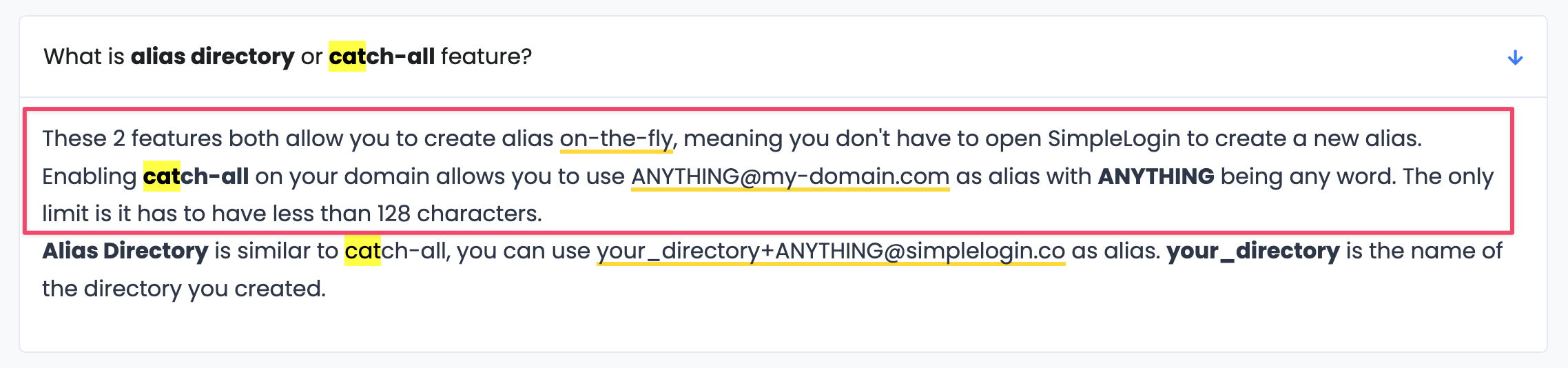
Just a wildcard domain catch-all and hence comfort/use of use.

At this point, I am not sure what you’re gaining aside from just giving the company a
simple and hello@mycustomdomain.com, then proceeding with email spam/blocking it or unsubscribing from their stuff.

Sure you could have those being valid:

  • ola@mycustomdomain.com
  • bonjour@mycustomdomain.com
  • asdaskllkjasdljlasd@mycustomdomain.com

working totally fine and hence switch them off independently, but even if you block an ola@mycustomdomain.com, I can just still spam you on ola-again@mycustomdomain.com because the catch-all will just create the address on the fly and forward it towards your main email box.
All of the above emails will still be very much linked to you from A to Z with all the tracking associated with knowing to whom the email goes. :slight_smile:

I’m hence quite concerned about all of this being a huge misunderstanding on what we’re trying to achieve here.

Last point I just read again but

my mailbox looking messy due to the encoded addresses

This shouldn’t be a problem in itself. You’re usually seeing your contacts name or the subject of the email. Or do you actually look at billing@netflix.com every time you do receive an email?
In which case, yes it will look more messy because you’ll have Addy/SimpleLogin being in front of it with the alias but that’s kinda the price to pay while dealing with a 3rd party that serves as anonymity intermediary. :sweat_smile:

I mean, if you really want to go hard and it to look slick without adding the email senders as contacts, using folder or other kinds of filtering, I do think there are ways to forward/change the sender’s name on the fly and unwrap all the filters so that even something like this

mmonium.purity671+store=fancy.com@addy.to

could still show up as

store@fancy.com

in your mailbox.

Just as you would have a John Doe being unwrapped into a john@doe.com.
I just haven’t dove too deep on that topic because aesthetics do not matter too much for me. :head_shaking_horizontally:

3 Likes

I agree that using my custom domain in addy would safeguard against sending with the wrong from address but it has the downsides I have mentioned previously, ideally I would like this same safeguard directly from my email provider.

I use both anonymous and custom domain aliasing, there are pros and cons of each.

I understand that custom domain aliasing potentially sacrifices some privacy compared to anonymous.

My preference for an absence of the addy encoding in my mailbox is not just aesthetics, it’s also usability, it’s much clearer without. I wouldn’t consider adding complexity to disguise the encoding, that’s not what my enfeebled brain wants at all :sweat_smile:

I don’t agree that wildcard sending has nothing to do with aliasing, it’s a very good solution to my specific custom domain aliasing problem which is the subject of this post and it’s currently looking likely I will switch to a system that has this feature.

That’s not the email provider’s job to do that I’d say, more of an email client as suggested with the tools above. :+1:t2:

Yes definitely.
I was mostly confused as of what you were trying to achieve here.

I guess it depends on your usage of mail inbox yes.
Mine is always empty as fast as possible, might not be for everybody but it’s not a stable source of knowledge/info IMO. I prefer to extract and sort/save the info elsewhere given the insecure nature of emails in the first place. :smiling_face:

Mostly saying that it’s 2 different technologies achieving different needs.
Making a gravy has nothing to do with stir frying some veggies.
They can still work together somewhat but not a replacement to each other.

Glad you narrowed down a solution to your needs tho. :+1:t2: