The BSI’s 2024 browser comparison would probably be the mack daddy of the bunch, since it evaluated Firefox against an actual government security standard. Though of course, things have only improved since then. And also the detailed NCSC guidance on the subject which was originally published in 2021, was reviewed and reaffirmed in May of this year. And DISA also maintains Firefox security benchmarks for formal Department of Defense deployments.
WB.2.1.08 – Sandboxing und Kapselung
a) Die Architektur des Webbrowsers MUSS die folgenden Eigenschaften besitzen:
• Sämtliche Komponenten MÜSSEN voneinander und zum Betriebssystem hin gekapselt sein.
• Darstellungskomponenten MÜSSEN von Steuerungskomponenten gekapselt sein.
b) Webseiten einschließlich ihrer Darstellungskomponenten MÜSSEN grundsätzlich in Form
eigenständiger Prozesse voneinander isoliert werden. Zugriffe zwischen Webseiten MÜSSEN vom
Webbrowser kontrolliert erfolgen
English translation:
WB.2.1.08 – Sandboxing and Encapsulation
a) The architecture of the web browser MUST have the following properties: • All components MUST be encapsulated from one another and towards the operating system. • Presentation components MUST be encapsulated from control components.
b) Web pages, including their presentation components, MUST generally be isolated from one another in the form of separate processes. Access between web pages MUST be controlled by the web browser.
It says that Firefox on Android isolates sites, which is just a lie, meaning the rest of the document isn’t worth the bytes being used to serve it. It doesn’t even take into account how much is isolated
I’ll concede the Android entry. It does not disprove every other row, but it puts a crack in the credibility of the entire comparison. If the study can award an unqualified “yes” on something as fundamental as Android site isolation, then the rest of its binary conclusions cannot be taken at face value, and the same caution applies to the other studies I cited. Deal? Deal.
But I was only pushing back on the way Firefox’s security problems are routinely overstated and pointing out that Chromium would not be immune to this class of exploit. I was never arguing that Firefox has the strongest security architecture. If that was unclear, then apparently we spent all this time arguing past each other.
I’m a Brave user, and I’m not willing to die on any Firefox or Gecko hill. You’re a great salesman, I’ll say that. I think we all need to start taking browser security far more seriously, especially as AI accelerates vulnerability discovery and exploitation. What good is privacy without security? Blackout curtains are useful, but they do not reinforce the underlying structure. You can harden Firefox’s defaults all day, but you cannot about:config your way into a new security architecture I suppose.
I dont have the depth of knowledge to completely, or confidently, answer your question. But perhaps the author of the blog was comparing improvements in chromes sandboxing and other hardnening features compared to firefox.
I found a blog post updated this year that compares chromium vs gecko.
According to the that blog, chromium is ahead of gecko in site isolation/sandboxing/memory safety et al. For instance, sandboxing on Gecko is weaker as noted by specific processes on linux still being able to escape the sandbox (pulseaudio and X11 are the examples given).
Additinonlly, Chromiums memory safety is ahead of Gecko’s. Also, they point out differences in how either engine handles extensions, Manifest V3 being more secure.
I jumped into the browser security topic a couple days ago and find it really interesting lol
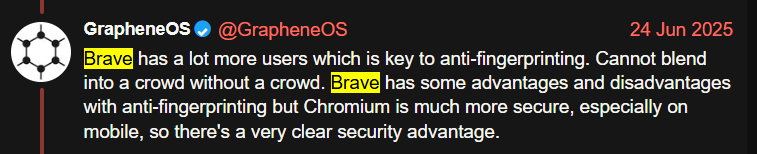
I practice brower compartmentilzation using CHROME, EDGE, MULLVAD and BRAVE on my laptops. But BRAVE is the only one I use on GOS because Vanadium doesn’t block ads as effectively or clear cache on exit but I leave it enabled so other GOS apps can use its hardened WebView libs. When it comes to anti-fingerprinting…
That tool is giving the same fingerprint for two different circuits in Tor Browser. Incredibly scary how easy it is for them to figure out who you are online. Are there actually any effective ways to avoid fingerprinting?
You would have to use the reset identity button and it seems to work on Fingerprint.com ime. Changing IP doesn’t even fool websites not fingerprinting if they keep logs or basic cookies. Fingerprint.com (Fingerprint Pro) doesn’t seem tricked by Tor Browser on Android but I haven’t tested FingerprintJS (Open Source version) on Tor Browser Android.
It was a real shock to me when fingerprint.com landed the same ID across private space Vanadium and regular user profile Vanadium with different IPs from different ISPs. I found cross-profile it didn’t hold but that was one test and it definitely could. I’ve read that Private Spaces are supposed to be essentially the same as separate profiles, however…
Additionally fingerprint.com seems to work for many days if not more and across IPs, browsers, data clears, and incognito mode.
Brave and specifically their VP and Privacy and Security has questioned if their demo is more marketing than accuracy. This is interesting considering fingerprint.com is defeated by other browsers but not Brave. Perhaps it’s cope, perhaps they’ve got a point. I really don’t know.
Him suggesting Cover Your Tracks by the EFF points to cope because it’s not a demonstration with tracking IDs that can be tested and rates brave highly because of “randomization”, adblock, and tracker blocking. It doesn’t matter if a browser has “randomization” if it doesn’t effectively prevent fingerprinting.
Tor Browser on desktop seems to be more effective to me than Tor Browser on Android based on fingerprint.com. It also focuses a lot on fingerprinting. Even if you are fingerprinted across sites, you are still anonymous.
Blocking javascript blocks a lot of fingerprinting techniques, but it is still possible without javascript. I don’t know the extent of any of this.
Profile-based, anti-detect browsers used by web scrapers, social media managers, and other scammy types seem to also work. For example Incogniton and Donut Browser. You could use each site or idenitty within a separate session to mitigate fingerprinting because each session is designed to have a different fingerprint. An example of a privacy-focused version of this type of anti-fingerprinting/anti-detect browser is Psylo, but I didn’t have good results testing it. There are of course many more built for corporations that are closed source, like Incogniton.
Donut Browser is actually open source. It’s effectively a launcher and GUI manager for Wayfern, a closed source, web-scraper anti-detect browser.
Another thing to know about these browsers is they typically implement fixes to appear as legitimate as possible to anti-bot mitigations (Cloudflare, recaptcha, hCaptcha) to enable webscraping and signing up for websites with anti-fraud protections. That means you might encounter far less captchas if the anti-detect browser is winning that day, or far more captchas if it’s outdated and detected. It really is a war.
One large caveat is these browsers seem to rarely if ever be open source. This is because the fingerprinting companies actively use and test the fingerprinting browsers to test their mitigations. The source code would apparently make it easier to find mitigations. And this is true on both sides of anti-spam, most Fingerprinting utilities are closed source (Fingerprint.com’s fingerprint pro is a SAAS product) and even the Signal server anti-spam algorithm is closed source iirc.
The most effective mitigation is not using sites implementing fingerprinting. A way to promote this for yourself is using a tool like Predirect or LibRedirect which redirect you from sites you specify to privacy-frontends.
Many sites don’t use fingerprinting and you can kind of guess which ones will, so that would help you.
Something I haven’t even mentioned is mouse and keyboard movement patterns and stylometry. These could hypothetically be used to identify people and seem to be used by reCaptcha and likely others like Cloudflare. That doesn’t mean they are or aren’t using them for the purpose of tracking for malice, they may be only using it for anti-bot detection.
You may have misread their post. They seem to understand that the same ID is indicative of effective fingerprinting.
Yes, that my understandting of it and it holds true with each fresh instance of EDGE or CHROME generating identical ID’s on FingerprintJS Demo but each session/container of BRAVE is randomized making each site visit unique but not across sessions.
In any case, no browser provides foolproof anti-fingerprinting.
Windows GPU sandbox shipped later (around Firefox 110). The comparison is no longer accurate. Enabled by default on Windows in Firefox 110 (Feb 2023); shader-cache workaround tightened in FF112. Source: gHacks, DebugPoint reporting on Mozilla’s own announcement https://www.ghacks.net/2023/02/14/firefox-110-is-out-here-is-what-is-new/
Not in original article, but relevant to modern context
CVE-2025-2857: Windows-only IPC sandbox escape patched in Firefox 136.0.4. (Found proactively by Mozilla after a similar flaw, CVE-2025-2783, was actively exploited in Chrome). Additionally: A subsequent sandbox escape, CVE-2026-8958, was patched in Firefox 151 (May 2026). Source: CVE records mentioned
These are real improvements, but they are incremental rather than architectural. Firefox’s process model remains less granular, its sandbox weaker on Linux, and its exploit mitigations still lag Chromium’s, so Madaidans’ core critique about the security model remains largely valid after 4 years, even if some specific details are now outdated.
Edit: Correction brought by @any1 related to Android Isoldation.
Looks like Mozilla flew a bit too close to the sun, with a small attempt to improve a little bit. That is tragic. Appreciate the correction! If anything, that reinforces the point even further that, like you mentioned before, Firefox’s engineering attention isn’t quite in the security architecture areas we would like at the moment. I hope this change someday.
In 2008, he donated $1,000 to a campaign promoting California Proposition 8, which called for banning same-sex marriage. He also donated $2,100 to Proposition 8 supporter Tom McClintok between 2008 and 2010.
People really did not like these donations, to such an extent that they forced him to resign from his position as Mozilla CEO and sever ties with Mozilla as a whole as a result.