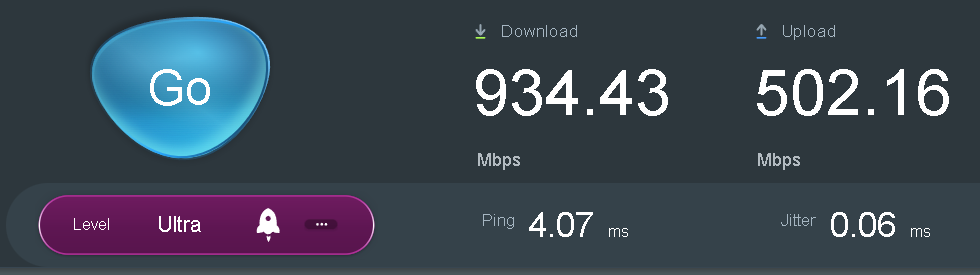
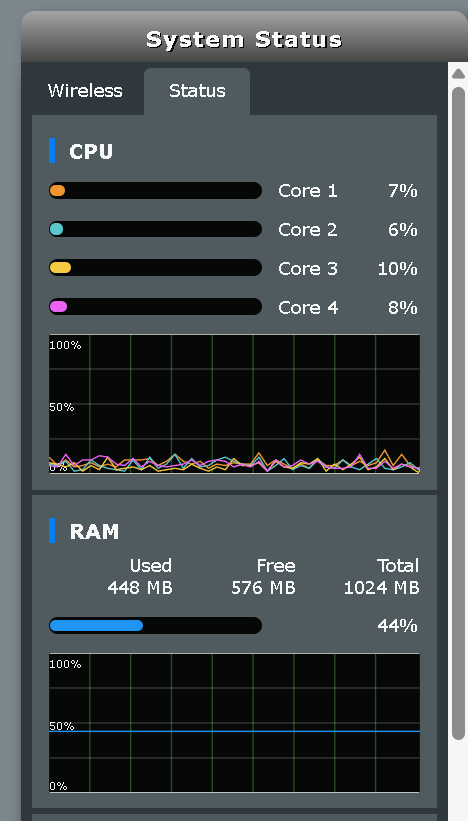
I haven’t really noticed the DNS list slowing down the router or the computer, which has a different DNS and also TIF. PC with VPN and NextDNS, the download speed is 850/450 and the latency is 12ms.
Router
I haven’t really noticed the DNS list slowing down the router or the computer, which has a different DNS and also TIF. PC with VPN and NextDNS, the download speed is 850/450 and the latency is 12ms.
Router
I suggest you read about adaptive modulation. That what used with Wifi router.
Also, reducing the wifi power has a very limited impatc on security, considering that attacker may use high gain antenna.
It’s akin to reducing your phone screen brightness and hoping other people’s eyes aren’t good enough to see you type your password in, the real answer is using biometrics or something so there’s nothing to see. If you have a WPA3 password set up that’s decent and you keep your router updated then there shouldn’t be anything to worry about.
For anyone following and wanting to know how everything turned out, I wanted to give an update. My goal was to isolate as many devices as possible to prevent them from unnecessary access to all of my network for better security and privacy using a regular off the shelf consumer router. To accomplish this, I’m using guest networks with all the protection that’s offered by a consumer router. Before someone asks, yes I know there’s better routers with VLAN support etc..
So to make a long story short, all devices that needs internet access only (tvs, streeaming boxes, light bulbs, etc.) were moved to a guest network with no intranet access. If it was WPA2 only, it had it’s own guest network on the 2ghz band unless the devices are 5ghz WPA3 which got their own guest network on the 5ghz band.
PMS (Protected Management Frames aka 802.11w) was used only for the WPA3. The WPA2 devices didn’t work with PMS.
MAC Filtering wasn’t used because it can be spoofed. AP Isolation (found in wireless settings) wasn’t used, BUT, was used within the guest networks automatically which was a surprise.
All networks were tested by connecting to each network and pinging devices in the guest network, outside of the guest network, from guest network to guest network and any other way I could think of. All the devices within the guest networks couldn’t see each other (AP Isolation) according to the pinging results. The devices also didn’t have access to any devices outside of the guest network which is the purpose of having a guest network for better protection. All devices outside of the guest network couldn’t access the devices in the guest network. Also devices in one guest network couldn’t access devices on another guest network.
***If you allow intranet access for guest networks, then you lose all protections. Your guest networks basicly become regular networks.
I’m using the Asuswrt-merlin firmware and recommend reading about the settings here: Home · RMerl/asuswrt-merlin.ng Wiki · GitHub
For all router security and good info on guest networks, kissu provided a great link here: Router Security
I heard of this issue (being spoofed) and I do agree that IoT devices probably broadcast the hell out of their soul to everybody nearby, I’m curious what’s a (possible) better approach then than MAC filtering. 
Is there evidence that IoT devices actually do this?
In any case, MAC addresses should be used to whitelist devices, not to filter them. That is, if an “unknown” device connects to the WiFi subnet for example, it cannot access any other private subset, or perhaps not even access the public IP space at all.
Light bulbs and other home automation devices should also ideally use local protocols like Zigbee that are non-routable to avoid such problems entirely.
Not sure to understand but:
I guess what OP meant is:
Hence why in this context it is used with no LAN cross-contamination (because no VLAN available).
Heard of that one (and Z-wave too) but not sure which one is the best/most secure? Got a simple opinion on this one maybe? please-eli5
MAC filtering is useless because liteally anyone can “hear” the traffic and just pick a MAC to use once it has disconnected, or in the case of not using 802.11w just deauth it and take its place.
If you want an actual security mechanism you need 802.1x and WPA Enterprise.
that’s also what I understood, WPA3 Enterprise with a Radius server is the way to go for the best security but that introduces quite some maintenance.
I guess I can always try and see how bad it is.
The squids look friendly at least: https://www.freeradius.org/
freeradius will haunt your nightmares
I don’t think folks working at DoD are unaware of the shortcomings.
There’s an entire Cybersecurity industry vertical built around DNS. My assessment is, they’ve got contacts in the right places to have such documents edited favourably … making a desperate case for PDNS’ role in “defense in depth”… to keep their businesses going…
I was subject to a phishing campaign that (ab)used a domain not on any blocklists. There are chinks in this armour (but that’s true for most armors). “PDNS” can be seen as soft mitigation, and might also come handy in post-incident analysis.
Depends. Filtering at DNS layer really doesn’t have to add perceivable lag (especially if running on an applicance local to a network); all of it can be engineered to be super light weight, regardless of the size of blocklists or the rate of DNS queries.
That’s not how latency/load is measured. You should check your load average while simulating load and measure the end to end latency. CPU load wouldn’t matter if DNS filtering is the only thing you’re running anyway as long as your device is capable of processing everything in time, so scratch even that.
I was doing such tests on MT7621 device i had in 2022 and got unsatisfactory results mainly attributed to lag spikes and lower tunneling performance with PBR rules on a router.
Sure. My point was mainly about price to gains ratio of dns filtering when it comes to robust networking. Let’s end this topic since OP is at a better place of understanding and got his questions answered.
@ Kissu - Instead of MAC Filtering make sure each guest network has its own password. Enterprise WPA if you’re crazy enough to go there.
@ Tux - MAC Filtering isn’t bad to use but it can be spoofed. I chose to not use it for now but that may change in a day or two. My thought is by using it, you’re making it harder and more work for someone to bother spoofing it. After all, it’s a home network and not a major corporation with valuable secrets. 
I’m not using Enterprise WPA because I believe it requires each device to have a password. That’s just insane! As for radius, it’s just overkill for a home network. I’m keeping it simple without becoming a mad scientist shaking my fist at the world screaming “You’ll never get into my network!”