Is there a reason to prefer Distrobox over Toolbox, except for the availability of more distros to choose from?
Off-topic
I hear this with some frequency. I’d be interested to really understand how distant is the security in gecko browsers. Firefox seems that implemented site isolation in 2021, but if I understand it right it doesn’t fully isolate renderer processes per tab. The fission was reported by madaidans back in 2022 “not as mature as Chromium’s site isolation, and it will take many more years for it to reach that point.”
How is that measured?
This was raised back in 2022, did we see progress in this front? did the prediction fully materialized?
Then there is the sandbox issues in Linux. It is from my understand that X11 and PulseAudio isn’t something affecting most people anymore with Wayland and Pipewire ascension. Remaining strengthening seccomp-bpf.
Have we saw some improvements with seccomp-bpf? For example, Firefox’s sandbox now includes GPU process sandboxing and other hardening measures, no?
In general, for someone that isn’t a target and take security measures in Linux, can we maybe reduce the potential inflamed claim that gecko based browsers are leagues behind in security compared to Chromium based browsers? Can and should we be challenging this view?
Just to be clear, I’m talking about desktop gecko browsers only not Android browsers.
This is all offtopic but:
How is that measured?
This was raised back in 2022, did we see progress in this front? did the prediction fully materialized?
I haven’t seen evidence that this has significantly changed since. If anything, the prediction was too favorable to Firefox, since Chromium has added new service sandboxes and sandboxing improvements since then.
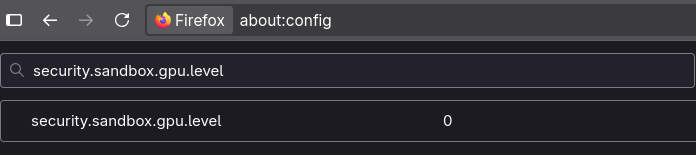
For example, Firefox’s sandbox now includes GPU process sandboxing and other hardening measures, no?
Disabled by default outside of Windows, AFAIK:
that isn’t a target
This is a poor way to think about security. Opportunistic attacks/malware are common.
can we maybe reduce the potential inflamed claim that gecko based browsers are leagues behind in security compared to Chromium based browsers?
No. It’s not inflamed. It’s An Inconvenient Truth.
Can and should we be challenging this view?
When/if I find significant free time (what’s that?  ) I may put together a github gist doing a deep dive into the code showing how little has changed on firefox’s end and the ways chromium has pulled further ahead since. Or if PG folks have time to dig into the code, that might be a cool video to have? @jordan ?
I was all excited, Brave didn’t start and Telegram didn’t give me the QR and as a novice I went back to Bluefin, I would have to learn to give permissions to all my programs, I’m not interested in the short term, I hope the security reaches the dummies like me.
Brave didn’t start
Last I checked, Brave defaults to the X11 backend. I have no idea why they do this especially since it’s a security degradation. If this is the underlying cause, I recommend asking them to fix this on their issues page. 
Also reminder not to use flatpaked browsers (especially chromium-based browsers like Brave) as the flatpaking significantly weakens the internal browser sandboxing.
Telegram didn’t give me the QR
Did you lock down flatpak permissions? If so, we make it clear that breakage is to be expected. It should be avoided if users don’t want flatpaks breaking without manual permissions changes.
This will configure flatpak to automatically reject most permissions (with the exception of the Wayland socket and the Dri device, since these are commonly used and ensure at the very least most apps will work without crashing).
This will also grant Flatseal and Warehouse access to certain permissions to allow them to operate and make reconfiguring much easier.
NOTE: This will break just about all Flatpaks by default, it is ON YOU to configure them to work with this configuration.
NOTE 2: This DOES NOT enable hardened_malloc, use the harden-flatpak ujust command.
I’m curious about a few installations on the standard GNOME DE:
a. I installed Steam via Flatpak using ujust install-steam and got the following error upon trying to launch. It will not launch. Any ideas why?
“The unofficial Steam Flatpak app requires a correctly-configured desktop
session, which must provide the DISPLAY environment variable to the
D-Bus session bus activation environment.
On systems that use systemd --user, the DISPLAY environment variable must
also be present in the systemd --user activation environment.
This is usually achieved by running:
dbus-update-activation-environment DISPLAY
during desktop environment startup.
For more details, please see:
https://github.com/ValveSoftware/steam-for-linux/issues/10554”
b. for installing packages like Proton Pass and Proton Mail, are those important enough to justify layering them using rpm-ostree, or should these be containerized?
Additionally, for the part about layering vs. using containers for Proton Pass and Proton Mail, does it matter that there’s no repo for those?
I’ve seen that Steam flatpak issue when there’s no X server. The ujust should have toggled it on, but run ujust set-xwayland to be sure. Also make sure the flatpak has the X11 permission (not just the Fallback to X11 permission).
Xwayland is enabled. I stopped getting that error (not sure what changed), but it still won’t launch. Now I’m getting an error that steamwebhelper is not responding. I attached a picture (sorry for the resolution, the popup is tiny). I’ve tried all the options except restart with sandboxing disabled.
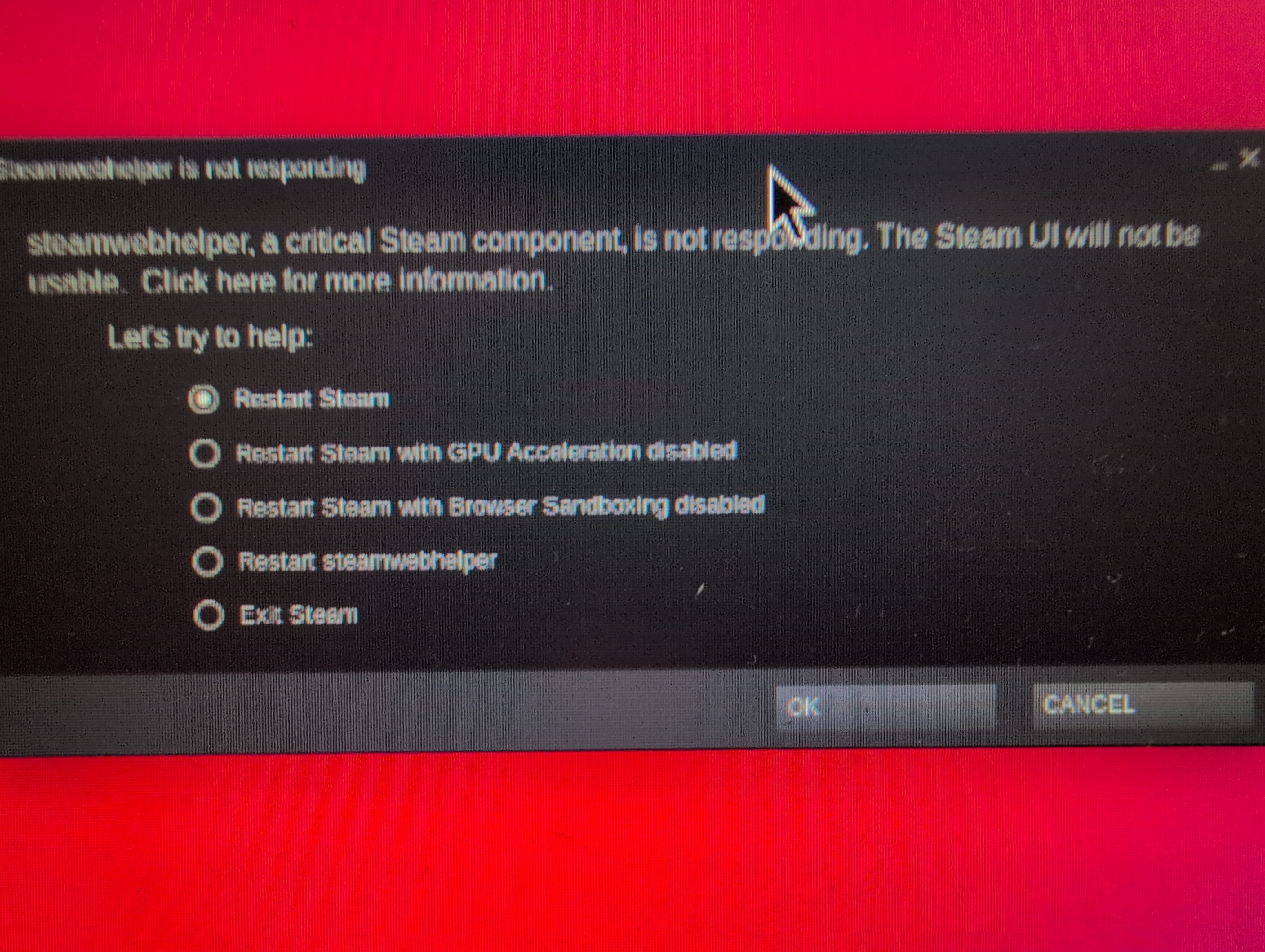
I would try all other options. Otherwise, I’d suggest hopping in the Secureblue Discord server and requesting support if that option is available for you.
Thanks y’all. Ended up just layering Steam (I actually don’t mind this solution because I don’t love the idea of unverified flatpaks) and Mullvad Browser, going with the web app for Proton Mail, and the browser extension for Proton Pass in Trivalent.
I strongly recommend using neither and using the PWAs instead. Distrobox is not a sandbox and provides no isolation, and the Proton Pass and Mail official apps are electron, which should be avoided.
This looks like hardened_malloc. Make sure it is not preloaded in env vars in Flatseal. Our ujust already removes this, but maybe it got added back for whatever reason.
layering Steam (I actually don’t mind this solution because I don’t love the idea of unverified flatpaks)
Layering steam is equivalent to using the unverified flatpak. As is the case for any distro’s steam package like arch’s. They are all unofficial third-party packages. The only official package is the deb from the steam website. Everything aside from that is equivalent to being unverified. At least with the flatpak, you get some kind of minimal sandboxing, and updates that are disconnected from the system (steam pulls in 32bit libs, which can cause dependency clashes due to package drift)
and Mullvad Browser
Using a Firefox-based browser on secureblue is largely contradictory. See this earlier post. TLDR, using an insecure browser on a “secure OS” is contradictory, because of the criticality of the browser in the desktop use case. Out of curiosity, what motivated this security downgrade?
web app for Proton Mail

This was really easy to do. You guys did a great job on that Trivalent browser. Trying it out was one of the main reasons I wanted to try Secureblue, and it hasn’t disappointed. Really nice to have a simple and functional hardened chromium.
This dawned on me like ten minutes after I posted that. I couldn’t get the flatpak working though and really wanted to game, so layering it was.
I don’t really use my computer for much that I need to be highly, highly secure. For those things, I’m using GOS and Vanadium mostly. (I don’t have another browser on my phone.) I like Mullvad browser for its decent combo of security and privacy. It also makes it easy to proxy different sites automatically. Will be using Trivalent for all my logged in accounts though.
Thanks for the replies. I think what y’all are attempting with SecureBlue is really cool. The install process is well documented and very, very easy. The ujust scripts are kind of genius to build right into the OS. The audit feature and the ability to easily reset settings to default are also really cool. Of all the Linux distros I’ve tried, this one is the one that’s inspiring the most confidence that my system is working how it should. Thanks for the hard work.
Can you define what you mean when saying “security.” Do you just mean exploit protection?
I would argue some high risk Individuals like Edward snowden (he is probably not as high risk anymore) isn’t really using Tor for anonymity but uses/need Tor mainly for security purposes. But QubesOS+Whonix+Kicksecure would probably be a better fit for him
Have you considered making a Secureblue template for QubesOS for people who need the extra protection? I know you can make a unofficial templates but they’re rarely as good as a official ones.
RoyalOughtness, I am not trying to hijack this discussion but I couldn’t find another way to contact you.
I am definitely an Eli5 member and have just started using SecureBlue (from Windows).
I’ve managed to get everything working and followed all the guidelines and advice I could find.(thank you to everyone).
My issue is that I can’t get my Canon MF743cw printer to work. Believe me, I have loaded drivers and have heard the printer react (beep) to my attempt to print, but it never leaves the laptop….
Where can I go to get help in resolving this? I’ve done internet searches and Fedora Discussion searches but noting has helped yet.
Please open a support thread on the Discord. PG is not the place for secureblue support.
Can you define what you mean when saying “security.” Do you just mean exploit protection?
I mean prevention of unauthorized activity.
Have you considered making a Secureblue template
That’s up to the Qubes folks. AFAIK it’s not possible yet because Qubes doesn’t support wayland, but I’m not entirely sure as I don’t keep up with Qubes or know much about it. SecureBlue template · Issue #9755 · QubesOS/qubes-issues · GitHub