I mean like the duckduckgo extension for alias generation, or the Bitwarden extension for example?
I hope someone with more knowledge will answer your question, but to be on the safe side, I put any non-standard extensions on a browser where I’m not trying to be private, like Firefox.
Yeah I have a similar set up in mind at the moment. Another FF profile, where I just have extensions and just use it from that window.
The guide on browser extensions says that another problem with them is increased attack surface, even the non-fingerprintable ones.
Also not an expert on this, but my understanding is the following (please correct me if anything is wrong):
Not every extension is detectable/fingerprintable. If the extension does not have access to your page in any way, it might have no side effects and is thus usually not detectable. However, they still get broad privileged access in your browser and thus pose first and foremost a security risk.
As for fingerprintability, I think a major risk is that the detection of individual extensions that do have side effects is relatively easy. For example most password manager extensions (including Bitwarden/Proton Pass) modify the DOM to show you the possible saved logins etc. These modifications are detectable with a simple querySelector.
As far as I know ad-/trackerblocking extensions are often also easily detectable. I don’t know exactly how but my guess would be that the page could check if any scripts are missing or signals that a browser usually sends gets blocked. That way, even the settings you made within the extension (e.g. specific filter lists) might make you stand out even more.
For extensions that have a wide user base, a detection alone doesn’t necessarily make you stand out immediately, however it can be a contributing factor to uniquely identify you. It’s similar to some browser settings: the more extensions/configurations are detected, the lower the chance that anybody else has the exact same configuration as you.
So, to answer your question I would say: it depends, on which extensions you install but mostly yes, many extensions do make you more fingerprintable.
Still, one also need to keep in mind that extensions can also have a comfort/security benefit. For example password managers extensions can check if the side you visit is actually the one you saved and not one with a similar but slightly different URL (homograph attack). A password manager that is installed as a separate program can not check that for you. It’s always a tradeoff.
imo it depends on the extension and need vs risk. Search engine plugins or alias generation or even password ones etc.. I personally would not install, but do that in a separate or vaulted process . But I do install ubo in Tor-browser even which they say is a big no-no.
I’m also interested in this question. I was thinking of trying Arkenfox with the DANE Padlock extension which is FireFox only (it isn’t available as a Chrome extension due to a missing API call). This extension does DANE validation where possible, for the however few sites that are set up with DANE TLSA records.
I also use KeePassXC’s browser extension for autofill, which provides phishing resistance.
It can - and @sizing387 is correct in that the extension is detectable if the extension changes the page. Typically those are extensions which defeat tracking or change the JS or something, but you may want to test what shows up and what doesn’t.
Case in point, fingerprinting demo page CreepJS shows when I use the Chameleon fingerprint spoofing extension. Which is fine - it’s a signal that nothing about the fingerprint can be trusted, so throw it in the trash. However, it also doesn’t show uBlock Origin, likely because it didn’t change the page if there’s no ads present.
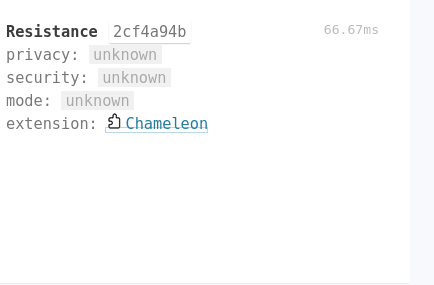
Try a few fingerprinting sites with your extension on/off and see what you get. Sometimes trial and error is the best way to go.
I wouldn’t apply that for the extension detection, since it checks known values for the Chameleon extension.
Oh cool. Thanks for correcting me. Can this test be applied to any extension, by any website, or is there something special about Chameleon that makes it possible?
Just keep it simple.
Less is more.
Think of it like, do I rely need this extension, or is it just handy?
Think about every extension you add. Every extension could harm your security, privacy, fingerprint. I’m not saying, they do, but could.
Some extensions are fine in the beginning, but later on get “bloatware” which can harm you.
This is not limited to just Chameleon
So can absolutely any extension be identified in this way if it’s known?
Yes, if it’s Chrome.
It’s more complicated with Firefox. An extension can be detected if, for example, it modifies web requests or injects scripts into the page.
Here is an interesting top-level video on the topic. User-agent spoofing is covered:
Well, I mean, isn’t everything you do on Chrome logged by Google at the very least?
(Not quite sarcastic, but also not entirely unsarcastic)