Brave vs Trivalent Security

@RoyalOughtness

I read that hardening guide again after a long time, and a question came to mind. I’ve been using NextDNS in Brave forever and YogaDNS because of VPN. So, as your text states, only domains are exposed when you use the browser’s DNS.

I remembered that by using the operating system’s DNS (Yoga), all paths are also exposed. Is this a threat or an opportunity? I use Brave’s own adblock + NextDNS, so is it just a matter of whether I trust Brave, NextDNS, and YogaDNS, which I already trust? Thanks.

“DNS/Network is arguably the most secure but the least effective (since it can only filter by domain, and not paths, e.g. all of google.com and not just google.com/tracking ) of any method. With most content blocking you have to add trust in multiple entities and add extra attack surface. With DNS filtering, you are placing your trust in something you already have to trust (DNS resolution). I would still suggest the usage of some DNS filtering in your browser, even if you have another content-blocking solution. It also has no performance impact and can resist some forms of censorship and tracking by encrypting not only DNS traffic but also the Client Hello (via ECH). Non-DNS network filtering has the same effectiveness with the added benefit of IP blocking, depending on the implementation. It should be noted that CNAME tracking can be fully mitigated through DNS filtering.”

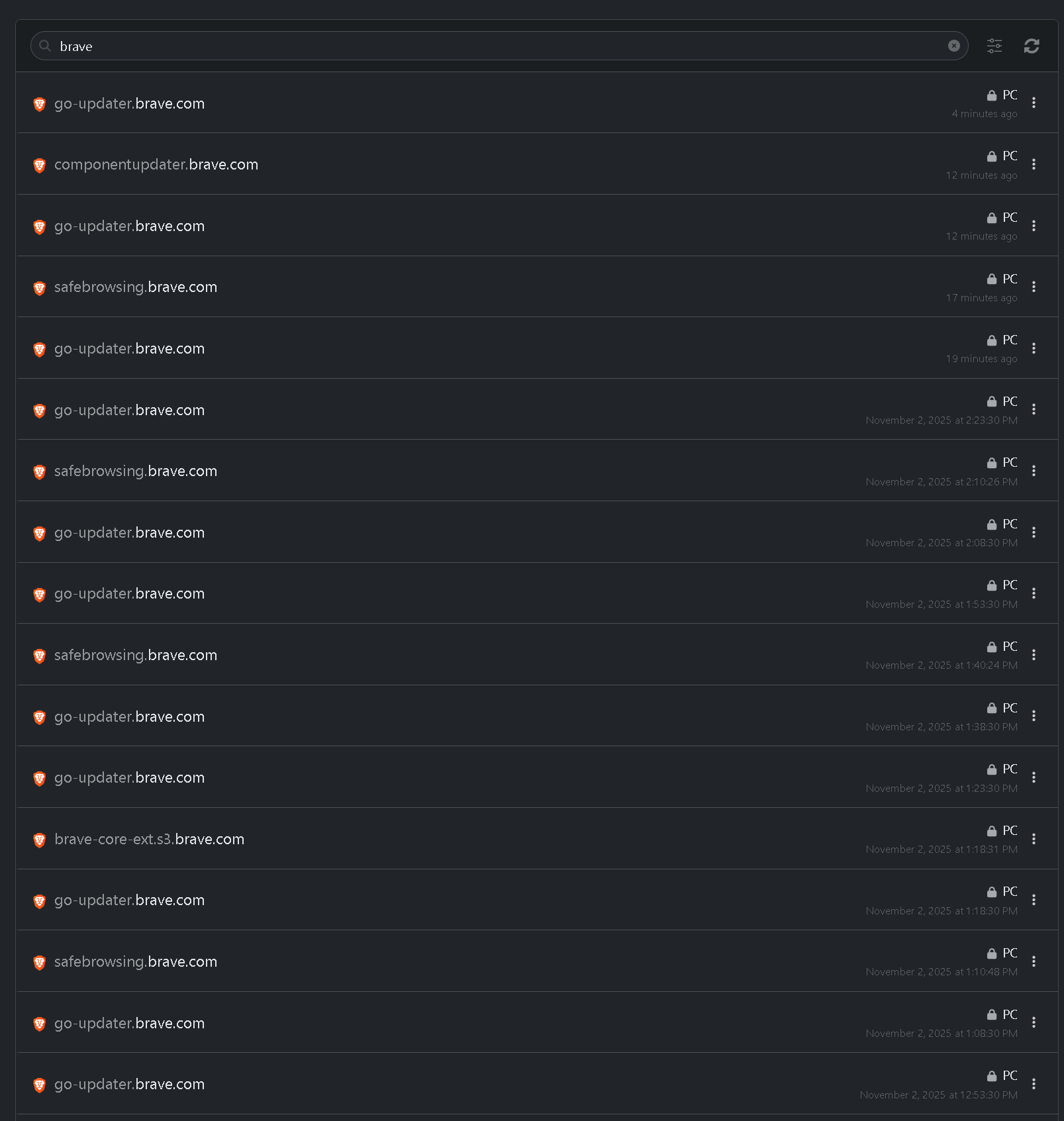
I don’t like Brave, and I also don’t like that it connects to all these domains without my permission:

go-updater.brave.com

brave.com

account.brave.com

accounts.brave.com

ads-admin.brave.com

ads-help.brave.com

ads-serve.brave.com

ads.brave.com

analytics.brave.com

api.rewards.brave.com

assets.brave.com

blog.brave.com

brave-core-ext.s3.brave.com

ci.brave.com

code.brave.com

community.brave.com

componentupdater.brave.com

crlsets.brave.com

dl.brave.com

feedback.brave.com

grant.rewards.brave.com

laptop-updates.brave.com

location.brave.com

mainnet-beta-solana.brave.com

mainnet-infura-api.brave.com

mainnet-infura.brave.com

mainnet-polygon.brave.com

matomo.brave.com

metrics.brave.com

mobile-data.s3.brave.com

mumbai-polygon.brave.com

mywallet.ads.brave.com

newsletter.brave.com

offers.brave.com

p2a-origin.brave.com

p2a.brave.com

p3a-json.brave.com

p3a.brave.com

payment.rewards.brave.com

pcdn-origin.brave.com

pcdn.brave.com

prometheus.brave.com

promo-services-staging.brave.com

promo-services.brave.com

proxy.aws-internal.brave.com

proxy.brave.com

publishers-staging.brave.com

publishers.brave.com

ratios.rewards.brave.com

redirector.brave.com

redis.promo-services-staging.brave.com

redis.promo-services.brave.com

referrals.brave.com

repsys.rewards.brave.com

reputation.rewards.brave.com

rewards.brave.com

rewards.grant.aws-internal.brave.com

rinkeby-infura-api.brave.com

ropsten-infura-api.brave.com

ropsten-infura.brave.com

rust-pkg-brave-core.s3.brave.com

safebrowsing.brave.com

safebrowsing2.brave.com

sb-ssl.brave.com

search-dev.brave.com

search.anonymous.ads.brave.com

search.brave.com

staging.brave.com

star-randsrv.bsg.brave.com

static.ads.brave.com

static.brave.com

static1.brave.com

stats.brave.com

status.brave.com

store.brave.com

support.brave.com

survey.brave.com

sync-v2.brave.com

tiles-alb.search.brave.com

tiles.search.brave.com

together.brave.com

translate.brave.com

updates-alb.brave.com

updates-cdn.brave.com

updates-panel.brave.com

updates.brave.com

upload-support.brave.com

usage-ping.brave.com

variations.brave.com

vpn-internal.brave.com

vpn.brave.com

wallet-docs.brave.com

webcompat.brave.com

And this is just a small sample of domains it connects to, but there are many more.

I read somewhere that their servers are compromised with spyware. Maybe it’s true, I don’t know.

I only see an update on my end. So you haven’t done it correctly.

1 Like

This is on you for not configuring Brave correctly. Several of the connections (e.g. Brave rewards) aren’t even active on a fresh install, i.e. you deliberately switched them on yourself.

Looking at my own Brave desktop connections from the last 24h I see just 7 domains and most of them are updater related, safebrowsing, account sync.

6 Likes

It’s possible, but I don’t use any services offered by Brave, nor do I sync anything to the cloud.

It’s not just possible, it’s 1000% certain.

@RoyalOughtness I am wondering if installing Trivalent outside of SecureBlue and losing SELinux confinement is still overall a better option then the other PG browser recommendations? Since users are not getting SELinux confinement outside of SecureBlue anyway, wouldn’t Trivalent still be the best option?
3 Likes

We’re 99% done moving the trivalent chunks of our selinux policy to an RPM (we just have to ship it), so you’ll be able to use (albeit unsupported) Trivalent confined by selinux on Fedora by swapping Fedora’s selinux policy for ours:

Outside of systems where that’s possible (Fedora-based), in theory Trivalent could still be a good option, but in practice there are no well-maintained repackages that I’m aware of. The AUR package for example is constantly out of date even on zero-days. Plus you lose out on the benefits of provenance generation for our trivalent builds, which allows anyone to cryptographically verify that our builds were run from a specific branch of our repo, on an authorized runner.

So as of now no, I can’t recommend using Trivalent outside of secureblue, or at least outside of Fedora-based distributions (since you can use our selinux policy and use official builds with provenance verification).

For more on Provenance/SLSA, check out: https://www.youtube.com/watch?v=6B9M_lEvyzg

8 Likes

I always thought that Flatpack is just a packaging format + sandboxing.
Why is it necessary to change the code of an Linux application to release it as a Flatpack?

Because Flatpak restricts the usage of Linux namespaces and prevents the use of SUID (for good reason), Chromium’s sandbox will literally not work. The solution is zypak or a direct patch, the problem is these methods are very poorly configured to the point they essentially break the typically very strong sandboxing chromium provides.

@RoyalOughtness I just had a quick look through Trivalent’s Selinux policy. It seems like trivalent_domain allows for very broad access:

  • manage_file_perms access to sensitive user data (user_home_t). Maybe provide a boolean to disable it and separate label for the Downloads folder?
  • Arbitrary code execution outside of trivalent_domain through multiple vectors:
    • manage_file_perms access to user_home_t, which allows to modify .bashrc and similar. Can be somewhat mitigated with ujust toggle-bash-environment-lockdown outside of Selinux.
    • manage_file_perms access to data_home_t, containing a lot of executables which can be modified, for example executables for user Flatpaks. Why does it need this access? Does the upcoming new Flatpak domain solve this for Flatpak executables? It might make sense to use multiple partitions for /home, some mounted noexec, the rest with a different Selinux label not accessible to Trivalent, and/or some application control like fapolicyd to mitigate this outside of Selinux.
  • Access to sensitive sockets (pulseaudio, xwayland). The latter shouldn’t be a problem at least for users who keep the OS default (no xwayland).

I am wondering what security benefit the Selinux policy provides in its current state?

Homedir access is just one variable of many. For example, think of all the kernel() interfaces Trivalent doesn’t have access to that it otherwise would, other sockets, etc etc. The list is very long.

We do plan on scoping homedir access down further, but it will require changes to homedir labelling first and foremost.

I am wondering what security benefit the Selinux policy provides in its current state?

Significant. Homedir files access is just one piece of the pie.

Well, for many home users, almost everything that is important to them is in there.

Yes, but this only helps, if the attacker cannot gain code execution with a more lax Selinux context or even unconfined, which is rather easily possible with the examples I mentioned.

Great :+1:

And Chromium normally uses the namespaces to isolate the websites, do I get this right?
Is this isolation so much stronger then for example Firefox’s container’s addon??

Firefox and isolation :frog:

Isn’t this addon at least a bit of isolation?

The container is isolation for privacy. It should not be used for security.

It doesn’t matter if the browser’s sandboxing is from 2015.

Firefox’s container addon has no meaningful impact on security. It is just for separating data and not an additional security boundary. It can be useful for privacy and usability.

1 Like

I know others have already replied, but I figured I’d add more context :slight_smile: . The main reason cited for Firefox’s sandbox being weaker is that it uses older methods to isolate vulnerable procedures and separate some privileges. This leads to multiple sites or extensions being executed in the same process, leading to possible contamination between them if one of these happened to be malicious. In contrast, Chromium (and derivatives) use a more modern model for privilege separation, segregating more functionality into their own OS processes and requiring them to communicate via IPC. This helps with regards to security because it’s significantly more difficult for a malicious site to successfully compromise the rest of the browser.

The extension you mentioned is useful when it comes to isolating potentially identifying information from websites. It helps by allowing only websites visited inside the container to read the cookies/auth tokens/etc stored in it. But that all goes away if a malicious site manages to find an exploit and take over the process, since the container itself is likely executing within the confines of said process, meaning the malicious payload gets access to the information regardless.

1 Like